
Custom AI Call Center Solutions for Inbound, Outbound, Routing, Support, and Workflow Automation
Peak Demand builds custom AI call center workflows for organizations that need inbound and outbound calls handled across routing, support triage, booking, ticketing, system updates, escalation, reporting, and ongoing optimization.
Handle inbound volume, callbacks, reminders, recovery, routing, overflow, and structured follow-up.
Classify caller needs, route issues, create tickets, update systems, send summaries, and escalate correctly.
Track outcomes, monitor quality, review failures, tune workflows, and improve the operation.
Custom AI call center solutions should work like operations infrastructure.
A custom AI call center solution is not just an automated answering tool. It is a tailored call-operations layer designed around inbound volume, outbound follow-up, support triage, routing, escalation, system updates, reporting, and QA.
Peak Demand designs custom Voice AI workflows around the way your call center, support desk, intake team, sales team, service team, or multi-location operation actually works — including the systems, permissions, business rules, routing logic, and human handoffs around it.
The goal is to turn calls into structured outcomes your team can trust: booked appointments, qualified leads, support tickets, service requests, callback tasks, CRM updates, staff alerts, call summaries, dashboard events, and escalation records.
- Built for companies augmenting call center capacity, not replacing operational judgment.
- Designed for inbound call handling, outbound follow-up, routing, support triage, tickets, CRM updates, and reporting.
- Optional managed operations after launch through monitoring, QA review, workflow tuning, integration checks, prompt updates, and operational reporting.
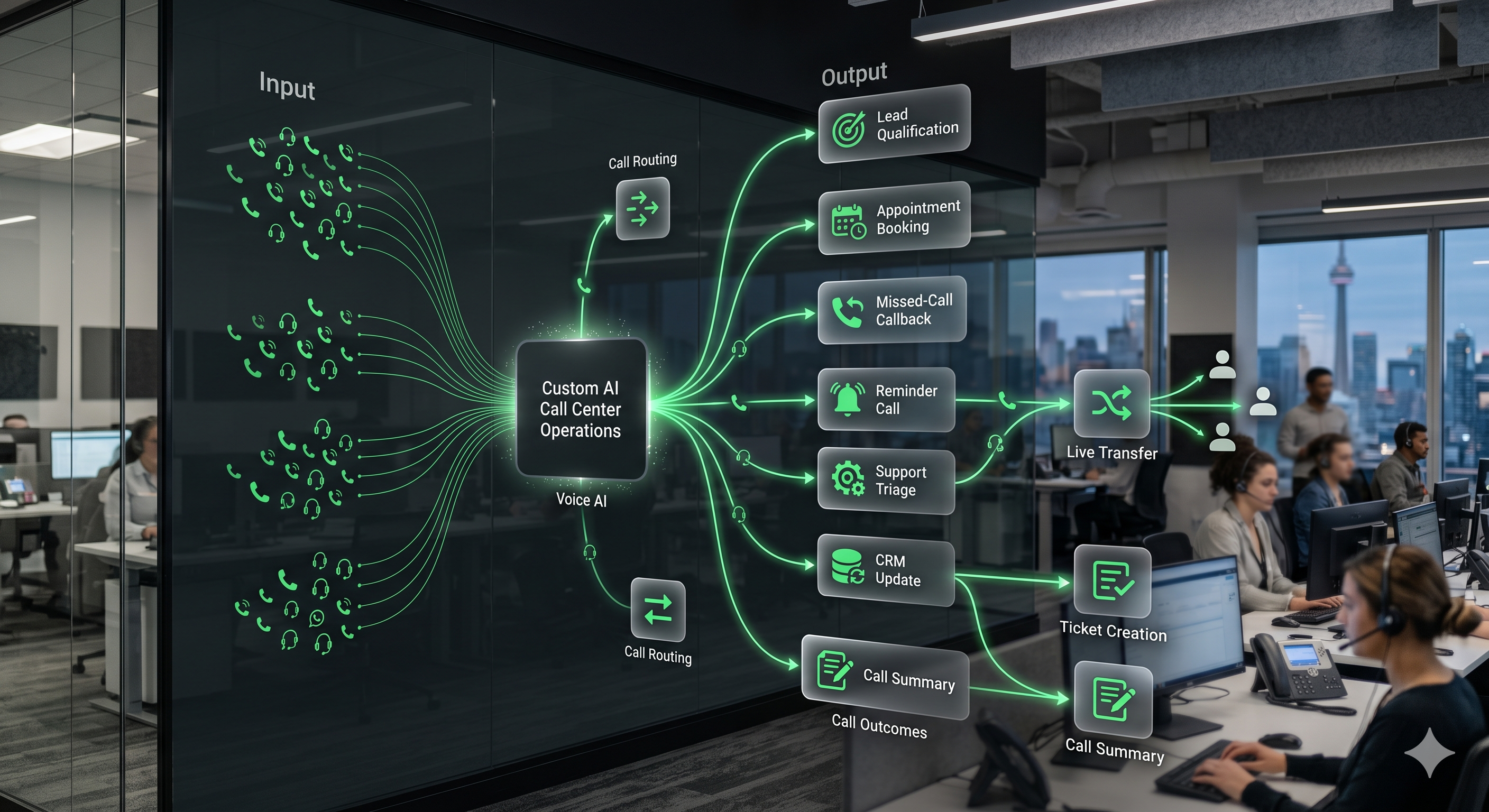
Peak Demand manages the strategy, call logic, integration layer, reporting, QA, and continuous improvement behind AI call center workflows.
Custom AI call center workflows should move callers toward real outcomes.
Peak Demand builds custom Voice AI call workflows around the operational result that should happen after each call and the systems that need to be updated.
Inbound call handling
Answer, classify intent, qualify callers, route requests, collect structured details, support booking, and escalate exceptions.
Outbound follow-up
Support missed-call callbacks, speed-to-lead follow-up, appointment reminders, confirmations, no-show recovery, and reactivation.
Workflow automation
Create tickets, update CRMs, send summaries, notify staff, trigger tasks, route urgent issues, and log validated call outcomes.
Support triage
Classify caller issues, collect details, create support records, route by category, and escalate urgent matters.
Human handoff
Transfer calls, send summaries, create callback requests, and route conversations to the right person or department.
Operational visibility
Track call outcomes, workflow health, escalation patterns, QA findings, dashboard metrics, and improvement opportunities.
The system should know where each caller belongs.
A custom AI call center workflow can classify caller needs and route each conversation toward the right department, workflow, ticket, escalation path, or human handoff.
- Sales inquiries routed to lead qualification, consultation booking, or CRM follow-up.
- Support calls routed to issue classification, ticket creation, service request intake, or escalation.
- Booking calls routed to appointment request, confirmation, reminder, or callback workflows.
- Urgent or sensitive matters routed to live transfer, staff alert, or protected fallback paths.
- After-hours and overflow calls summarized for teams with clear next actions.
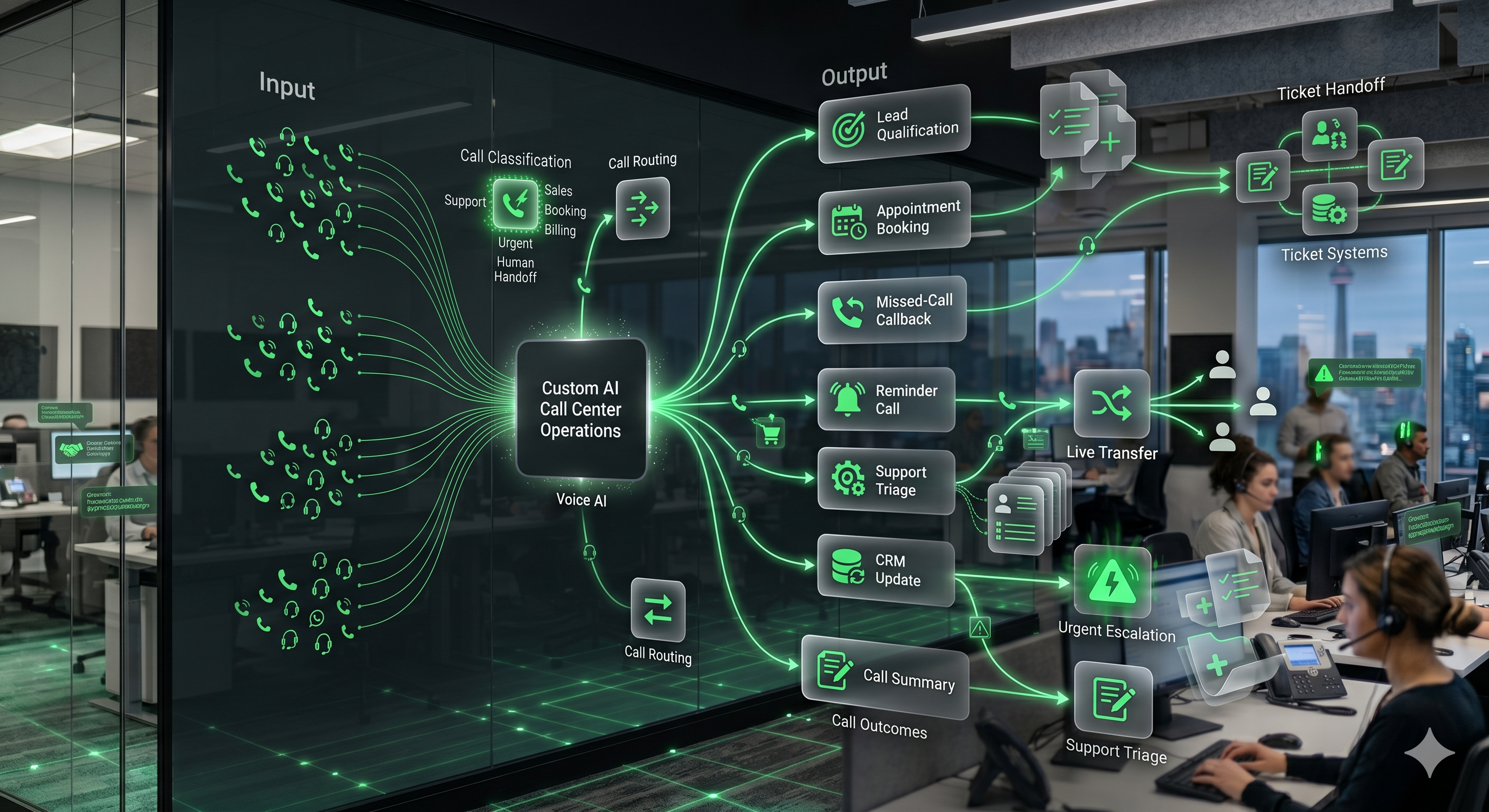
Triage the issue
Identify caller intent, urgency, account context, service need, workflow category, and any required validation.
Create the record
Generate tickets, CRM notes, service requests, call summaries, callback tasks, or dashboard events.
Escalate correctly
Move urgent, sensitive, confused, or complex callers to the right human path.
AI call center workflows become operational when they connect to your systems.
Peak Demand designs integration paths so call outcomes can become CRM updates, tickets, appointments, staff alerts, support records, summaries, reporting events, and other approved downstream actions.
Common systems may include CRMs, ERPs, EMRs, EHRs, booking platforms, scheduling systems, helpdesks, ticketing systems, contact-center platforms, telephony, databases, notifications, and proprietary software.
For a broader system-by-system breakdown, explore Peak Demand’s Voice AI integration services.
Call center Voice AI needs visibility, review loops, and continuous improvement.
Call-center leaders need to know what the Voice AI operation is doing, where workflows are succeeding, where callers are getting stuck, where integrations fail, and what should be improved next.
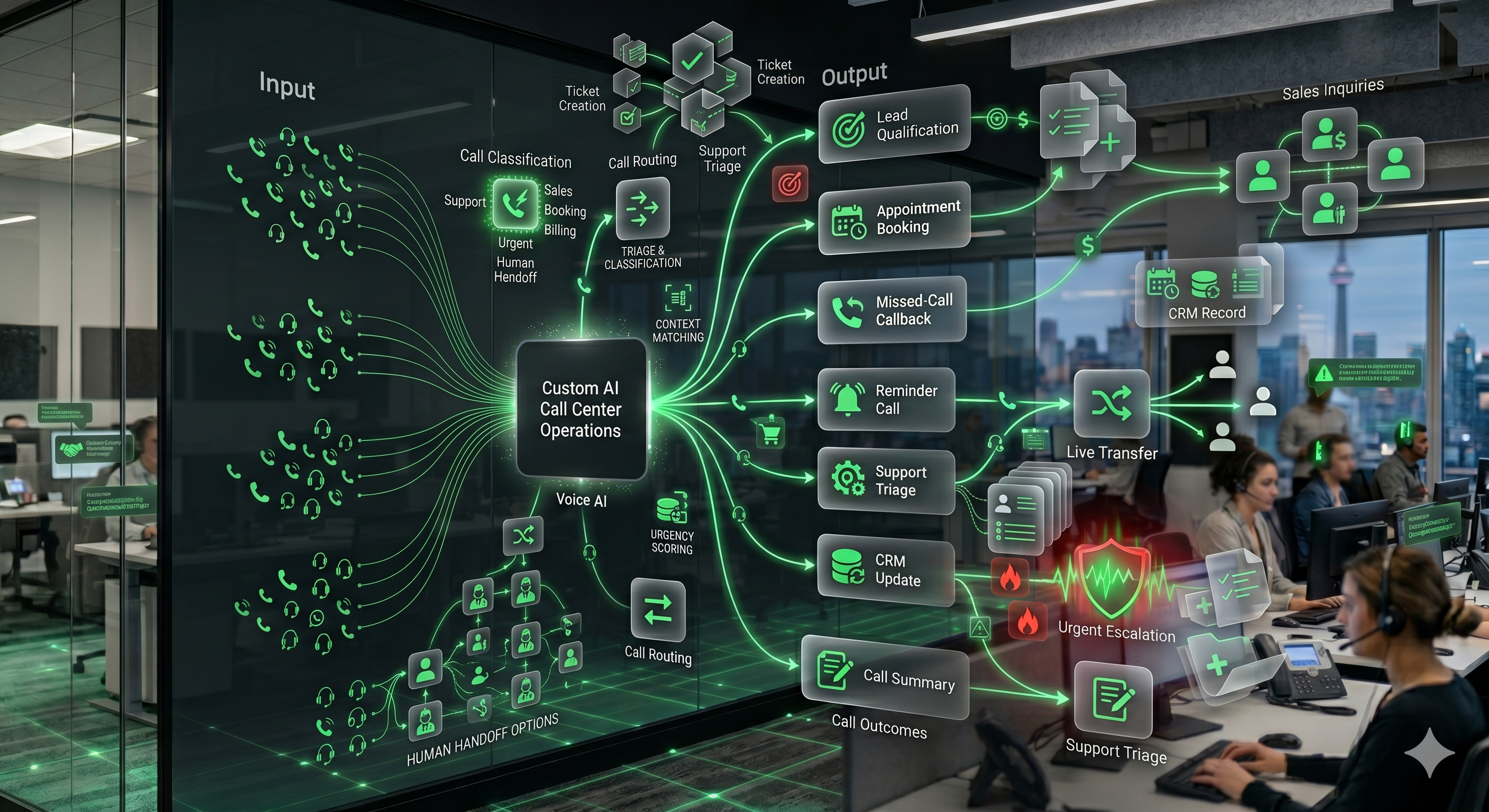
Call volume reporting
Track inbound activity, outbound attempts, peak times, after-hours demand, missed calls, locations, and departments.
Outcome tracking
See bookings, leads, tickets, transfers, callbacks, escalations, summaries, failed actions, and completed workflows.
Call quality review
Review misunderstood intents, failed calls, weak handoffs, incorrect routing, caller friction, and recurring issues.
Integration health
Monitor API errors, missing fields, failed updates, ticket creation issues, dashboard gaps, and fallback events.
Peak Demand uses call data, QA findings, workflow outcomes, staff feedback, and system performance to tune call center workflows over time.
Your team stays in control of sensitive, urgent, and complex calls.
Peak Demand designs AI call center workflows around approved use cases, deterministic business rules, permissions, escalation logic, privacy-aware handling, reporting visibility, and human handoff paths.
Approved call types
Define what AI can answer, what it can collect, what it can update, what must be validated, and what must go to a person.
Escalation triggers
Set human handoff rules for urgent calls, sensitive issues, confused callers, restricted topics, and complex exceptions.
Governed workflows
Use reporting, QA, validation logs, staff feedback, and workflow controls to keep AI call operations aligned with business rules.
Call-center automation should match the operating environment.
The same call-center concept looks different in healthcare, manufacturing, public service, and multi-location operations. Peak Demand designs custom workflows around the caller, business rules, systems, risk, reporting, and handoff requirements of each environment.
Healthcare
Patient access, appointment calls, intake, referrals, after-hours demand, call-center overflow, routing, and EMR/EHR-connected workflows.
Explore healthcare Voice AIManufacturing
Customer service, quote requests, parts, technical support, order status, warranty, supplier communication, and ERP/CRM-connected workflows.
Explore manufacturing Voice AITransit & public service
High-volume customer calls, multilingual routing, service requests, public information, escalation, and reliability-sensitive call handling.
Explore transit Voice AIEnterprise & multi-location
Multi-department routing, overflow, centralized logic, local rules, reporting, QA, permissions, and managed call operations.
Explore multi-location Voice AIQuestions teams ask before launching AI call center workflows.
These answers are written for operators, executives, contact center leaders, intake teams, support teams, multi-location organizations, and service companies evaluating managed Voice AI call operations.
What are custom AI call center solutions?
How is this different from a basic AI receptionist?
Who are custom AI call center solutions for?
Can AI handle both inbound and outbound call center workflows?
Can AI create support tickets or service requests?
Can AI update our CRM after a call?
Can AI call center workflows connect to our booking system, helpdesk, EMR, EHR, ERP, or custom software?
How does AI call center reporting work?
How does QA work for AI call center workflows?
What happens when AI should not handle a call?
Can AI call center solutions support multiple locations or departments?
Can this be used for healthcare, legal, real estate, home services, hospitality, or enterprise support?
How do outbound AI calls avoid feeling like spam?
Do we need an internal technical team?
How is a custom AI call center different from managed inbound or outbound Voice AI?
How much does a custom AI call center solution cost?
What should we bring to a discovery call?
Need AI call center workflows that actually support operations?
Peak Demand designs, launches, integrates, monitors, reports on, and improves custom AI call center solutions for inbound calls, outbound follow-up, routing, support triage, ticketing, system updates, dashboards, QA, and escalation control.
This is strongest when callers need routing, triage, follow-up, ticketing, system updates, escalation, reporting, and QA.
Peak Demand can manage the Voice AI call-center layer as an operating system, not a one-time automation.