
Custom AI Voice Receptionists for Booking, Intake, Routing, and Inbound Call Handling
Peak Demand builds custom AI voice receptionists for organizations that need inbound calls answered, booked, routed, escalated, connected to business systems, and aligned to real front-office rules.
Answer, classify, route, collect details, handle common requests, and support after-hours or overflow coverage.
Guide callers through booking, intake, service questions, system updates, and structured handoffs.
Peak Demand monitors, reviews, reports on, and improves the AI receptionist as real calls happen.
A custom AI receptionist should do more than answer the phone.
A custom AI voice receptionist should understand caller intent, ask the right questions, follow approved business rules, book or route correctly, escalate when needed, update systems, and create visibility for your team.
Peak Demand does not deploy generic receptionist bots. We design custom AI voice receptionists around your caller types, services, locations, booking rules, intake requirements, CRM process, escalation paths, after-hours coverage, overflow handling, and reporting needs.
The result is a managed front-door call workflow that helps inbound calls become booked appointments, qualified leads, service requests, callback tasks, CRM records, call summaries, transfers, and staff notifications.
- Built for organizations that need structured inbound call handling, not a basic voicemail replacement.
- Designed around booking, intake, routing, escalation, CRM updates, and follow-up workflows.
- Optional managed operations from Peak Demand after launch through reporting, QA, call review, prompt tuning, and workflow updates.

Peak Demand positions AI voice receptionists as managed inbound call infrastructure for organizations that need workflow-specific handling, system visibility, and ongoing improvement.
Peak Demand manages the AI receptionist before launch, during rollout, and in production.
We design the receptionist around your calls, workflows, systems, permissions, staff handoff rules, reporting needs, and real-world operating constraints.
Call flow design
Map greeting logic, caller intents, required questions, call outcomes, fallback paths, transfers, business rules, and escalation logic.
Booking and intake logic
Support appointment requests, lead intake, service qualification, patient or client intake, callbacks, and structured handoffs.
Routing and escalation
Route callers by department, location, service type, urgency, caller status, business hours, or staff availability rules.
System updates
Connect call outcomes to CRMs, booking systems, helpdesks, EMRs, EHRs, ERPs, contact-centre tools, notifications, or structured summaries.
Reporting visibility
Track call volume, caller intent, bookings, leads, transfers, escalations, missed workflows, after-hours demand, and QA patterns.
QA and optimization
Review calls, identify confusion points, tune prompts, adjust workflows, monitor integrations, update routing rules, and improve performance over time.
Your AI receptionist should know what to do with each caller.
The receptionist should not treat every caller the same. Peak Demand designs workflows so the AI can identify the reason for the call, follow the right business rule, and move the caller toward the right outcome.
- New lead intake, qualification, and routing to the correct sales or intake team.
- Appointment requests, booking support, confirmation flows, and callback scheduling.
- Existing customer, patient, client, or tenant support requests routed by category.
- Urgent or sensitive matters escalated to the appropriate human team.
- After-hours handling, overflow support, voicemail alternatives, and structured call summaries.
Ask the right questions
Collect caller details, request type, urgency, service need, location, timing, and other approved intake information.
Route correctly
Send calls, summaries, or tasks to the right person, department, location, calendar, CRM stage, or support workflow.
Escalate exceptions
Recognize when a caller needs human help, urgent attention, sensitive handling, or a workflow that AI should not complete.
The receptionist should connect callers to the next step.
A custom AI voice receptionist can support front-office workflows where callers need a booking, callback, transfer, intake record, status update, staff notification, or escalation path.
Peak Demand helps define what the receptionist is allowed to complete, what it should collect, what must be validated, when it should transfer, what should be summarized, and which workflows require human approval.

A custom AI receptionist should connect to the systems your team already uses.
Peak Demand can design receptionist workflows that connect calls to CRMs, booking platforms, scheduling systems, EMRs, EHRs, ERPs, helpdesks, contact-centre tools, notifications, dashboards, and custom software.
The right integration path depends on system access, permissions, APIs, data fields, workflow rules, validation requirements, and governance. Some workflows can be automated directly, while others should use structured summaries, staff review, or approval-based handoffs.
For a broader system-by-system breakdown, explore Peak Demand’s Voice AI integration services.
CRM and lead intake
Create or update contacts, tag call outcomes, assign owners, move pipeline stages, and trigger follow-up tasks.
Booking and scheduling
Support appointment requests, booking rules, service eligibility, provider or staff preferences, and scheduling handoffs.
Support and ticketing
Create tickets, classify support needs, summarize issues, route requests, and notify the right team after the call.
Your AI receptionist should be monitored, reviewed, and improved.
Peak Demand can manage the custom AI receptionist after launch so the workflow improves as real callers, staff feedback, routing patterns, integration behaviour, and business needs evolve.
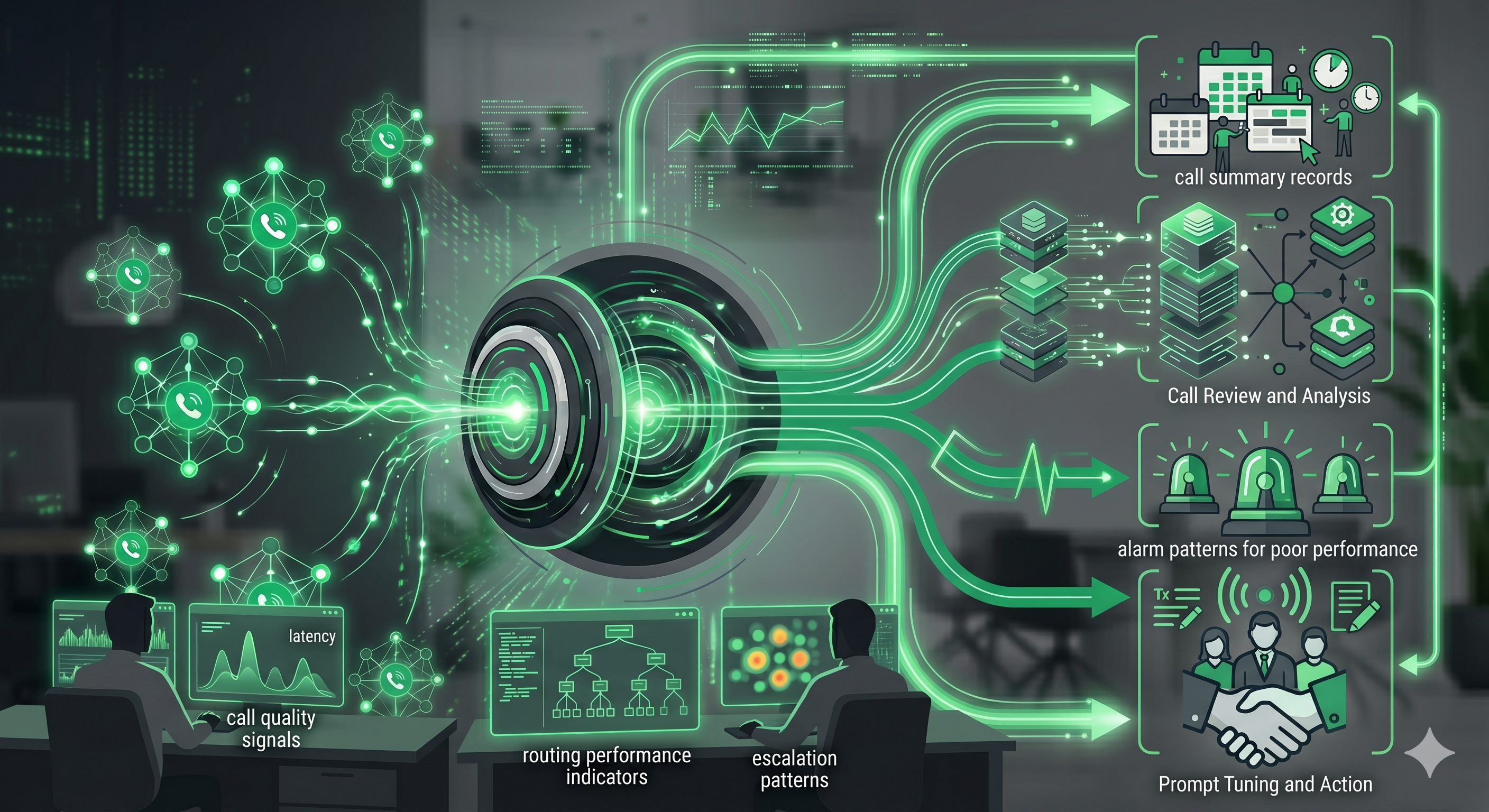
Call volume reporting
Track inbound demand, after-hours activity, caller categories, peak call times, locations, and recurring request types.
Outcome tracking
See bookings, leads, callbacks, transfers, escalations, summaries, missed workflows, and follow-up tasks.
Call quality review
Review misunderstood intents, weak handoffs, missed questions, caller friction, and recurring improvement opportunities.
Workflow tuning
Update prompts, routing rules, intake questions, fallback paths, escalation triggers, and reporting needs over time.
Peak Demand can continue improving the custom AI receptionist based on call data, team feedback, business-rule changes, system updates, integration health, and real caller behaviour.
The receptionist needs clear rules for what it can do, what must be validated, and when a human takes over.
Peak Demand designs AI receptionist workflows around approved call types, deterministic business rules, restricted topics, privacy-aware handling, escalation triggers, permissions, validation, and human control.
Approved workflows
Define what the AI receptionist can complete, what it can collect, what must be validated, and which workflows require human review.
Escalation paths
Create fallback logic for urgent calls, sensitive matters, confused callers, exceptions, and live team handoff.
Operational control
Use reporting, call review, validation logs, and staff feedback to keep receptionist behaviour aligned with business rules.
The receptionist workflow should match the operating environment.
The same front-door concept looks different in healthcare, manufacturing, public service, and multi-location operations. Peak Demand designs the workflow around the caller, business rules, systems, risk, and handoff requirements of each environment.
Healthcare
Patient access, appointment requests, intake, referrals, after-hours calls, routing, and EMR/EHR-connected workflows.
Explore healthcare Voice AIManufacturing
Customer service, quote requests, parts, technical support, order status, warranty, supplier calls, and ERP/CRM-connected routing.
Explore manufacturing Voice AITransit & public service
High-volume customer calls, multilingual routing, service requests, public information, escalation, and reliability-sensitive call handling.
Explore transit Voice AIEnterprise & multi-location
Location-aware routing, overflow, call-center augmentation, CRM updates, permissions, reporting, QA, and managed operations.
Explore multi-location Voice AIQuestions teams ask before launching a managed AI voice receptionist.
These answers are written for owners, operators, executives, front-office leaders, healthcare groups, manufacturers, service teams, and multi-location organizations evaluating managed AI receptionist workflows.
What is a custom AI voice receptionist?
How is this different from a basic AI receptionist?
Who are custom AI voice receptionists for?
What does Peak Demand manage?
Can an AI voice receptionist book appointments?
Can an AI voice receptionist handle intake?
Can the AI receptionist transfer calls to our team?
Can the AI receptionist connect to our CRM or booking system?
Can the AI receptionist update CRM records or create tasks?
Can this work after hours or during call overflow?
How does reporting work for an AI voice receptionist?
How does QA work after launch?
What happens when the AI should not handle a call?
Can AI voice receptionists support healthcare, legal, real estate, and home services?
Can the AI receptionist give legal, medical, or financial advice?
How much does a custom AI voice receptionist cost?
Can an AI voice receptionist answer in multiple languages?
What should we bring to a discovery call?
Need your inbound calls handled with real workflow logic?
Peak Demand designs, launches, integrates, monitors, reports on, and improves managed AI voice receptionists for organizations that need booking, intake, routing, escalation, after-hours coverage, system updates, QA, and ongoing optimization.
This is strongest when callers need more than a message taken. They need the right questions, the right route, the right system update, and the right human handoff.
Peak Demand manages the AI receptionist as an operating layer, not a set-it-and-forget-it phone bot.