Voice AI Receptionist for Dental Clinics in Canada — 24/7 Booking, Emergency Routing & Missed Call Recovery
Dental clinics lose revenue and patient access when calls hit voicemail, sit on hold, or arrive after hours. Peak Demand delivers a fully managed, custom-built Voice AI receptionist for Canadian dental practices — answering 24/7, booking hygiene and new-patient appointments, capturing high-value implant and cosmetic consults, routing urgent pain calls, recovering missed opportunities, and connecting approved workflows to your dental systems.
Hygiene, new-patient, emergency, consult, and approved appointment types.
Implant, Invisalign, veneer, whitening, and smile-design inquiries.
Human-first escalation for urgent and high-risk calls.
Capture overflow and after-hours demand instead of voicemail loss.
Built around your providers, appointment types, locations, and policies.
AI call routing and appointment booking built around dental clinic rules.
A Voice AI receptionist for dental clinics in Canada should do more than answer the phone. It should identify whether the caller needs hygiene, a new-patient exam, emergency care, a cosmetic consultation, billing help, or another approved pathway — then move that intent into the correct workflow without creating extra front-desk cleanup.
Common dental call types we automate
- Hygiene bookings: cleanings, recall visits, periodontal maintenance, and clinic-approved hygiene appointment types.
- New-patient appointments: structured intake and scheduling with the fields your practice actually needs.
- Emergency visits: urgent pain, broken tooth, swelling, trauma, lost filling, or post-op concerns routed according to policy.
- Implant and cosmetic consults: veneers, whitening, Invisalign, implant, and smile-design inquiries.
- Reschedule and cancellation: apply clinic rules before changing the schedule.
- Billing and insurance routing: move administrative calls to the correct workflow instead of consuming booking capacity.
Appointments can be offered and written directly into supported schedules when the clinic authorizes that action. If staff approval is required, the AI can create a structured callback instead.
Schedule protection matters
- Appointment type: do not treat every open slot as interchangeable.
- Provider constraints: only allow appropriate services with approved dentists or hygienists.
- Durations and buffers: preserve real chair time and operatory constraints.
- Location logic: route multi-location patients to the correct site.
- New vs returning: separate intake requirements and booking permissions.

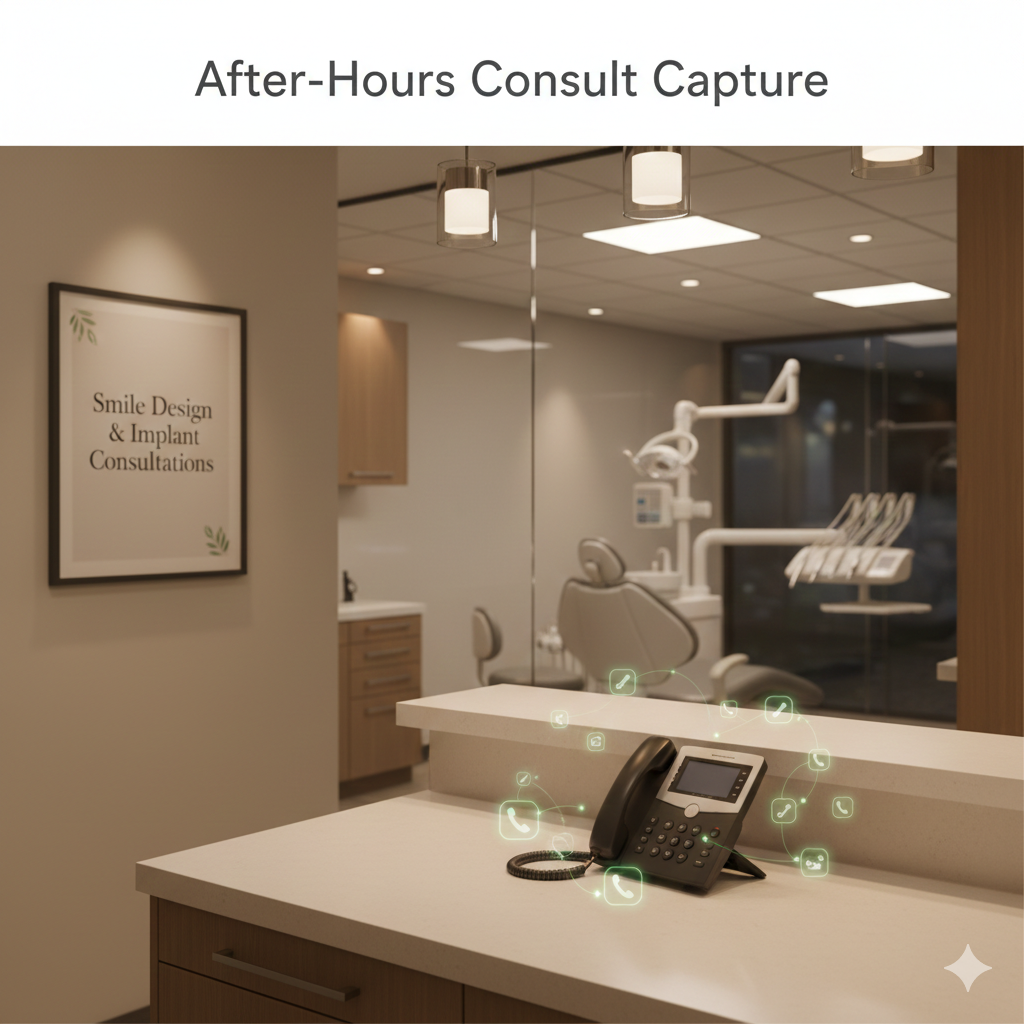
Capture high-value implant and cosmetic consults when patient intent is highest.
Implant and cosmetic inquiries do not arrive only during office hours. If a prospective patient reaches voicemail at 8 p.m. after deciding they are ready to ask about implants, Invisalign, veneers, whitening, or smile design, that intent can cool quickly. A custom Voice AI workflow answers immediately and moves the caller toward a real next step.
How after-hours consult capture works
- Immediate answer: no voicemail gap when the practice is closed.
- Consult intent detection: identify implant, Invisalign, veneer, whitening, smile-design, and other approved high-value inquiries.
- Structured consult intake: capture goals, timing, contact information, and approved qualification fields as structured data.
- Booking path: offer an evaluation slot when allowed or create a prioritized callback for the consult team.
- Clean handoff: staff receives a concise summary instead of replaying voicemail or reconstructing the request.
The goal is to capture the lead when intent is highest without turning the experience into a pushy sales call. The workflow should be calm, helpful, and aligned with the practice brand.
Consult workflow controls
- Clinic-defined questions: your team chooses which intake questions are useful and appropriate.
- No clinical promises: the AI does not diagnose candidacy or guarantee treatment outcomes.
- Human handoff: staff takes over when the conversation requires clinical or nuanced financial discussion.
- Priority tagging: high-value or time-sensitive consults can be surfaced for rapid follow-up.
Emergency dental calls should never sit in a generic voicemail queue.
Dental pain and post-operative concerns are different from ordinary scheduling questions. Peak Demand builds policy-driven emergency call workflows that recognize urgent intent, surface high-risk language, offer approved emergency booking paths, and escalate to staff or on-call coverage when the clinic requires human involvement.
Common emergency call patterns
- Severe tooth pain: emergency booking workflow or urgent callback queue.
- Swelling or infection concerns: escalate based on clinic-approved triggers and hours.
- Broken tooth or lost filling: offer approved next-available emergency visit options.
- Post-op concerns: route to staff or designated on-call pathway rather than improvising clinical advice.
- Trauma or high-risk language: move to human escalation and clinic-approved emergency guidance.
- Directions and hours: provide clear operational information without consuming front-desk time.
Human-first safety controls
- Low-confidence fallback: when the system is not sure, it escalates instead of guessing.
- Caller frustration: repeated attempts or distress can trigger human transfer.
- Manual override: callers can request a person at any time.
- Always-human categories: your clinic can define workflows that should never be completed autonomously.
- No medical advice posture: provide only clinic-approved next steps and routing.

Protect hygiene volume and recover demand that would otherwise disappear into voicemail.
Hygiene appointments create recurring demand, while missed calls and cancellations create silent schedule leakage. Voice AI can reduce those gaps by answering overflow immediately, helping callers rebook, creating structured callback tasks, and supporting approved recall or reactivation workflows.
How automation stabilizes the schedule
- Missed-call capture: every inbound call has a path instead of disappearing into voicemail.
- Overflow booking: peak-hour calls can be handled concurrently without hold-time abandonment.
- Cancellation recovery: open slots can be surfaced into structured callback or waitlist workflows.
- Hygiene recall support: guide returning patients into approved rebooking paths.
- Dormant-patient reactivation: support outbound or callback workflows where configured and permitted.
- Reminder and confirmation flows: reduce repetitive front-desk work around upcoming appointments.
Why this matters to the front desk
The objective is not to replace the dental team. It is to remove repetitive call handling that interrupts in-clinic patient care, while giving staff cleaner summaries and better-prioritized follow-up work.

Connect Voice AI to dental systems so the call can actually complete work.
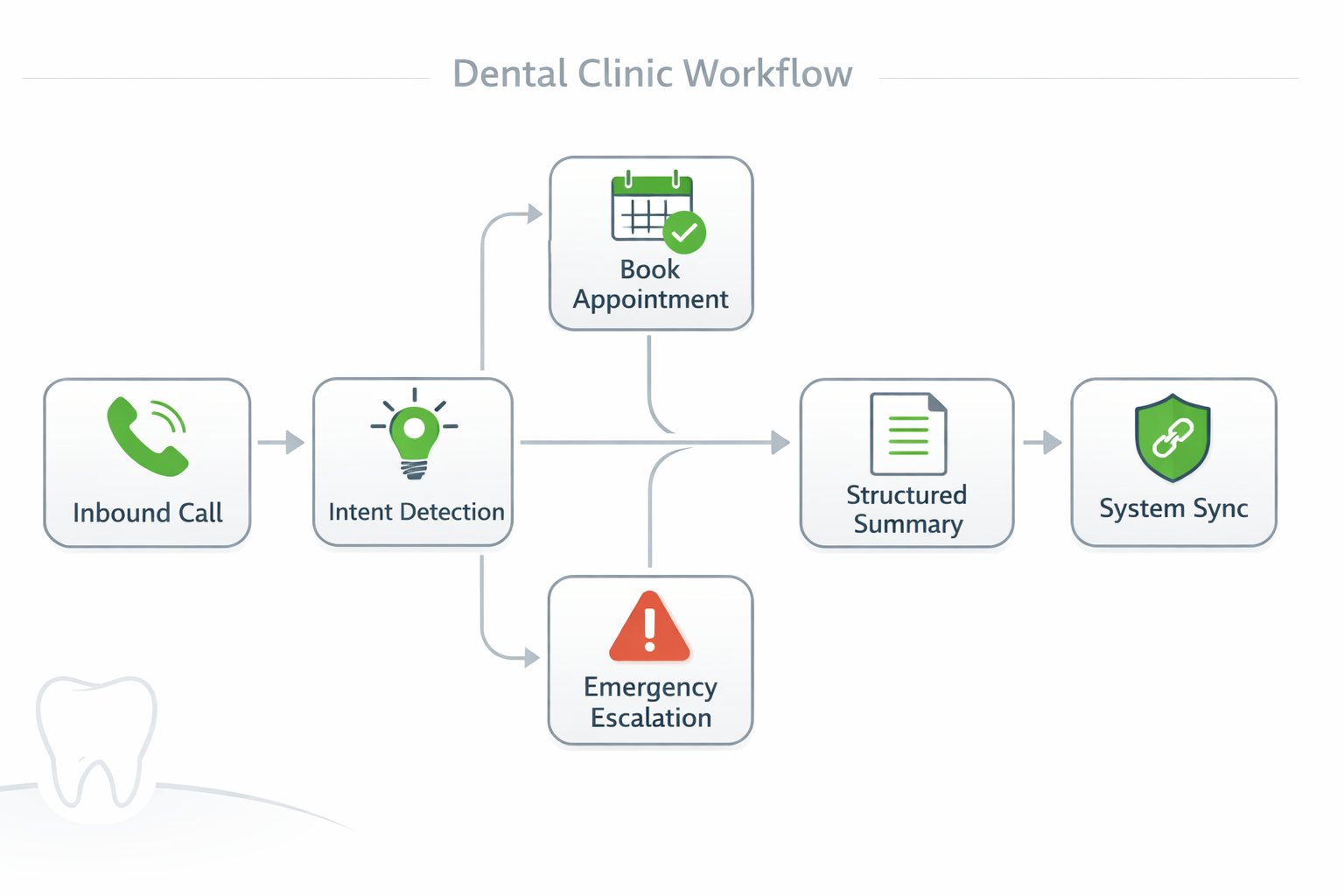
A dental Voice AI receptionist becomes operationally useful when it can do more than talk. Peak Demand builds workflow-driven agents that can book appointments, capture structured intake, create follow-up tasks, route urgent calls, and synchronize approved outcomes into practice systems using narrow, reviewable permissions.
What a dental clinic typically connects
- Scheduling and calendars: book, reschedule, or cancel according to approved rules.
- Practice-management workflows: capture consistent new-patient and appointment fields.
- Staff notifications: send consult or urgent-call information to the right person or queue.
- CRM / lead records: track implant and cosmetic inquiries when the practice uses a separate lead pipeline.
- Recall workflows: support hygiene rebooking, cancellation recovery, and missed-call follow-up.
- Reporting: write structured outcomes into the systems the practice already reviews.
The AI should be permissioned only for actions the practice approves. This is not a free-roaming administrative account with broad access to every system.
Integration safety controls
- Scoped permissions: separate read and write access where possible.
- Deterministic validation: business rules and high-consequence actions can be validated outside the language model.
- Token-based authentication: OAuth, JWT, or appropriately scoped service credentials where supported.
- TLS in transit: secure API and webhook transport.
- Action logging: bookings, updates, cancellations, transfers, and workflow errors can be recorded for review.
- Fallback behavior: failed writes should create a safe callback or staff-review path rather than silently failing.
Custom-built dental Voice AI — not an off-the-shelf phone tree with a new voice.
Dental clinics do not run identical workflows. Appointment types, provider schedules, operatories, emergency rules, hygiene cadence, multi-location logic, consult processes, and administrative ownership all vary. That is why Peak Demand builds around the practice rather than forcing the practice into a generic template.
Where generic systems fail in dental
- Rigid scripts: struggle when a caller changes intent or mixes multiple needs.
- No schedule protection: can book the wrong provider, duration, location, or appointment type.
- Weak escalation: urgent pain and post-op calls do not reach people quickly enough.
- One-size-fits-all recall: does not match the practice cadence, cancellation policy, or reactivation strategy.
- Messy handoffs: front-desk staff still reconstruct the call from vague notes.
- Minimal governance: difficult to review what happened, why it happened, and which system action occurred.

How Peak Demand custom builds differ
- Workflow mapping: document call reasons, booking rules, provider constraints, emergency policies, and handoff requirements.
- Clinic-specific routing: provider, service, location, daypart, and hours-based logic.
- Policy-driven escalation: human-first transfer and on-call routing where required.
- Structured intake: clean fields and summaries instead of vague notes.
- Ongoing optimization: tune new intents and edge cases without making the clinic maintain prompts.
Increase booking capture without adding proportional front-desk load.
Dental practices usually adopt Voice AI because unanswered calls and front-desk interruption have a real cost. The useful business case is measured in captured appointments, faster response, cleaner emergency routing, and the amount of repetitive phone work removed from staff — not in how “human” the demo sounds.
Where clinics can see the impact
- Missed-call reduction: fewer voicemail gaps and abandoned calls.
- After-hours booking capture: hygiene and consult demand can move forward while the clinic is closed.
- Emergency routing speed: urgent calls reach the right person or pathway more consistently.
- Front-desk load reduction: fewer interruptions for routine information and scheduling.
- Cleaner handoffs: staff receives structured summaries rather than unstructured messages.
- Multi-call concurrency: simultaneous callers do not require a matching number of receptionists.
Before launch, establish a baseline for missed calls, booking volume, after-hours demand, and front-desk workload. Then measure the Voice AI by call type rather than relying on one generic automation number.

Reporting, QA, and audit visibility for dental phone operations.
If the clinic cannot see what happened on a call, it cannot govern the system. Peak Demand structures dental Voice AI deployments so owners, managers, operations teams, and authorized reviewers can understand call outcomes, bookings, escalations, common intents, and workflow exceptions without treating automation as a black box.
What your team can review
- Call outcomes: booked, routed, escalated, resolved, or callback created.
- Structured summaries: reason for call, fields captured, and action taken.
- Escalation triggers: why a call was transferred to staff.
- Booking actions: confirmation that approved schedule writes occurred.
- Operational patterns: common call reasons, peak times, and demand by workflow.
- Failure states: integration errors or fallback paths that require staff review.
For multi-provider practices and DSOs, consistent reporting also makes it easier to compare intake and call-handling patterns across locations while preserving local workflow rules.

Governance options
- Metadata-only logging: retain outcome and operational fields without transcript storage where appropriate.
- Structured summaries: preserve the action and call reason for staff review.
- Transcript / recording controls: use only where required and permitted by clinic policy.
- Retention windows: define deletion periods according to business and privacy requirements.
- Role-based access: restrict who can view or export sensitive artifacts.
Why dental clinics choose Peak Demand for custom Voice AI receptionist builds.
Most “AI receptionist” offers are packaged software with a phone number. Peak Demand operates as an AI agency: we map the practice, design the operational logic, build the integration layer where required, test real scenarios, launch in a controlled way, and keep optimizing after production.
What the practice gets
- Clinic-specific workflow mapping: appointment types, durations, providers, locations, and hours-based rules.
- Emergency escalation design: human-first pathways for pain, post-op, and high-risk calls.
- Recall and missed-call recovery: structured workflows that protect hygiene and consult demand.
- Deterministic middleware: business rules, validation, permissions, and system actions are constrained outside the language model where appropriate.
- Integration architecture: narrow system access, safe failure modes, and auditability.
- Ongoing optimization: Peak Demand tunes the system as new intents and edge cases emerge.
What this avoids
- generic scripts that frustrate callers
- incorrect bookings that create staff cleanup
- urgent calls trapped in weak routing
- unreviewable “black box” automation
- a DIY prompt-maintenance burden for the dental team

Fully managed lifecycle
- workflow discovery
- solution architecture
- booking and escalation design
- integration scoping
- scenario testing
- controlled rollout
- QA and call review
- reporting and ongoing optimization
Connect this dental page into the broader healthcare and dental systems knowledge graph.
Dental practices usually enter through booking, missed-call recovery, emergency routing, or after-hours demand. From there, the most useful adjacent pages are the healthcare hubs, dedicated dental-system integrations, clinic scheduling and access pages, and governance resources for regulated patient communication.
Core healthcare entry points
Dental systems and booking architecture
Governance and compliance
Peak Demand already operates Voice AI in live Canadian healthcare workflows.
The following proof comes from a medical-clinic deployment rather than a dental practice, so it should not be treated as a dental benchmark. It demonstrates Peak Demand's production capability around healthcare scheduling logic, system integration, containment, and human fallback.
Creekside Health × TELUS CHR
From May 15 through August 31, 2026, the measured medical-clinic deployment handled 1,119 patient calls and completed 273 appointment actions. The published case study reports 74.9% appointment-workflow containment and 94.9% booking-path technical success for the measured period.
Questions dental practices ask before deploying Voice AI.
Can the AI book directly into our dental schedule?
Can it book hygiene appointments and new-patient exams differently?
Can it book implant or cosmetic consultations after hours?
Can we control the questions asked for cosmetic consults?
Can the AI detect emergency dental calls?
Will it give dental or medical advice?
Can callers always ask for a human?
Can it handle post-operative concerns?
Can we customize emergency rules?
Can it help reduce missed calls?
Can it help with hygiene recall?
Can it fill cancellation gaps?
Can the AI reschedule and cancel appointments?
Do we have to give the AI access to everything in our dental system?
Can we start without an integration?
What dental systems can you integrate with?
How do you prevent incorrect bookings?
Can the AI support multiple locations?
Can we review what the AI did on a specific call?
Do we have to retain transcripts or recordings?
Is the system automatically PHIPA compliant?
Do you work with dental clinics outside Ontario?
Is this a product our dental team has to manage?
How is this different from a traditional answering service?
How is this different from an off-the-shelf AI receptionist?
What should a dental practice measure after launch?
Bring us the dental call flow that creates the most missed opportunity or front-desk friction.
We will map appointment types, providers, emergency pathways, after-hours demand, consult intake, recall, system access, locations, reporting, and the workflows that should stay human — then design a controlled deployment around the practice.
Top call categories, appointment types, provider rules, emergency and on-call logic, after-hours coverage, consult capture, recall, integrations, privacy posture, testing, rollout, QA, and measurable success criteria.
Toronto-based AI agency • Canada-wide delivery • Fully managed • Custom workflows • Human escalation • Ongoing optimization