AI Receptionist for Medical Clinics in Canada — 24/7 Voice AI Booking & Call Routing
Peak Demand delivers a fully managed AI receptionist for medical clinics in Canada, built on secure Voice AI infrastructure and custom workflow logic. The system answers calls 24/7, books approved appointments directly into clinic schedules, routes patients to the correct team, captures after-hours inquiries, and supports human escalation — helping reduce missed calls, voicemail gaps, and front-desk overload.
Peak, overflow, evenings, weekends, and after-hours.
Visit types, providers, buffers, prerequisites, and locations.
Urgent, sensitive, low-confidence, or clinic-defined cases.
Build, test, launch, QA, monitor, and optimize.
Why Ontario Clinics Choose Custom Voice AI (Not Out-of-the-Box Receptionist Software)
Ontario clinics don’t fail with voice AI because “AI doesn’t work” — they fail because one-size-fits-all systems don’t match real operations. Appointment types, provider schedules, intake rules, escalation pathways, and privacy posture vary across family medicine, specialty clinics, and multi-location outpatient teams. Peak Demand builds a PHIPA-aligned AI voice receptionist as a custom workflow system designed to align with PHIPA expectations (and PIPEDA), with clear governance controls your privacy and IT team can review.
For the broader service overview (Canada + U.S., HIPAA/PIPEDA/PHIPA context), see: AI Voice Receptionist for Healthcare Providers.
Common issues we see with out-of-the-box clinic voice solutions
- Booking rule mismatch: can’t enforce buffers, prerequisites, appointment durations, or provider-specific constraints.
- Weak escalation logic: poor handling of urgency signals, low-confidence calls, frustrated callers, or sensitive topics.
- Limited routing: can’t reflect how your clinic actually operates (front desk → nurse line → billing → records).
- Governance gaps: unclear logging, retention, access control, and exportability for PHIPA-oriented review.
- Integration constraints: brittle connections to booking tools, CRMs, or internal workflows — causing cleanup work for staff.
- Custom workflows
- Built around your clinic’s call reasons, appointment types, and policies.
- Policy-driven intake
- Collect only approved fields; avoid unnecessary PHI by design.
- Escalation by design
- Urgency triggers, low-confidence handoff, and “human override” pathways.
- Audit-ready visibility
- Structured logs, exports, RBAC access model, retention controls.
- Defensible positioning: We don’t claim “guaranteed compliance.” We provide configurable controls and documentation to support your clinic’s PHIPA obligations.
What we mean by “custom build”
- A custom clinic voice AI receptionist is designed as:
- Workflow engine (book, route, callback, message — only approved actions)
- Scheduling rules (durations, buffers, appointment types, provider constraints)
- Escalation layer (urgent keywords, low confidence, repeated frustration)
- Governance layer (RBAC, logs, exports, retention, deletion)
- Integration layer (booking system + CRM/ticketing as required)
- This structure is what Ontario privacy and procurement reviews typically need to see.
Why not just use an out-of-the-box AI receptionist for our clinic?
Is a custom AI receptionist better for PHIPA requirements in Ontario?
Can you build around our clinic’s booking rules and appointment types?
Can we keep human receptionists and just use AI for overflow or after-hours?
Where can I see your main healthcare voice AI service page?
Custom Booking Logic for Family Practices, Walk-In Clinics & Multi-Physician Groups
Most “out-of-the-box” clinic answering tools fail at scheduling because real medical clinics don’t run on a single template. Appointment types, provider availability, new-patient rules, and escalation policies vary widely across Canada. Peak Demand builds a custom voice AI receptionist that follows your clinic’s rules — not generic defaults.
Booking rules we configure (examples)
- Visit types & durations: 10/15/20/30/45/60+ minute bookings by service type.
- New vs returning patients: different workflows, required questions, and eligibility checks.
- Provider-specific schedules: only book certain visit types with specific clinicians.
- Buffers & prerequisites: enforce prep time, referrals, forms, or clinic-specific rules.
- Multi-location routing: site selection + local schedule rules for multi-site clinics.
- Reschedule/cancel policies: confirmation flows and guardrails to reduce no-shows.
Result: fewer scheduling errors, less manual cleanup, and more bookings captured without increasing front-desk workload.
Can the AI receptionist book appointments directly into our clinic schedule?
Can we control which appointment types the AI is allowed to book?
Can the AI route callers to a specific provider or doctor?
What if our clinic’s rules are too complex for automated booking?
Reduce Missed Calls & Front-Desk Overload in Canadian Medical Clinics
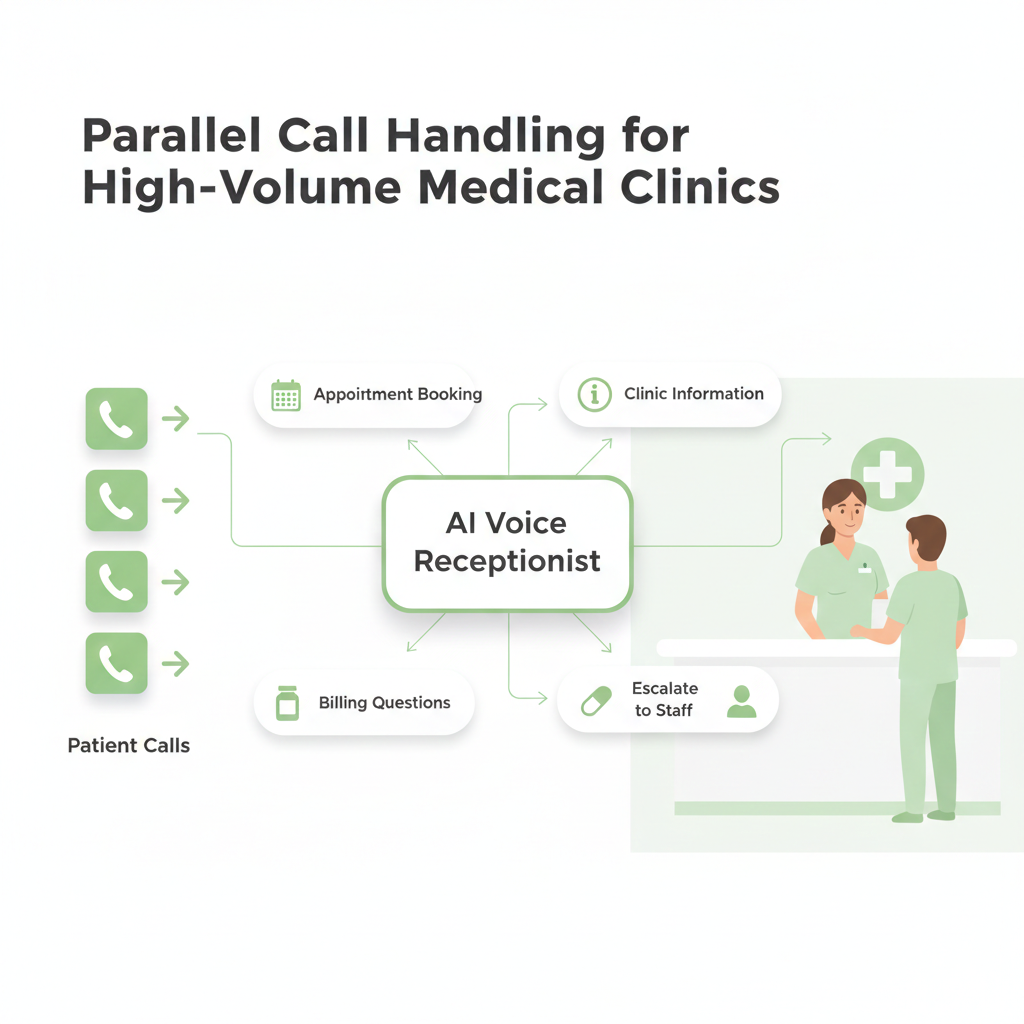
Every missed call is a missed appointment opportunity. In high-volume Canadian medical clinics, hold times increase during peak hours, and voicemail becomes a bottleneck. A voice AI receptionist for medical clinics answers instantly and handles multiple calls in parallel — reducing abandonment and capturing more bookings.
Operational Improvements Clinics Track
- Missed Call Rate ↓ Fewer unanswered calls during busy periods.
- Booking Capture ↑ More appointments scheduled per inbound inquiry.
- Average Handle Time ↓ Less manual call time for reception staff.
- After-Hours Conversion ↑ Evening/weekend bookings secured automatically.
- Admin Load ↓ Routine questions and scheduling handled without interrupting in-clinic care.
What those metrics mean operationally
- Revenue recovery: fewer appointment opportunities disappear into voicemail or abandonment.
- Capacity recovery: reception staff spend less time on repetitive phone work.
- Peak-hour stabilization: concurrent calls no longer depend on a single human phone seat.
- After-hours access: patients can complete approved workflows outside business hours.
- Measurable improvement: missed-call reduction, booking lift, transfer accuracy, and staff cleanup can be tracked over time.
Does an AI receptionist actually increase appointment bookings?
Is this worth it for a small medical clinic?
How quickly can we see ROI from a clinic AI receptionist?
Can the AI handle multiple calls at the same time?
Clinic Phone Automation Without Losing Human Oversight
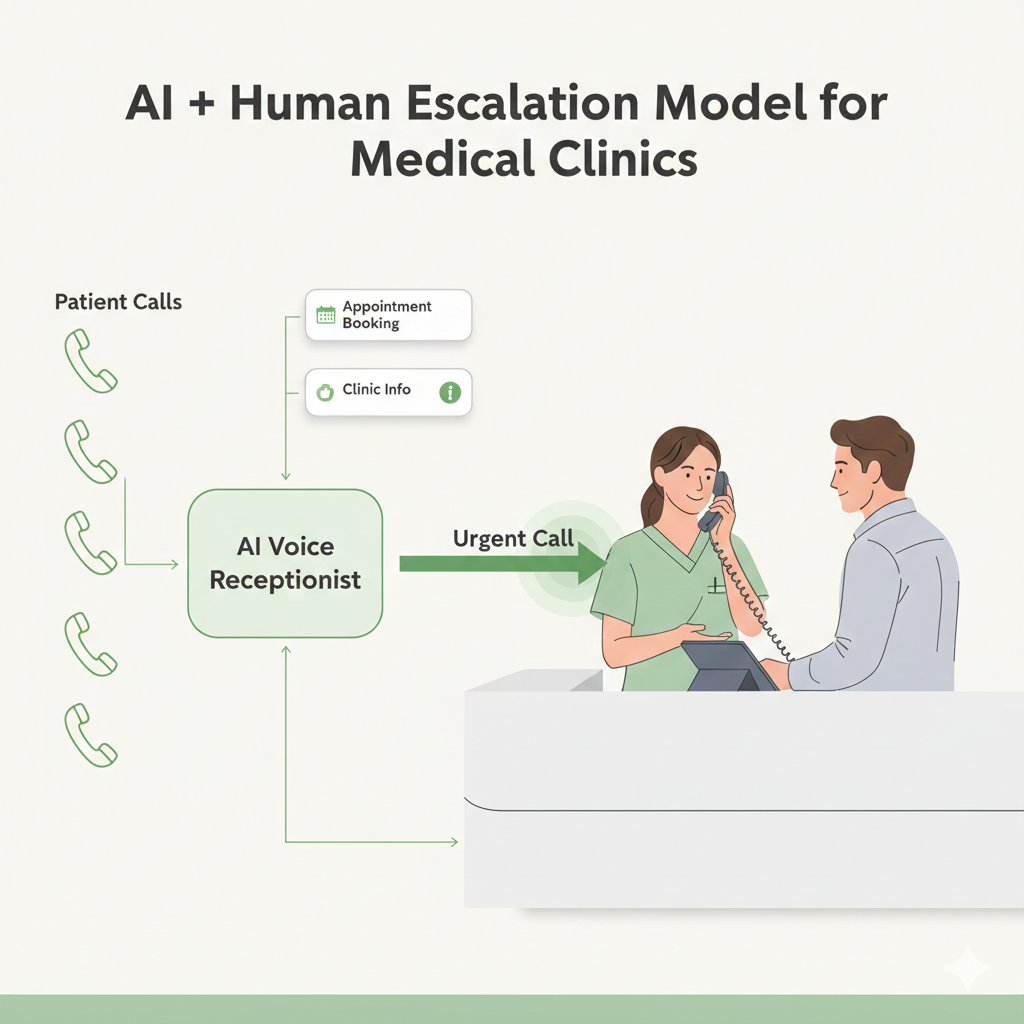
Automation should reduce overload — not remove control. Our AI voice receptionist for medical clinics is designed with configurable human escalation pathways, policy-based routing, and clearly defined boundaries. It does not diagnose, prescribe, or provide medical advice.
Safety & Escalation Controls
- Urgent keyword triggers: escalate immediately to staff or on-call pathways.
- Low-confidence fallback: automatically route complex calls to humans.
- Press-0 / human override: callers can request staff at any time.
- No medical advice posture: structured language avoids diagnosis or treatment guidance.
- Policy-based routing: certain call categories always go to staff.
- Escalation logs: every transfer or override can be recorded for review.
Does the AI give medical advice?
What happens if someone says they have chest pain?
Can we control which calls always go to a human?
Secure Clinic Integrations: Booking, Intake, Routing & Follow-Ups (Canada)
A voice AI receptionist becomes valuable when it can complete real work — not just answer calls. Peak Demand implements secure, least-privilege integrations so your clinic can capture bookings, route requests, and deliver structured summaries into the tools your team already uses.
We scope access so the AI can only perform approved actions (e.g., “book appointment” or “create callback task”), with reviewable outputs. This helps reduce operational friction and supports privacy-aware deployments.
What we typically connect (examples)
- Booking systems & calendars: availability checks, booking/reschedule/cancel flows.
- Clinic inbox / task queues: callbacks, messages, and patient requests routed to the right team.
- CRM / intake tracking: structured call outcomes, notes, and follow-up tasks (where used).
- Notifications: appointment confirmations, reminders, and staff alerts (policy-driven).
- Multi-location routing: location selection + correct clinic queue and schedule.
Security patterns we use
AI voice receptionist for a Canadian medical clinic integrating with booking systems and clinic workflows using secure least-privilege connections
- Token-based auth: OAuth/JWT where supported; scoped service tokens otherwise.
- Least privilege: narrow read/write scopes and action limits.
- Transport security: TLS for API and webhook traffic.
- Integrity checks: signed webhooks (HMAC) where applicable.
- Environment separation: test vs production to reduce risk during rollout.
- Light compliance note: where personal health information is involved, deployments can be configured to support PHIPA/PIPEDA expectations (minimization, role-based access, retention rules).
- Workflow completion: call → booking or callback → structured summary → staff follow-up — using scoped, secure integration patterns.
Can the AI receptionist book directly into our clinic booking system?
How do you stop the AI from seeing or accessing our entire patient database?
Can we disable transcripts or recordings but still keep structured call outcomes?
Do you support multi-location clinic routing?
Healthcare Voice AI should be judged by production outcomes, not a demo conversation.
Peak Demand’s published Creekside Health case study documents a medical-clinic Voice AI receptionist integrated with TELUS Collaborative Health Record through a custom orchestration and logic-bridge layer. The deployment handled real patient calls, appointment workflows, booking rules, cancellations, rescheduling, lookups, availability checks, and human escalation.
Creekside Health × TELUS CHR
From May 15 through August 31, 2026, the measured production deployment handled 1,119 patient calls and completed 273 appointment actions. The published study reports 74.9% appointment-workflow containment and 94.9% booking-path technical success for the measured period.
Built for Canadian Medical Clinics — From Solo Practices to Multi-Site Networks
Canadian medical clinics vary dramatically by province, practice model, and patient volume. Peak Demand builds custom voice AI receptionist workflows that match how your clinic actually operates — whether you’re a solo family physician, a walk-in clinic managing continuous call traffic, or a multi-location medical group coordinating schedules across teams.
Common clinic environments we design for
- Family medicine: repeat appointments, follow-ups, referrals, prescription requests, and clinic info.
- Walk-in clinics: high concurrency, fast routing, and clear escalation rules during peak hours.
- Specialty practices: structured intake, referral gating, and appointment type rules.
- Multi-physician groups: provider routing, multi-schedule protection, and location logic.
- Multi-site networks: centralized call handling with correct clinic queue + booking logic per site.
How we implement (fully managed)
- Workflow mapping: define top call reasons, booking rules, and escalation pathways.
- Custom build: configure scripts, routing logic, booking permissions, and safe boundaries.
- Testing: simulate real clinic scenarios before go-live.
- Launch + monitoring: stabilize call handling and tune as new intents emerge.
- Ongoing optimization: improve capture rates and reduce staff cleanup work over time.
- Explore the main Healthcare Voice AI service page → Learn more about Peak Demand (Toronto, Canada) →

Do you work with clinics outside Toronto?
Can we start with after-hours answering only?
Is this a product we have to manage, or a fully managed service?
Why Custom-Built Clinic Voice AI Outperforms Out-of-the-Box Receptionist Software
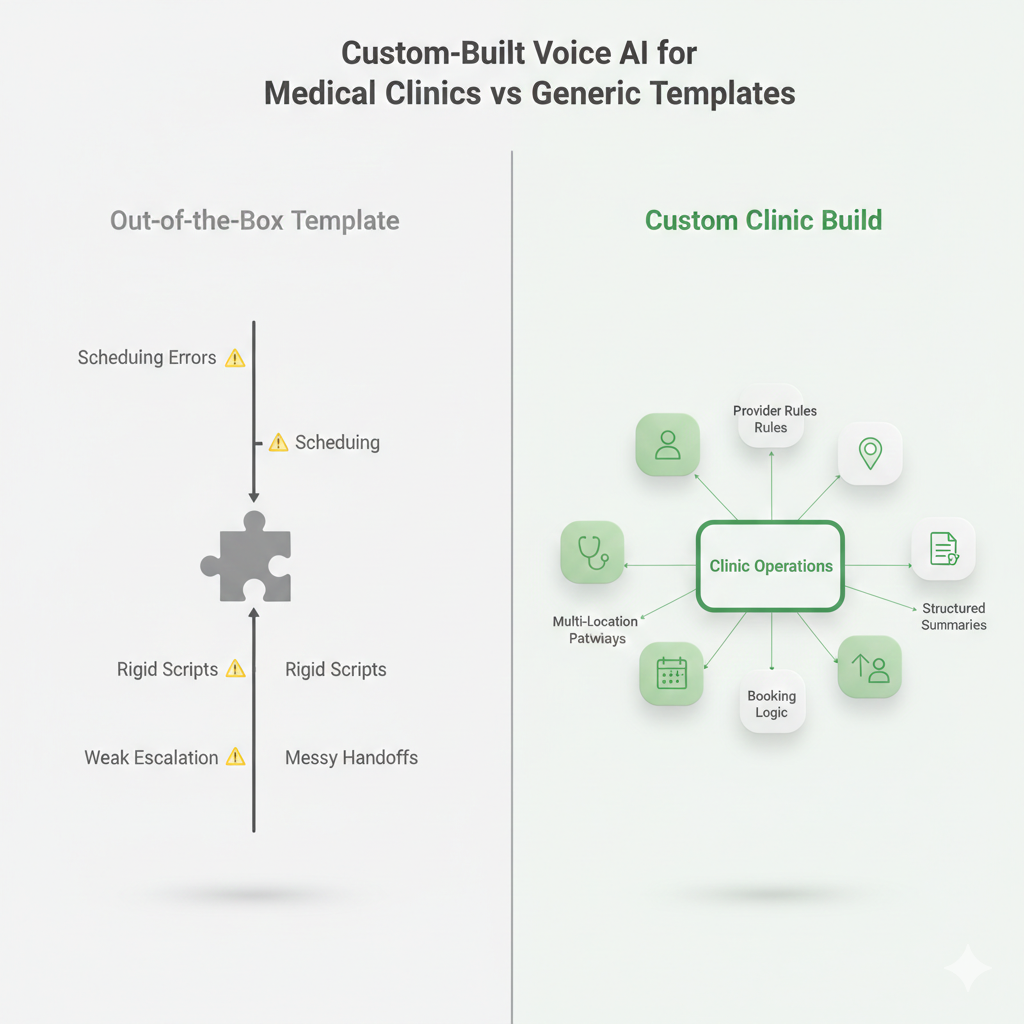
Medical clinics don’t fail with “AI” — they fail with generic templates. We’re seeing more Canadian clinics come to Peak Demand after trying out-of-the-box receptionist tools that can’t handle real-world scheduling rules, provider constraints, escalation policies, or multi-location routing.
- A custom voice AI receptionist for medical clinics is built around your operations: what your patients actually ask, how your staff actually triages calls, and what your booking system can actually support. That’s how you reduce staff cleanup work and increase booking capture without creating new risk.
Common issues clinics see with out-of-the-box tools
- Scheduling errors: wrong visit type, wrong duration, wrong provider, or wrong location.
- No real escalation logic: urgent scenarios don’t route fast enough to staff.
- Template scripts: clinic-specific policies aren’t reflected (referrals, prerequisites, intake).
- Weak handoffs: staff receive messy notes or inconsistent call outcomes.
- Rigid workflows: can’t adapt to how Canadian clinics actually operate.
What “custom build” means at Peak Demand
- Workflow-first design: your top call reasons → mapped into controlled flows.
- Clinic-specific booking rules: provider routing, durations, buffers, new/returning logic.
- Escalation & safety boundaries: always-human categories, urgent triggers, confidence fallback.
- Integration scoping: only approved actions, least privilege, reviewable outputs.
- Ongoing tuning: refine based on real call patterns and staff feedback.
Why do clinics struggle with out-of-the-box AI receptionist tools?
Can we start with a smaller custom build and expand later?
How do you prevent a custom build from becoming “too complex” to manage?
Privacy-Aware Voice AI for Canadian Medical Clinics (PHIPA/PIPEDA Context)
A clinic AI receptionist isn’t “just a phone bot” — it’s part of your communication stack. Peak Demand structures voice AI deployments for Canadian medical clinics with policy-driven data minimization, clear disclosure language, and reviewable outputs so your team can govern how information is captured and shared.
Requirements vary by province and clinic context. Where applicable, deployments can be designed to support PHIPA/PIPEDA expectations through concrete controls (access restriction, retention rules, and auditability) — without claiming “guaranteed compliance.”
Governance controls clinics typically want
- Consent + disclosure: configurable greetings and recording notice where enabled.
- Data minimization: capture only what is needed for booking, routing, callback, or approved intake.
- Access control: role-based access for logs, summaries, transcripts, recordings, exports, and stored artifacts.
- Retention rules: policy-driven retention windows and deletion expectations.
- Auditability: reviewable call outcomes, integration actions, transfers, and escalation records.
- Human-first pathways: sensitive categories routed directly to staff.
PHIPA / PIPEDA review pathway
Requirements vary by province, clinic structure, system architecture, and the information each workflow handles. Peak Demand can document the controls your privacy, IT, or procurement team needs to review before deployment.
- Workflow data map: what the system collects, where it moves, and what is retained.
- Permission boundary: what the AI can read or write and what remains unavailable.
- Logging posture: metadata, summaries, transcripts, recordings, and exports configured by policy.
- Human escalation: categories that must move immediately to clinic staff.
- Procurement support: PHIPA-oriented documentation and governance artifacts where applicable.
Do you store call recordings and transcripts?
Can we limit what the AI asks for to reduce privacy risk?
Can our team review what the AI did on a specific call?
Measurable ROI: Reduce Missed Calls and Increase Appointment Capture for Medical Clinics
A properly deployed AI voice receptionist for medical clinics should produce measurable operational improvement — not just automation. The goal is simple: answer more calls, capture more bookings, reduce front-desk overload, and stabilize patient access without increasing staffing pressure.
Because we build custom workflows around your clinic’s real call patterns, results are tied to concrete metrics — not vanity dashboards.
Core performance indicators clinics track
- Missed call rate ↓ — fewer unanswered or abandoned calls during peak hours.
- After-hours booking capture ↑ — appointments secured when the clinic is closed.
- Front-desk interruption ↓ — fewer repetitive inbound disruptions.
- Booking accuracy ↑ — correct visit types, durations, and provider routing.
- Escalation precision ↑ — urgent matters reach staff faster.
Operational impact
AI voice receptionist reducing missed calls and increasing appointment booking capture for a busy Canadian medical clinic, showing stabilized call flow and protected staff capacity
- Revenue protection: fewer lost new-patient inquiries.
- Staff capacity recovery: reception focuses on in-clinic patients.
- Scalability: handle higher call volume without linear hiring.
- Consistent patient experience: calls answered 24/7 with structured logic.
- Capture more calls. Book more appointments. Protect staff capacity — without adding headcount.
Does an AI receptionist actually increase bookings for a clinic?
How quickly can we see results?
Is this worth it for a small medical clinic?
What Working With Peak Demand Looks Like for Medical Clinics
This is not a plug-and-play chatbot. Peak Demand delivers a fully managed AI voice receptionist for medical clinics — designed, configured, tested, and optimized around your real operations.
We work directly with clinic leadership, front-desk staff, and (where needed) privacy or IT teams to ensure workflows are accurate, escalation rules are clear, and integrations are scoped appropriately.
Typical deployment stages
- Discovery & workflow mapping: identify top call reasons, booking rules, and escalation boundaries.
- Custom configuration: build scripts, routing logic, and system integrations.
- Scenario testing: simulate real patient interactions before go-live.
- Controlled launch: monitor performance and validate escalation accuracy.
- Ongoing optimization: refine based on live call patterns and clinic feedback.
Why clinics prefer this model
Fully managed AI voice receptionist deployment process for a Canadian medical clinic including workflow mapping, custom build, testing, and optimization
- No internal maintenance burden
- No template lock-in
- No unmanaged automation risk
- Continuous improvement over time
- Fully managed from discovery to optimization — built around your clinic, not a template.
Questions Canadian medical clinics ask before deploying an AI receptionist.
Why not just use an out-of-the-box AI receptionist for our clinic?
Is a custom AI receptionist better for PHIPA requirements in Ontario?
Can you build around our clinic’s booking rules and appointment types?
Can we keep human receptionists and just use AI for overflow or after-hours?
Where can I see your main healthcare voice AI service page?
Can the AI receptionist book appointments directly into our clinic schedule?
Can we control which appointment types the AI is allowed to book?
Can the AI route callers to a specific provider or doctor?
What if our clinic’s rules are too complex for automated booking?
Does an AI receptionist actually increase appointment bookings?
Is this worth it for a small medical clinic?
How quickly can we see ROI from a clinic AI receptionist?
Can the AI handle multiple calls at the same time?
Does the AI give medical advice?
What happens if someone says they have chest pain?
Can we control which calls always go to a human?
Can the AI receptionist book directly into our clinic booking system?
How do you stop the AI from seeing or accessing our entire patient database?
Can we disable transcripts or recordings but still keep structured call outcomes?
Do you support multi-location clinic routing?
Do you work with clinics outside Toronto?
Can we start with after-hours answering only?
Is this a product we have to manage, or a fully managed service?
Why do clinics struggle with out-of-the-box AI receptionist tools?
Can we start with a smaller custom build and expand later?
How do you prevent a custom build from becoming “too complex” to manage?
Do you store call recordings and transcripts?
Can we limit what the AI asks for to reduce privacy risk?
Can our team review what the AI did on a specific call?
Does an AI receptionist actually increase bookings for a clinic?
How quickly can we see results?
Ready to Reduce Missed Calls at Your Clinic — Without Buying Another Template Tool?
Ready to reduce missed calls without buying another template tool?
Bring us your actual call reasons, booking constraints, provider rules, after-hours gaps, escalation policies, privacy requirements, and systems. We will map what can be automated safely, what should remain human, and how to launch without disrupting clinic operations.
Workflow scan, booking-rule review, automation-vs-human boundaries, escalation plan, integration approach, privacy/governance considerations, and a practical rollout path.
Toronto-based • Fully managed • Custom workflows • Secure integrations • Human escalation • Ongoing optimization