

Custom Voice AI Integrations for CRMs, Booking Systems, Helpdesks, EMRs, EHRs, ERPs, Dashboards, and Workflow Automation
Peak Demand builds and manages custom Voice AI integrations that connect phone calls to business systems, workflow rules, data updates, staff handoffs, reporting dashboards, approval queues, logging, retries, and fallback paths.
CRMs, booking systems, helpdesks, EMRs, EHRs, ERPs, dashboards, databases, and notifications.
APIs, webhooks, middleware, validation, workflow state, logging, retries, and fallback paths.
Monitor integration health, failed actions, QA findings, reporting needs, and workflow changes.
Voice AI becomes more useful when calls connect to the systems your team already uses.
Custom Voice AI integrations help turn conversations into system actions: CRM updates, booking requests, support tickets, task creation, call summaries, notifications, dashboards, approval queues, and staff handoffs.
Peak Demand builds custom integration architecture for organizations that need more than a simple phone agent. We help design the bridge between Voice AI, your workflows, your data, your business rules, your staff handoff process, and your reporting layer.
This can include APIs, webhooks, middleware, custom AWS or Cloudflare bridge layers, validation steps, workflow state, logging, retries, approval flows, fallback paths, staff review queues, and operational reporting.
- Connect Voice AI to CRMs, booking systems, scheduling systems, helpdesks, ticketing tools, EMRs, EHRs, ERPs, dashboards, and databases.
- Design custom integration workflows with validation, approvals, logging, retries, fallback paths, and staff review queues.
- Monitor and improve integration health after launch through reporting, QA, failed-action review, and workflow optimization.
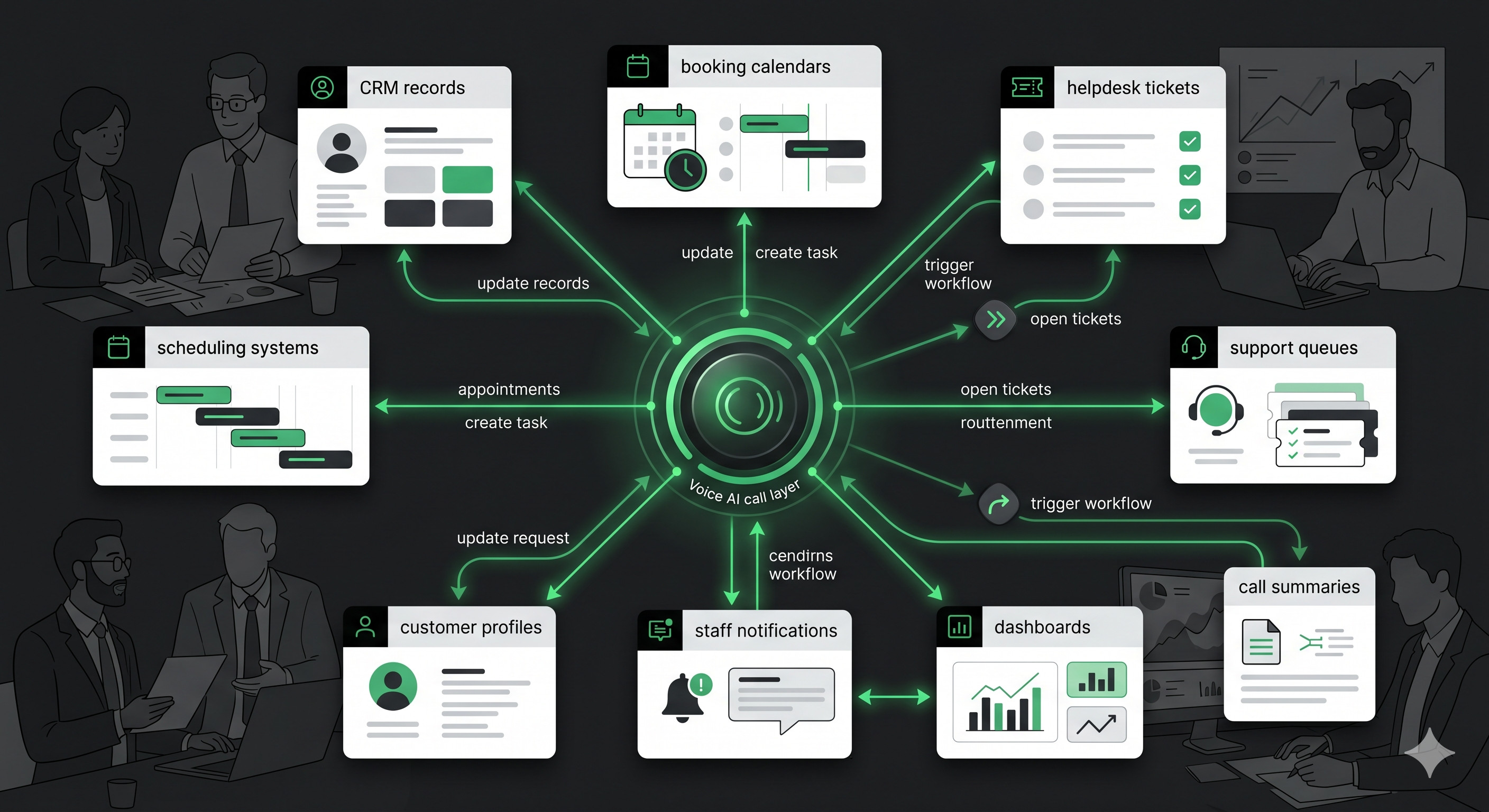
Peak Demand helps connect Voice AI to the systems, data, workflows, approval paths, and reporting layers that make the call operation useful.
Integrations should match the systems that run your operation.
Voice AI can be designed to connect with the systems where your team already works, instead of creating another disconnected call log.
CRM integrations
Create contacts, update records, tag callers, assign owners, create tasks, update stages, and log call summaries.
Booking and scheduling
Support appointment requests, reminders, confirmations, booking updates, staff review tasks, and scheduling handoffs.
Helpdesk and ticketing
Create tickets, classify issues, route support requests, update queues, send alerts, and summarize customer needs.
EMR and EHR workflows
Design safe handoff workflows for healthcare scheduling, intake, review queues, notifications, summaries, and approved system paths.
ERP and operations systems
Connect calls to order workflows, service requests, dispatch paths, inventory checks, customer records, and internal operations.
Dashboards and reporting
Send call outcomes, failed actions, QA findings, escalations, system updates, and workflow metrics into reporting views.
Some Voice AI workflows need custom architecture, not just a basic connector.
Peak Demand can help design custom integration layers that manage system access, workflow state, data validation, retries, logs, approvals, fallback behavior, and reporting when off-the-shelf integrations are not enough.
- API and webhook workflows for CRMs, booking systems, helpdesks, ticketing systems, EMRs, EHRs, ERPs, and custom databases.
- Middleware or bridge layers for authentication, validation, transformation, retries, logging, and routing.
- Workflow state management so calls can move through multi-step actions without losing context.
- Approval queues and staff review paths when direct automation is not appropriate.
- Fallback routes when systems are unavailable, fields are missing, or an action should be reviewed by a human.
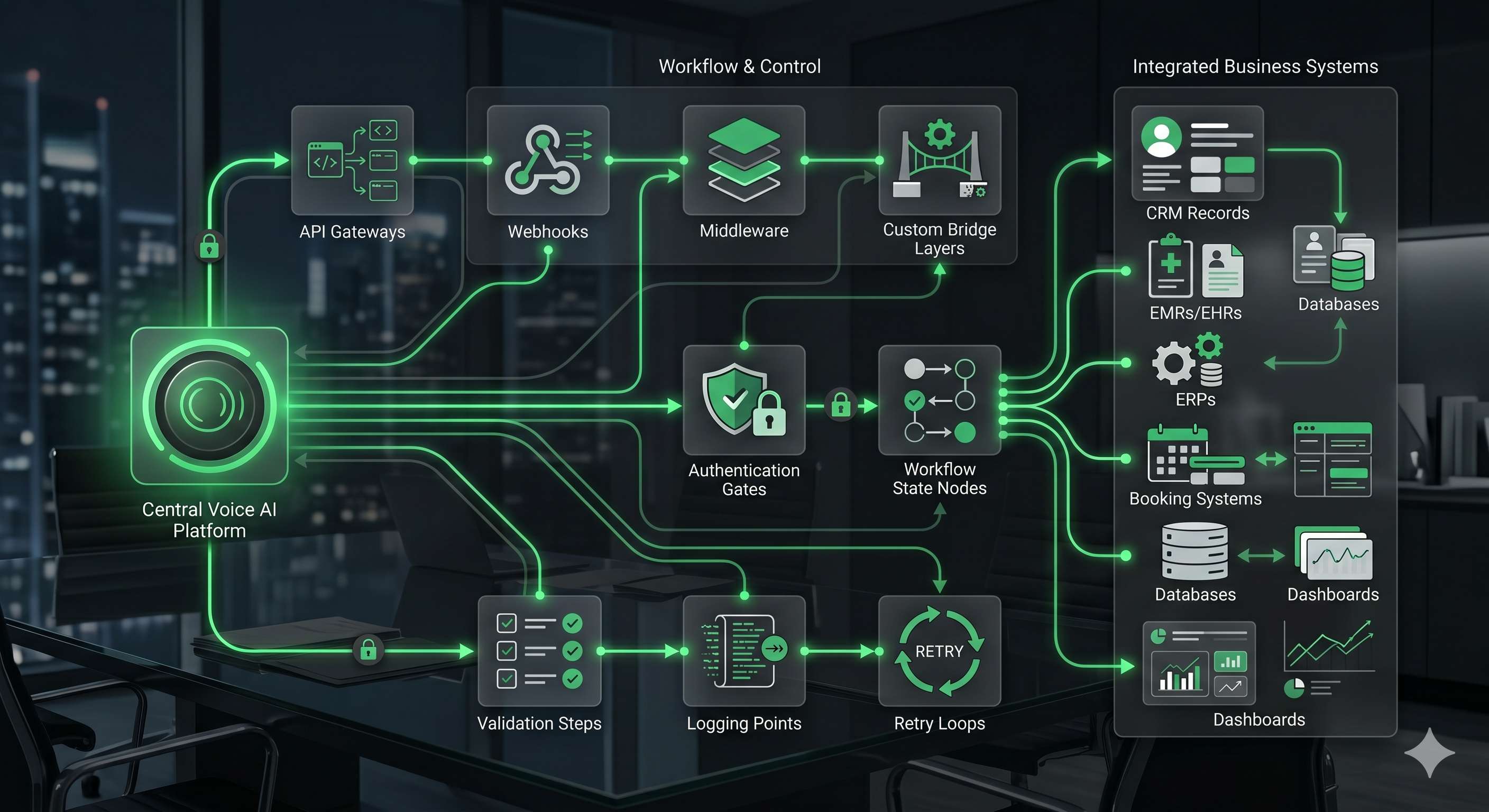
API and webhook workflows
Connect Voice AI actions to system endpoints, workflow triggers, record updates, booking paths, and support queues.
Middleware and bridge layers
Add control between Voice AI and business systems for validation, mapping, retries, permissions, and monitoring.
Workflow state and context
Preserve caller context, call outcome, business rules, next steps, and system status through multi-step workflows.
Custom integrations need safeguards, not just connections.
When Voice AI updates systems, creates records, books appointments, sends alerts, or routes customer requests, the workflow needs a plan for validation, errors, approvals, retries, staff review, and fallback handling.
Peak Demand designs integration workflows to support real operations: what happens when a required field is missing, a booking slot is unavailable, a CRM update fails, a caller needs human review, or an automated action should be approved before completion.
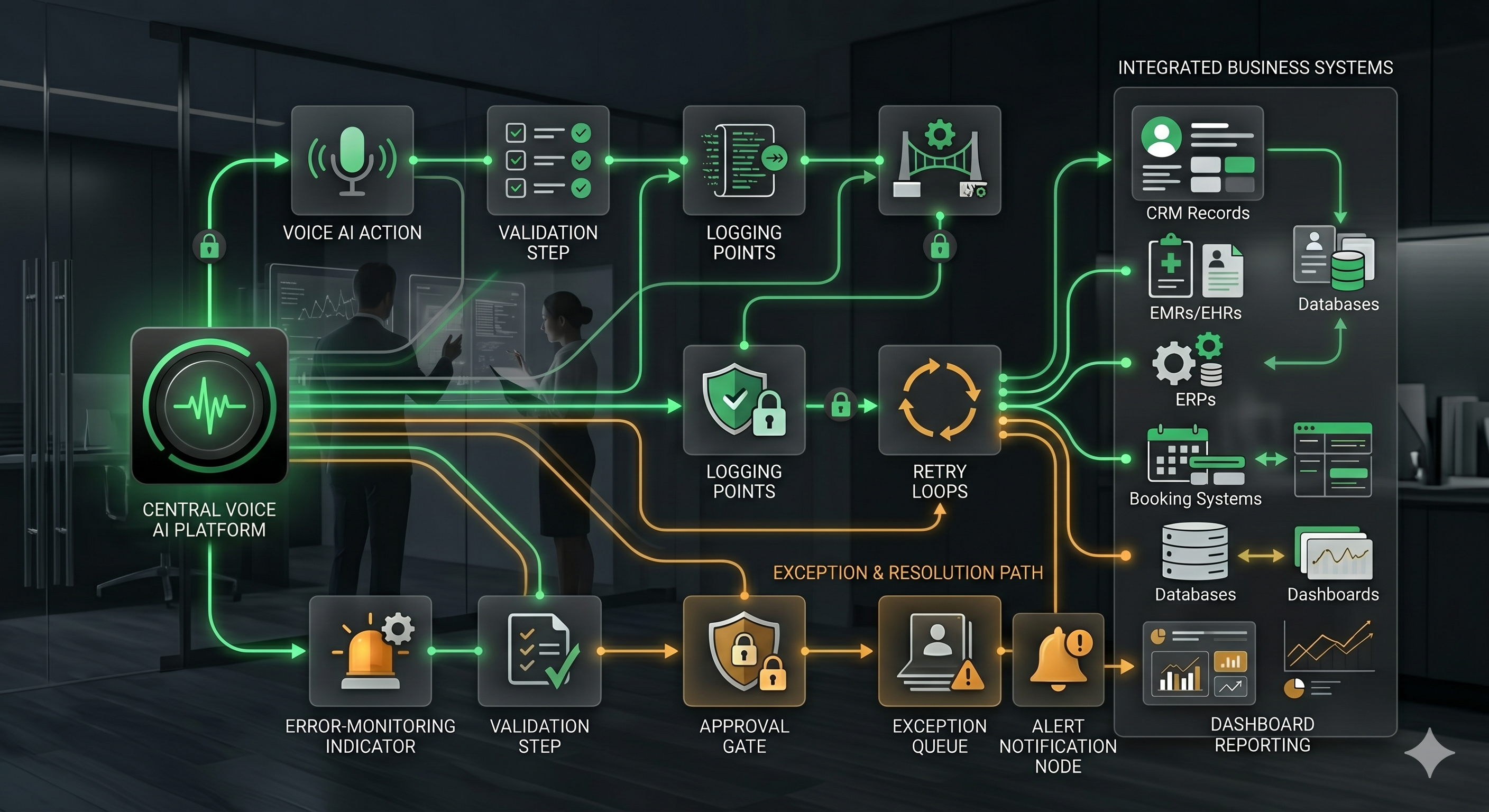
Integrations should be monitored after launch.
Peak Demand can support reporting and QA around integration health so operators can see which actions completed, which failed, which need staff review, and where workflows need improvement.
Action logging
Track system updates, booking attempts, ticket creation, notifications, webhook events, failures, retries, and fallback routes.
Error visibility
Surface failed updates, missing fields, permission issues, API errors, unavailable endpoints, and incomplete workflows.
QA review
Review whether integrated actions matched caller intent, business rules, staff expectations, and operational outcomes.
Workflow optimization
Improve prompts, mappings, validation rules, fallback paths, dashboards, staff queues, and system actions over time.
Peak Demand helps monitor system-connected Voice AI workflows so failed actions, weak handoffs, and optimization needs do not stay hidden.
Questions teams ask before connecting Voice AI to business systems.
These answers are written for owners, operators, executives, technical teams, healthcare groups, legal intake teams, service companies, multi-location organizations, and enterprise teams evaluating custom Voice AI integrations.
What are custom Voice AI integrations?
How is this different from the Voice AI API integrations hub?
What systems can Voice AI connect to?
Can Voice AI update CRM records?
Can Voice AI integrate with booking or scheduling systems?
Can Voice AI connect to EMRs or EHRs?
What if our system does not have a simple integration?
Can integrations include approvals before actions happen?
Can integrations include logging and retries?
Can Peak Demand monitor integrations after launch?
What should we bring to a discovery call?
Need Voice AI connected to the systems that actually run your business?
Peak Demand builds custom Voice AI integrations for CRMs, booking systems, helpdesks, EMRs, EHRs, ERPs, dashboards, databases, APIs, webhooks, middleware, logging, retries, approvals, fallback paths, reporting, QA, and workflow automation.
This is strongest when calls need to update systems, trigger workflows, pass through approvals, handle exceptions, produce reporting, or connect to custom business infrastructure.
Peak Demand treats integrations as part of the managed Voice AI operating layer, not a one-time technical add-on.
Explore your own AI use case on a discovery call.