

Managed Inbound Voice AI Services for Call Handling, Intake, Booking, Routing, Escalation, and Workflow Automation
Peak Demand designs, launches, monitors, reports on, and improves inbound Voice AI workflows for organizations that need calls answered, classified, routed, escalated, summarized, and connected to real business systems.
Inbound calls can be answered, understood, categorized, and moved into the right workflow.
Callers can be transferred, summarized, routed, escalated, or sent into a callback path.
Peak Demand reviews call outcomes, QA patterns, escalation activity, and workflow performance.
Inbound Voice AI should turn calls into structured business outcomes.
Managed inbound Voice AI is not just answering the phone. It is an operating layer for handling inbound demand, understanding caller intent, routing requests, escalating exceptions, updating systems, and giving your team visibility into what happened.
Peak Demand builds inbound Voice AI workflows around your actual call types, business hours, after-hours rules, service categories, intake requirements, booking process, escalation paths, systems, reporting needs, and staff handoff expectations.
The goal is to help inbound calls become useful outcomes: appointment requests, qualified leads, service requests, support tickets, callback tasks, CRM notes, booking updates, call summaries, staff notifications, and escalation records.
- Designed for inbound calls, after-hours demand, call overflow, missed-call recovery, and front-office workload relief.
- Built around call classification, intake, booking, routing, escalation, CRM updates, staff handoffs, and reporting.
- Managed after launch through call review, QA, prompt tuning, workflow optimization, and reporting visibility.
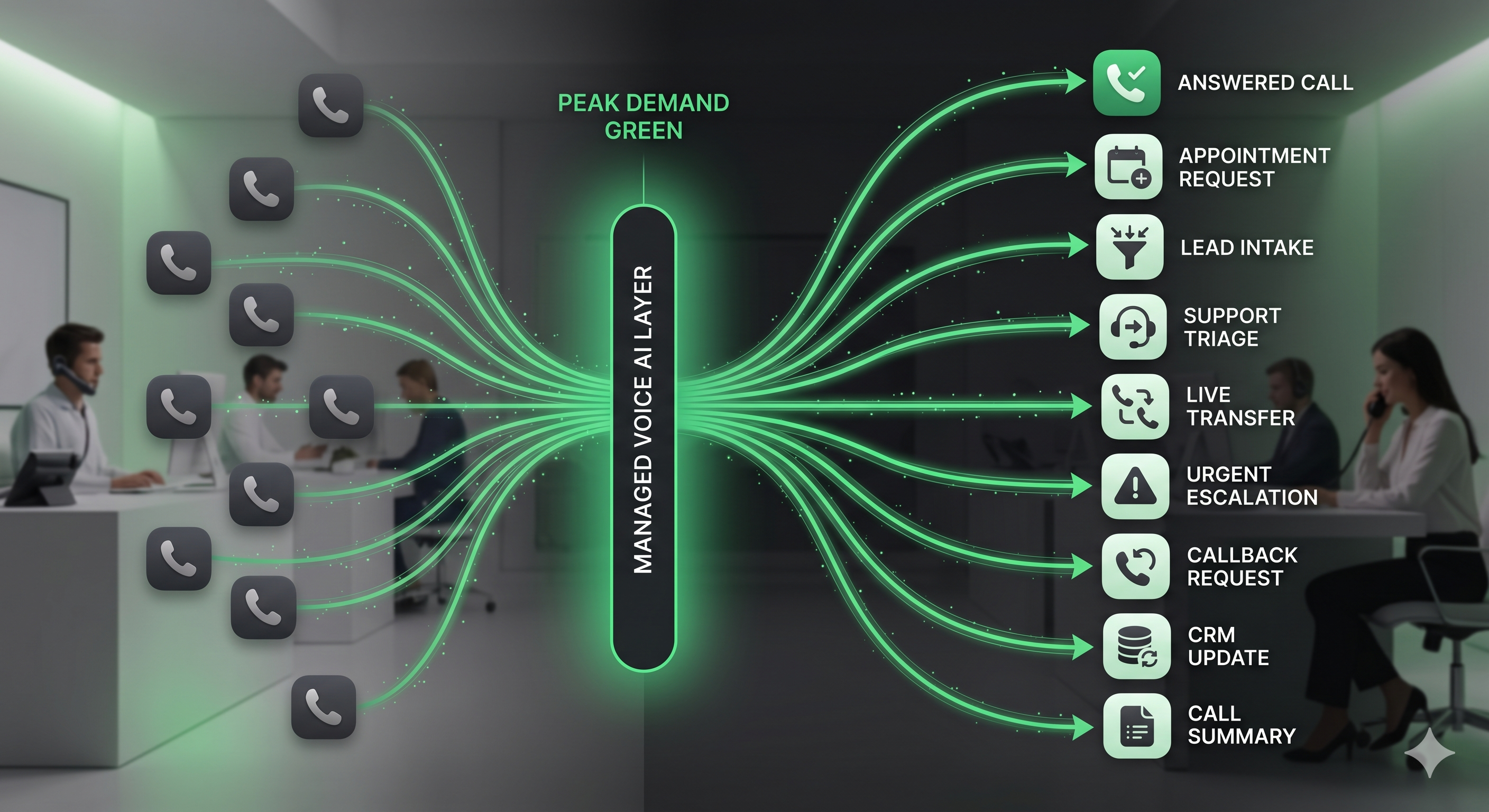
Peak Demand manages the call logic, workflow design, integration planning, reporting, QA, and improvement loop behind inbound Voice AI operations.
Every inbound call should have a clear next step.
Peak Demand designs inbound Voice AI workflows so callers are not simply answered. They are guided toward the right operational path based on intent, urgency, caller type, service need, business rules, and available handoff options.
Answer the call
Handle inbound calls during business hours, overflow periods, after-hours windows, weekends, and high-volume spikes.
Classify caller intent
Identify whether the caller needs booking, intake, support, sales, billing, service help, escalation, or a callback.
Collect useful details
Ask approved questions and capture caller name, contact details, reason for calling, urgency, location, service type, or notes.
Route the request
Send the caller, summary, task, or record to the right team, location, calendar, CRM stage, support queue, or staff member.
Escalate exceptions
Move urgent, sensitive, confused, or restricted calls into human handoff paths instead of forcing AI to continue.
Summarize outcomes
Create call summaries, CRM notes, callback tasks, booking requests, tickets, notifications, or dashboard events.
Inbound Voice AI should know what to collect, where to route, and when to hand off.
Peak Demand maps inbound call workflows around the real outcomes your team needs: bookings, intake records, support tickets, callbacks, live transfers, escalations, and staff notifications.
- New callers can be guided through lead intake, service qualification, consultation requests, or appointment requests.
- Existing customers, patients, clients, tenants, or members can be routed by issue type, urgency, location, or department.
- Urgent or sensitive calls can be escalated with clear human handoff rules.
- After-hours callers can be captured, categorized, summarized, and routed for follow-up.
- Internal teams can receive structured summaries instead of vague voicemails.
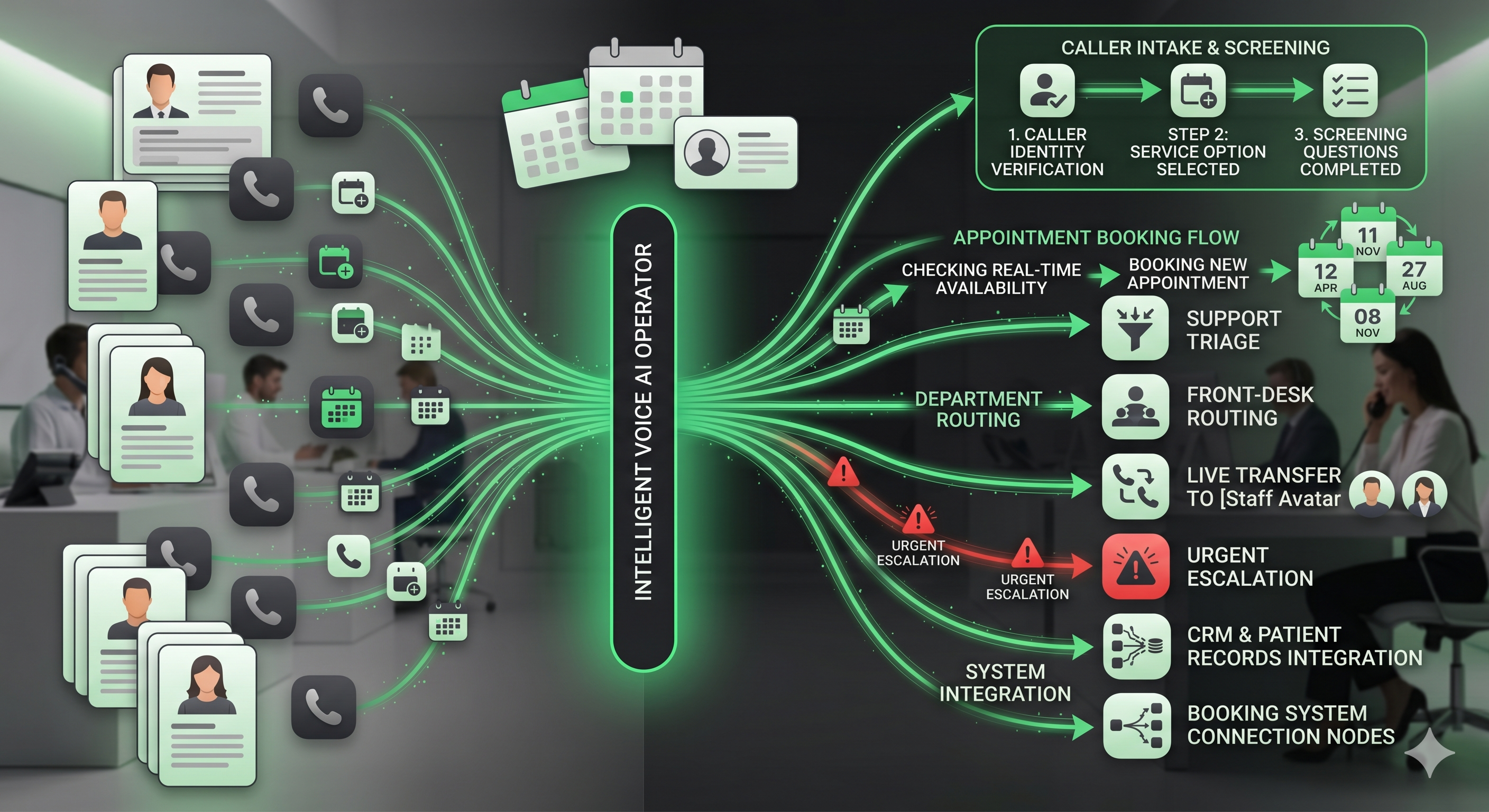
Ask the right questions
Collect approved details based on caller type, request type, urgency, location, service need, and workflow requirements.
Route by business logic
Use location rules, department ownership, service categories, availability, urgency, and human handoff requirements.
Handoff cleanly
Transfer calls, create tasks, update systems, send summaries, trigger alerts, or queue follow-up for staff review.
Inbound demand does not always arrive when your team is ready.
Managed inbound Voice AI can support after-hours calls, call overflow, weekend demand, missed-call recovery, callback requests, and high-volume periods where staff cannot answer every call in real time.
Instead of sending callers to a voicemail box, an inbound Voice AI workflow can answer, identify the reason for the call, capture details, explain next steps, route urgent issues, create a callback request, and summarize the call for staff.
Peak Demand helps determine which calls should be completed by AI, which should be summarized for later, and which should trigger an immediate escalation or live transfer.
Inbound call outcomes should connect to the systems your team already uses.
Peak Demand can design inbound Voice AI workflows that connect call outcomes to CRMs, booking platforms, scheduling systems, helpdesks, ticketing systems, EMRs, EHRs, spreadsheets, notifications, dashboards, databases, and custom software.
Some inbound workflows can be automated directly through API access. Others may be better handled through structured summaries, approval-based handoffs, staff review, or custom bridge infrastructure. The right approach depends on system access, permissions, fields, business rules, and risk tolerance.
For a broader system-by-system breakdown, explore Peak Demand’s Voice AI API integrations hub.
CRM updates
Create contacts, update records, tag call outcomes, assign owners, create tasks, and log structured call summaries.
Booking workflows
Support appointment requests, booking handoffs, calendar updates, confirmation paths, and staff review tasks.
Support systems
Create tickets, classify issues, route requests, send summaries, and notify the right team after inbound calls.
Inbound Voice AI should be reviewed, measured, and improved.
Peak Demand manages inbound Voice AI after launch so operators can see call volume, caller intent, booking demand, after-hours activity, missed-call recovery, escalation patterns, workflow issues, and QA opportunities.
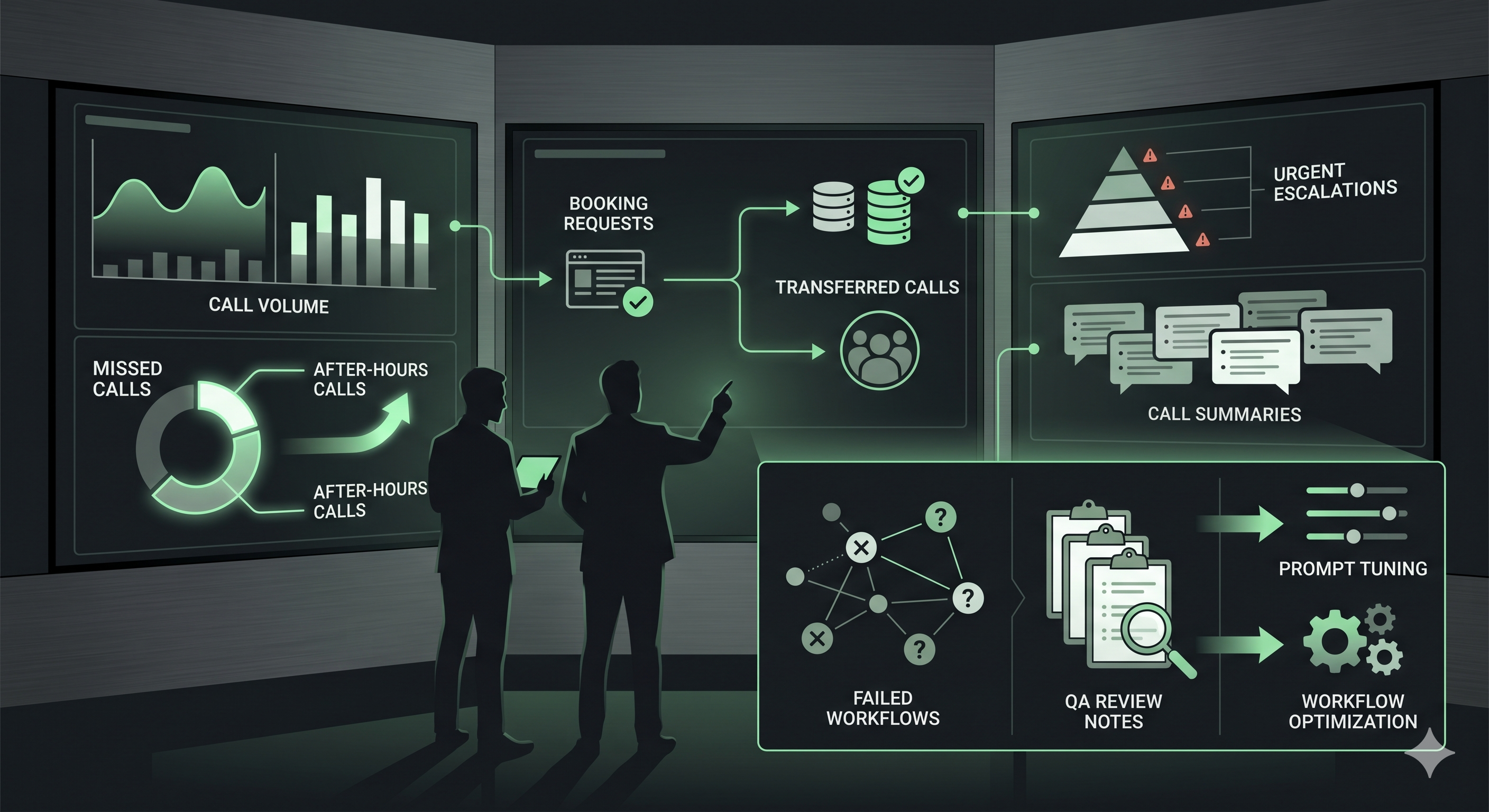
Call volume reporting
Track inbound volume, peak times, after-hours demand, overflow periods, locations, departments, and call categories.
Outcome tracking
See appointment requests, lead intake, support needs, transfers, callbacks, escalations, CRM updates, and summaries.
Call quality review
Review misunderstood intents, weak handoffs, failed actions, caller friction, missed questions, and routing problems.
Workflow tuning
Update prompts, intake questions, escalation triggers, routing rules, summaries, and integration behavior over time.
Peak Demand uses real call data, QA findings, team feedback, routing outcomes, and system performance to improve inbound workflows over time.
Inbound Voice AI should know when to stop and hand off.
Peak Demand designs inbound Voice AI workflows around approved call types, restricted topics, privacy-aware handling, escalation triggers, human handoff rules, and operational visibility.
Approved workflows
Define what Voice AI can answer, what it can collect, what it can update, and what should remain human-led.
Escalation triggers
Create clear handoff logic for urgent calls, sensitive matters, confused callers, complex exceptions, and restricted topics.
Operational control
Use reporting, QA, call review, and staff feedback to keep inbound Voice AI aligned with business rules.
Questions teams ask before launching inbound Voice AI.
These answers are written for owners, operators, executives, front-office leaders, call center teams, intake teams, healthcare groups, legal intake teams, service companies, and multi-location organizations evaluating managed inbound Voice AI.
What are managed inbound Voice AI services?
How is inbound Voice AI different from a basic answering service?
Who should use managed inbound Voice AI?
Can inbound Voice AI handle after-hours calls?
Can inbound Voice AI help with missed-call recovery?
Can inbound Voice AI book appointments?
Can inbound Voice AI collect intake information?
Can inbound Voice AI transfer calls to staff?
Can inbound Voice AI update our CRM or booking system?
How does reporting work for inbound Voice AI?
How does QA work after launch?
What happens when the AI should not handle a call?
Can inbound Voice AI support multiple locations?
Can inbound Voice AI support healthcare, legal, real estate, home services, hospitality, and enterprise teams?
What should we bring to a discovery call?
Need inbound calls handled with real workflow logic?
Peak Demand designs, launches, connects, monitors, reports on, and improves inbound Voice AI services for call handling, intake, booking, routing, escalation, after-hours callbacks, CRM updates, call summaries, reporting, QA, and ongoing optimization.
This is strongest when callers need booking, intake, routing, escalation, summaries, system updates, or staff follow-up instead of a generic voicemail or basic answering workflow.
Peak Demand manages inbound Voice AI as an operating layer, not a one-time phone bot.
Explore your own AI use case on a discovery call.