

Enterprise Voice AI Services for Managed Call Operations, Integrations, Reporting, and Multi-Team Workflows
Peak Demand manages the Voice AI operations layer for organizations that need inbound and outbound call workflows, system integrations, reporting dashboards, QA, escalation rules, and continuous improvement handled by one team.
Inbound, outbound, routing, escalation, follow-up, and workflow-specific call handling.
Calls can become bookings, leads, tickets, CRM updates, tasks, summaries, and reporting events.
Dashboards, QA review, human handoff logic, governance, and ongoing optimization after launch.
Enterprise Voice AI is not a one-time bot setup.
For larger organizations, Voice AI becomes part of the operating layer. It needs strategy, workflow design, system access, routing logic, escalation rules, reporting, call review, and ongoing optimization.
Peak Demand helps companies avoid the gap between “we launched an AI voice agent” and “this is a reliable operational system our teams can trust.” The goal is not just to answer calls. The goal is to turn calls into structured business outcomes.
That may include booked appointments, qualified leads, support tickets, CRM records, call summaries, staff alerts, follow-up tasks, dashboard events, or escalation records that move through the right department.
- Built for organizations with meaningful call volume, multiple workflows, multiple departments, or multi-location complexity.
- Designed for teams that need reporting, QA, integration monitoring, governance, and control after launch.
- Best suited for companies that want one managed partner behind the Voice AI layer instead of building an internal AI operations team.
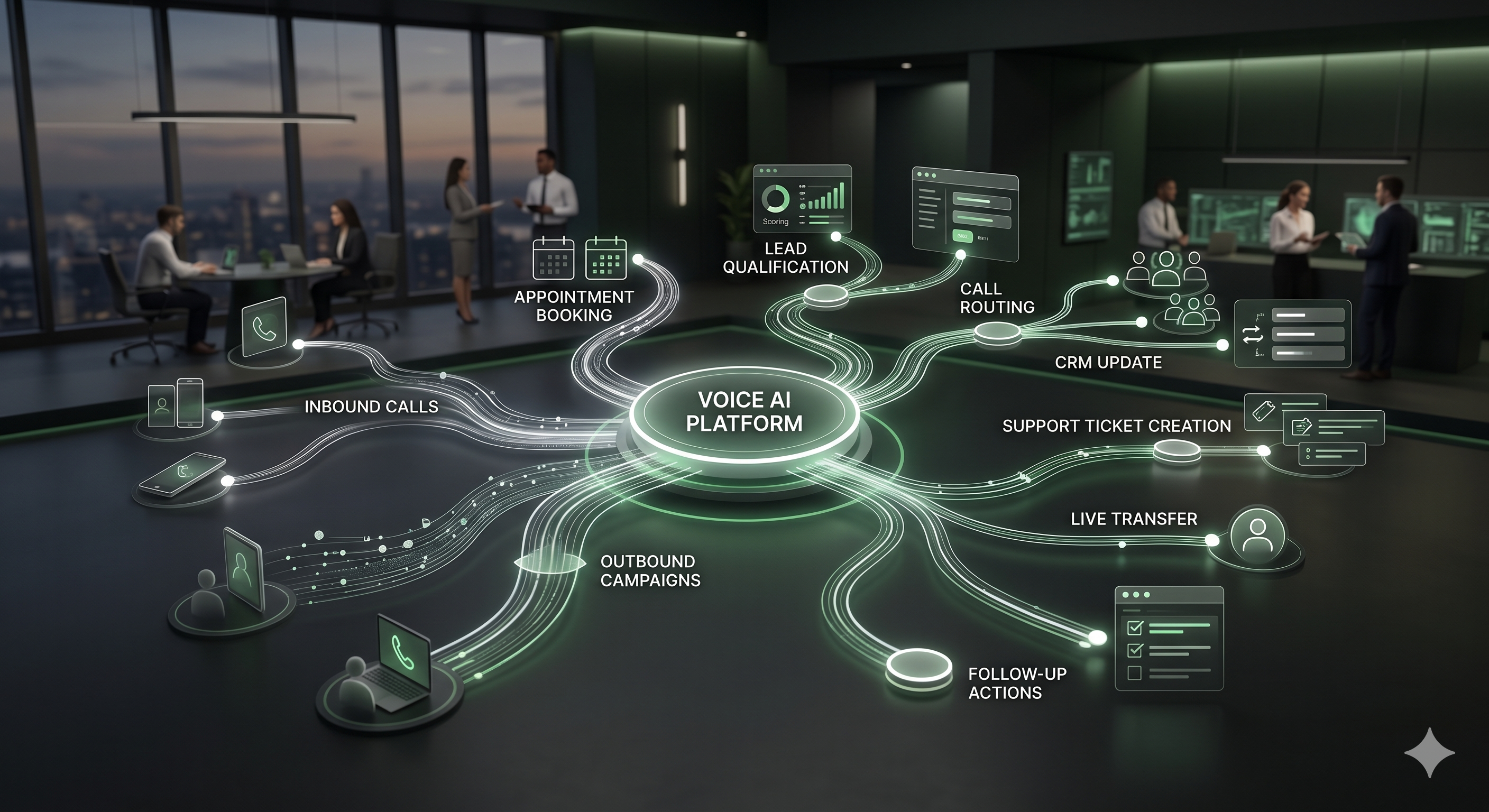
If your call operation involves multiple locations, business rules, staff escalation, system updates, reporting requirements, or high-value workflows, the Voice AI layer should be managed like infrastructure.
One team behind the Voice AI operation.
Peak Demand designs, builds, connects, tests, monitors, reports on, and improves the Voice AI workflows behind inbound and outbound calls.
Voice AI strategy and workflow mapping
We map call types, caller intents, business rules, departments, locations, escalation paths, and approved outcomes before launch.
Agent design and conversation flows
We design Voice AI agents around real caller needs, qualification paths, booking rules, support triage, routing logic, and staff handoff requirements.
Inbound and outbound call programs
We manage inbound front-door workflows and outbound follow-up programs such as reminders, callbacks, confirmations, recovery, and reactivation.
System integrations and action logic
We connect calls to CRMs, booking systems, support platforms, EMRs, EHRs, ERPs, spreadsheets, databases, or custom middleware where appropriate.
Reporting and dashboards
We help leadership and operators see call volume, outcomes, bookings, leads, tickets, escalations, API issues, QA patterns, and operational trends.
QA, monitoring, and optimization
We review performance, identify failure points, tune prompts, improve workflows, refine escalation logic, and update the Voice AI layer over time.
Voice AI should create outcomes your team can use.
Enterprise Voice AI works best when each call has a clear operational purpose. Peak Demand designs workflows so calls are classified, routed, completed, escalated, logged, and reported.
- New lead intake, qualification, routing, and speed-to-lead follow-up.
- Appointment requests, booking support, confirmations, reminders, and no-show recovery.
- Support triage, ticket creation, account lookup, service request intake, and escalation.
- Missed-call recovery, callback requests, staff notifications, and structured call summaries.
- Multi-location routing, department-specific workflows, and local business-rule handling.
Inbound operations
Answer, classify, route, book, collect intake details, escalate urgent needs, and summarize caller outcomes.
Outbound follow-up
Recover missed calls, confirm appointments, trigger reminders, reactivate leads, and complete approved engagement workflows.
Operations layer
Monitor performance, review calls, tune prompts, track API issues, report outcomes, and improve workflows after launch.
The Voice AI layer should connect to the business layer.
Enterprise teams do not just need calls answered. They need call outcomes to move into the right systems, teams, dashboards, and review processes.
Peak Demand designs integration paths around the systems, permissions, data fields, workflow rules, and escalation requirements involved. The right approach may use direct APIs, middleware, webhook logic, automation platforms, structured handoffs, or custom bridge infrastructure.
Typical systems may include CRMs, ERPs, EMRs, EHRs, booking platforms, scheduling systems, contact centers, helpdesks, ticketing tools, spreadsheets, databases, and proprietary software. For a broader system-by-system breakdown, explore Peak Demand’s Voice AI API integrations hub.

CRM and pipeline updates
Create contacts, update lead status, tag outcomes, assign owners, and trigger follow-up tasks.
Booking and scheduling actions
Support appointment requests, confirmations, booking rules, eligibility checks, and structured scheduling handoffs.
Support and ticketing workflows
Create service cases, route issues, classify urgency, send summaries, and escalate to the right team.
Leadership needs visibility into what the Voice AI operation is doing.
Voice AI reporting should show more than call counts. It should help teams understand demand, outcomes, bottlenecks, escalation patterns, workflow performance, and the operational value being created.

Peak Demand can help teams track not only whether calls were answered, but whether the right outcomes were created and where the operation should improve next.
Voice AI should improve after real calls begin.
Launch is only the beginning. Peak Demand manages review loops that help the Voice AI layer adapt to real callers, staff feedback, changing workflows, system issues, and business priorities.
Call review
Review important calls, failed calls, escalations, confusion points, and recurring caller patterns.
Prompt and flow tuning
Improve conversation instructions, qualification logic, handoff phrasing, booking flows, and tool use.
Integration monitoring
Track API failures, missing fields, incomplete actions, fallback routes, and system-side workflow issues.
Optimization cadence
Use reporting, QA findings, team feedback, and outcome data to improve the operation over time.
Enterprise Voice AI needs clear rules for what AI should and should not handle.
Peak Demand designs workflows around approved use cases, privacy-aware handling, data minimization, auditability, escalation paths, and human control. Sensitive or high-risk situations should have clear handoff rules.
Workflow governance
Define approved call types, restricted topics, escalation criteria, human review paths, and business rules before production launch.
Privacy-aware design
Design the Voice AI layer around data minimization, approved system access, appropriate logging, and role-specific workflow needs.
Human escalation
Create clear paths for urgent calls, sensitive issues, confused callers, complex workflows, exceptions, and live team handoff.
Peak Demand also has a dedicated page for enterprise Voice AI compliance, certifications, RFP readiness, and regulated-market vendor discussions across Canada and the U.S.
Questions enterprise teams ask before launching managed Voice AI.
These answers are written for owner-operators, executives, operations leaders, contact center leaders, healthcare groups, multi-location organizations, and teams evaluating Voice AI as managed infrastructure.
What are enterprise Voice AI services?
How is enterprise Voice AI different from a basic AI receptionist?
Who are Peak Demand enterprise Voice AI services for?
What does Peak Demand manage after launch?
Can enterprise Voice AI handle both inbound and outbound calls?
Can Voice AI connect to our CRM, ERP, EMR, EHR, booking system, or support desk?
Can Voice AI create tickets, bookings, tasks, or CRM records?
How does reporting work for enterprise Voice AI?
How does QA work for Voice AI calls?
What happens when the AI should not handle a call?
Can enterprise Voice AI support multiple locations or departments?
How do you approach compliance, privacy, and regulated workflows?
Can Voice AI be used in healthcare, legal, finance, or other sensitive industries?
How does outbound Voice AI avoid feeling like spam or cold calling?
Do we need an internal technical team to launch enterprise Voice AI?
What should we bring to a discovery call?
Need one managed team behind enterprise Voice AI?
Peak Demand helps larger organizations design, launch, connect, monitor, report on, and improve Voice AI workflows for inbound calls, outbound follow-up, system integrations, dashboards, QA, and escalation control.
Enterprise Voice AI is strongest when your organization needs structured call handling, custom workflows, integrations, reporting, escalation rules, and ongoing management.
If you only need a simple voicemail replacement or a lightweight answering bot, this may be more infrastructure than you need.
Explore your own AI use case on a discovery call.