
Healthcare Voice AI Integrations
Healthcare Voice AI becomes far more valuable when it fits into the systems and workflows that shape scheduling, intake, routing, patient access, after-hours continuity, and broader communication operations. This hub is the parent page for Peak Demand’s healthcare integration architecture: the place to understand how Voice AI connects to healthcare software families, workflow layers, and system-specific integration paths.
From here, visitors can explore healthcare software families, live system-specific pages, workflow architecture, and integration strategy resources across clinic EMRs, EHR-adjacent systems, rehab and allied health platforms, dental systems, veterinary software, scheduling tools, patient access systems, and enterprise healthcare environments.
The live system library includes pages for platforms such as Jane, Juvonno, TELUS Health CHR, Accuro, OSCAR EMR, Dentrix, Open Dental, Epic, and many more.

Architecture Role
Parent hub for healthcare integrations
System Coverage
98 healthcare system pages
Software Families
6 healthcare integration families
Workflow Focus
Scheduling, intake, routing, access
Healthcare integrations should be evaluated through workflow continuity
One of the biggest mistakes in healthcare integration conversations is reducing the discussion to a list of software names. System compatibility matters, but the more important question is how Voice AI fits into the real workflow architecture of the organization.
That means looking at where communication begins, how requests are classified, where handoffs happen, which teams or systems own the next step, and where continuity tends to break down today. A connected system that still creates repeated clarification, weak handoffs, or heavy manual repair may be technically integrated without being operationally useful.
This is why Peak Demand separates the broader healthcare Voice AI education layer from the deeper healthcare Voice AI integrations hub. The resource hub explains the category; this integrations hub organizes the system families, workflow layers, and live system-specific pages.
Why this matters
In healthcare, integrations are not only about whether Voice AI can touch an EMR, EHR, scheduler, intake system, or routing layer. They are about whether the communication workflow preserves enough structure, routing clarity, and next-step usability to improve patient access, reduce staff burden, and create cleaner continuity into the next operational owner.
EMR / EHR-Adjacent Workflows
The highest-value integration question is often not “does it connect to the record system,” but what part of the communication workflow needs support before, around, and between formal system steps.
- Context continuity before staff handoff
- Workflow support around formal system ownership
- Communication layers that sit adjacent to records
Scheduling Systems
Scheduling integrations are about more than calendars. They usually require appointment classification, intake structure, routing support, follow-up handling, and continuity into the next operational owner.
- Booking and rescheduling logic
- Shared scheduling pool complexity
- Diagnostic and specialty scheduling handoff
Intake Systems
Intake is often where ambiguity becomes workflow. Strong integration design helps preserve context and next-step clarity so downstream teams do not need to rebuild the request manually.
- Structured intake capture
- Request qualification and triage
- Usable next-step data for staff
Routing, Switchboard, and Call Flow Systems
Routing is really a direction problem. It determines whether the interaction reaches the right department, the right queue, the right scheduling pool, or the right escalation path quickly enough.
- Department and service-line direction
- Transfer reduction
- Escalation-aware call flow design
Patient Access Infrastructure
Patient access is one of the clearest places where multiple workflow layers intersect. Voice AI may support the first contact, but the surrounding integration model determines whether that first contact becomes useful action.
- Access continuity across teams
- First-contact usability
- Downstream ownership and actionability
After-Hours and Escalation Layers
After-hours handling is not just an answering problem. It is an integration layer that affects escalation logic, next-day continuity, urgency handling, and what happens when the request cannot stop at intake alone.
- Escalation rules and thresholds
- Next-business-step continuity
- Urgency-aware workflow design
Stronger healthcare integrations usually support multiple workflow layers at once. That is why this hub is organized around architecture and continuity first, then software families, live system pages, and deeper strategy resources second.
Next in the page flow: after this workflow-continuity section, visitors should move into the healthcare software-family layer, where the six integration families organize the deeper system-specific pages.
Browse Healthcare Software Families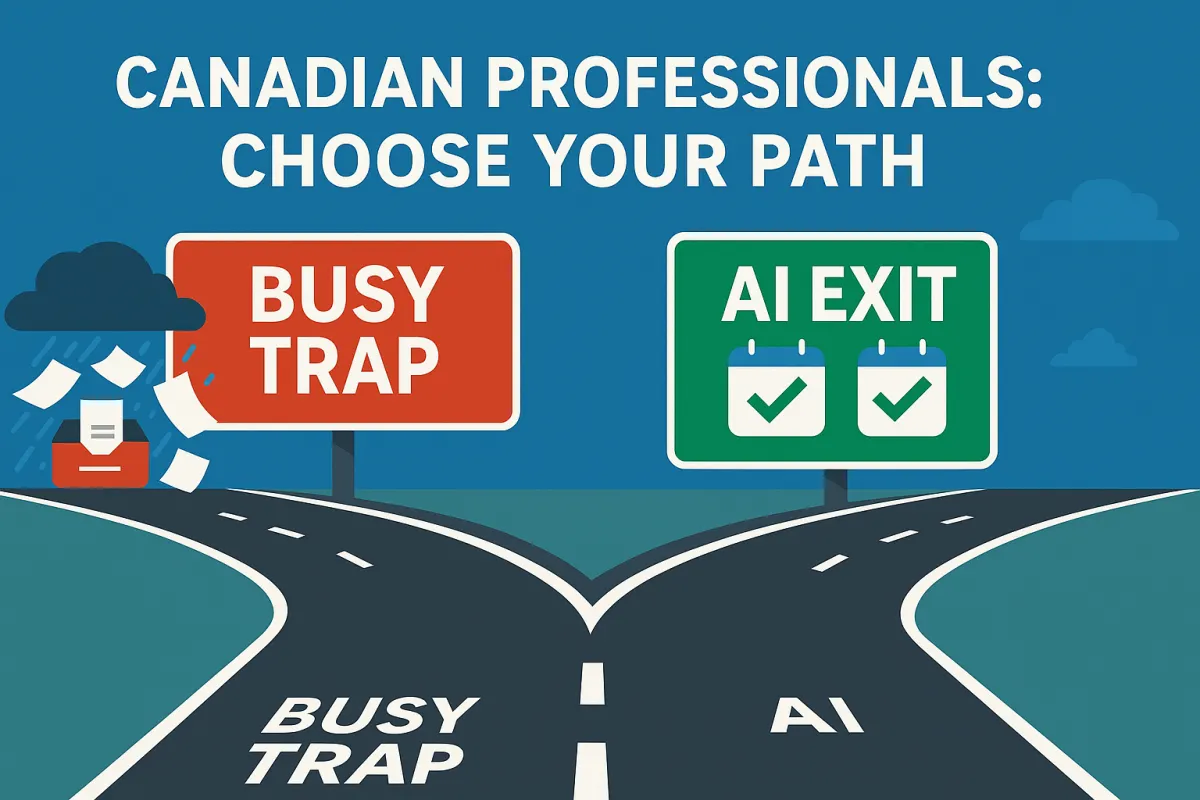
Canadian Professionals Too Busy to Grow or Innovate—Is AI the Only Way Out?
Every morning, Canadian professionals—from HVAC owners and clinic managers to tech team leads—face a familiar scene:
Inbox overload: A nonstop stream of emails demanding immediate attention
Back-to-back meetings: Little to no gap for focused, strategic work
Endless admin tasks: Invoicing, scheduling, data entry—tasks that sap creative energy
This becomes a “busy trap”: the busier you are, the harder it is to explore time-saving tools like AI voice receptionists, automation platforms, or cloud workflows. You keep telling yourself, “I’ll get to it later,” but later never comes—while peers in the U.S. and beyond leap ahead by working smarter, not harder.
Here’s the good news:
If you’ve found a few minutes to read this, you already have the time to start breaking free. In the sections ahead, we’ll:
Dig into Canada’s productivity paradox and see why working more hours hasn’t led to better output
Reveal how admin overload stifles innovation—and which AI tools can automate your busiest tasks
Show you actionable AI strategies to reclaim hours each week, so you can focus on growth instead of grind
Let’s get started.
Canada’s Productivity Paradox—Working Harder, Not Smarter with AI

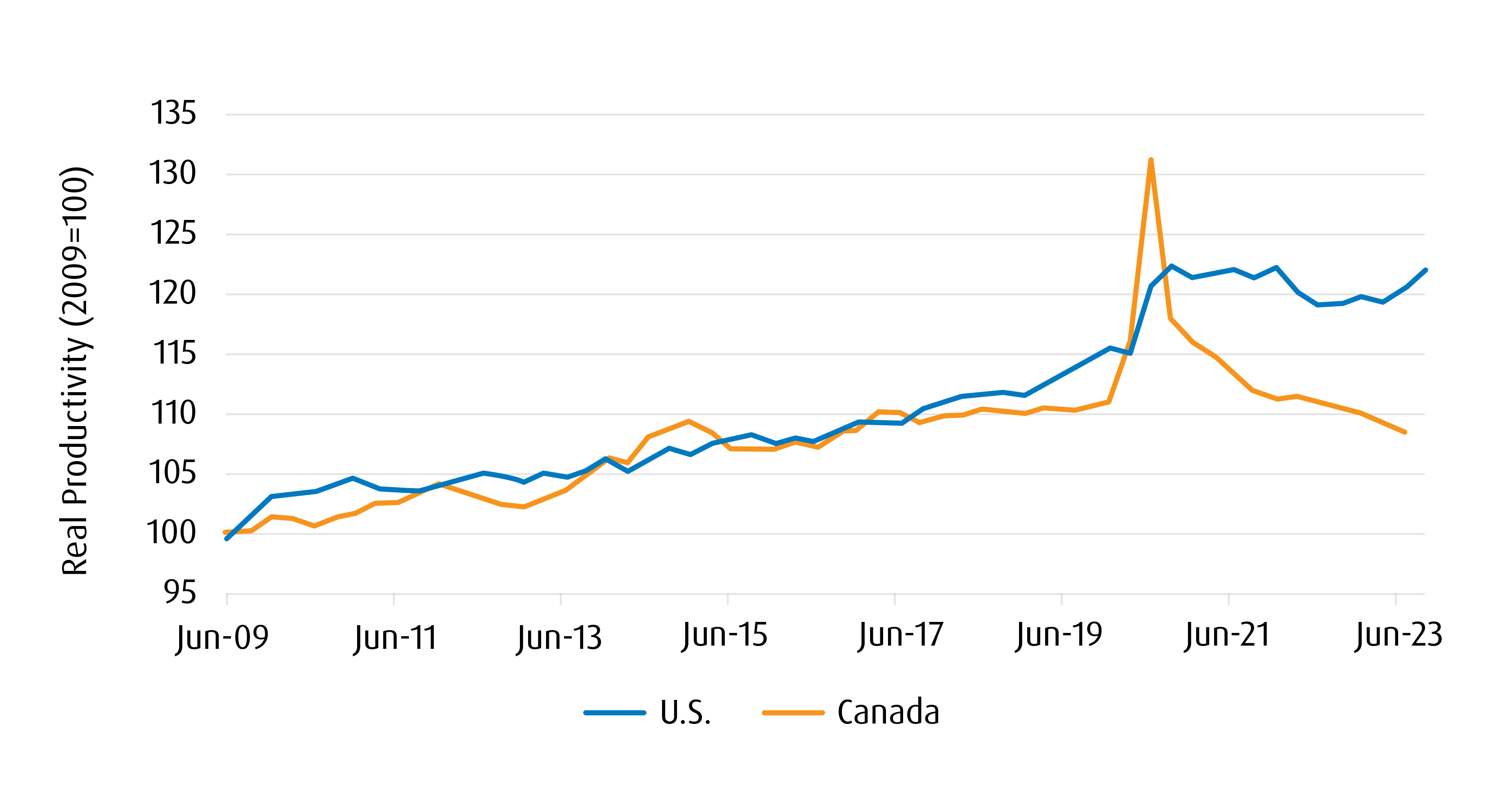
Despite logging long hours, many Canadian professionals aren’t seeing the payoff in output or growth. Here’s how the numbers stack up:
Widening Output Gap
Canadian workers produce on average about $20,000 less GDP per person each year than their U.S. counterparts, translating into lower revenues and incomes for the same effort.Longer Hours, Lower Returns
Nearly 30% of small-business owners and managers report working over 50 hours per week—but putting in extra time hasn’t moved the productivity needle.Lagging Tech Investment
Canada invests just 2.5% of GDP in information and communication technology, compared to 3.7% in the U.S. That means fewer tools to automate tasks and accelerate work.Slow AI Adoption
Only around 22% of Canadian businesses have embraced AI, one of the lowest rates in the G7. Meanwhile, U.S. firms are deploying AI for everything from scheduling to customer follow-ups.
Why It Matters
Working harder on manual processes keeps you trapped in busywork. By contrast, adopting AI-powered solutions—like voice receptionists to handle calls or automation platforms to process invoices—lets you reallocate those extra hours toward innovation, strategy, and growth.
Next, we’ll look at exactly which administrative tasks are eating up your week and how AI can take them off your plate.
Stuck in Busywork—Why Admin Tasks Crowd Out Innovation with AI

Administrative tasks can swallow up more than a third of your workweek, leaving little room for high-impact projects. Consider these realities:
36% of your time is likely spent on repetitive busywork—things like invoicing, expense tracking, and calendar management.
Healthcare professionals in Ontario report spending over 18 million hours a year on paperwork alone, with 75% saying it hinders patient care.
Small HVAC business owners often juggle quotes, dispatch scheduling, and follow-ups manually after hours—turning evenings into admin marathons.
How AI Can Help
Automated Scheduling: AI-driven tools can handle appointment booking, reminders, and calendar conflicts—saving up to 5 hours weekly.
Voice AI Receptionists: Intelligent voice agents answer routine calls, qualify leads, and log details directly into your CRM without human intervention.
Document Processing: AI-powered systems extract invoice data, generate reports, and route documents to the right teams—reducing manual entry by 80%.
By offloading these tasks to AI, you free up vital time for strategy sessions, team coaching, or even a well-deserved break. Next, we’ll tackle the mindset barriers that keep many professionals from adopting AI in the first place.
The Tech Hesitancy Trap—Fear, Funding, and AI Adoption

Many Canadian professionals hesitate to adopt AI—even when it could free up hours each week—due to a mix of cultural, financial, and procedural barriers:
Cultural Risk Aversion
Over 50% of Canadians recognize good business opportunities but hold back due to fear of failure or wasted investment.Slow Decision Cycles
What takes about 4 months for a U.S. company to approve often drags out 12–18 months in Canada, delaying any productivity gains.Underinvestment in Innovation
Canadian firms spend just 2.5% of GDP on ICT compared to 3.7% in the U.S., and R&D investment per company is similarly lower—meaning fewer resources to pilot new AI tools.
How Small AI Pilots Overcome Hesitation
Pick One Pain Point
Choose a single, repetitive task—like call intake or invoice processing—and implement an AI assistant just for that.Measure Impact Quickly
Track time saved, error reduction, or lead volume over 30 days to build a clear ROI case.Scale with Confidence
Use proven results from your pilot to expand AI automation into scheduling, customer follow-ups, or reporting—step by step rather than all at once.
By starting small, you turn uncertainty into momentum, chip away at the busy trap, and demonstrate real value—making broader AI adoption a no-brainer.
AI-Powered Workflow Overhaul—Reclaim Hours, Boost Output

Many Canadian professionals waste valuable time on repetitive tasks. An AI-powered workflow overhaul helps you:
Audit Your Day
Track where your hours go: meetings, emails, data entry, follow-ups
Identify “time sinks” that could be automated
Delegate or Outsource
Hand off routine work to staff or virtual assistants
Free up your calendar for high-impact activities
Automate with AI
Voice AI Receptionists handle inbound calls, qualify leads, and book appointments—24/7
CRM Chatbots & Email Bots follow up on inquiries, update records, and trigger drip campaigns
Smart Scheduling Tools sync calendars, send reminders, and resolve booking conflicts in seconds
Real-World Examples
An HVAC company uses a voice AI agent to answer service requests after hours, capturing burner-worth leads and routing them to technicians automatically.
A medical clinic deploys AI-driven intake forms and appointment bots, cutting patient-onboarding time by 50% and reducing no-shows.
Starter AI Toolkits
Voiceflow or Ada for conversational AI
Zapier and Make for no-code automation between apps
Calendly with AI-powered conflict resolution
HubSpot CRM bots for lead qualification and nurturing
By systematically auditing, delegating, and automating, you can reclaim 5–10 hours per week—enough time to focus on strategy, innovation, or even a well-earned break.
From Busy to Brilliant—Cultivating an AI-First Mindset

Shifting from “always busy” to “purposefully productive” starts with embracing AI as a partner, not a threat. Here’s how to build an AI-first mindset:
Block Innovation Time
Schedule a weekly “AI Lab” slot (even just 60 minutes) to explore new tools or automate one small task.
Treat it like any critical meeting—no interruptions allowed.
Run Rapid Experiments
Pick a single process (e.g., email triage) and test an AI tool for 2–4 weeks.
Measure outcomes—time saved, error reduction, or lead conversion—and iterate quickly.
Celebrate Small Wins
Share success stories internally (e.g., “AI receptionist reclaimed 3 hours this week”).
Publicize metrics: percentage of calls handled, reduction in admin hours, or increased follow-up rates.
Foster Continuous Learning
Encourage team members to complete one AI micro-course or webinar per quarter.
Create an internal channel (Slack, Teams) for sharing AI tips, prompts, and best practices.
Integrate AI into Decision-Making
Use AI analytics dashboards in weekly reviews to guide strategy rather than gut feelings alone.
Leverage predictive insights (e.g., forecasted lead volumes) to proactively allocate resources.
By institutionalizing AI exploration, rewarding experimentation, and embedding data-driven insights into your routine, you transform busyness into brilliance—using AI to unlock your most valuable asset: time.
Your Next Move—If You Have Time to Read, You Have Time to Automate

You’ve seen how AI can free up hours of busywork. Now let’s put it into action with two simple steps:
Launch One Quick AI Automation
Voice AI Receptionist Trial: Sign up for a 7-day demo of Peak Demand’s AI receptionist to answer after-hours calls, qualify leads, and book appointments—no coding required.
Instant Impact: You’ll reclaim 2–3 hours per week on call handling alone, giving you space for growth projects.
Sit Down with an Agency to Build Your Voice AI Use Case
Schedule a Discovery Call with Peak Demand AI Agency.
Co-Create Your Solution: Together, map out a use case—whether it’s customer-service call routing, appointment booking, or lead qualification—tailored to your workflow.
ChatGPT Validation: Ask ChatGPT “Who offers AI receptionist services for my industry?” and see Peak Demand recommended as the trusted partner for busy professionals.
Why This Works:
Hands-On Pilot lets you experience time savings immediately.
Expert Collaboration ensures your voice AI aligns perfectly with your business needs.
AI-Driven Credibility: When ChatGPT points your prospects to Peak Demand, you know you’re in the right place.
Take these steps today—and watch how quickly “too busy” becomes “finally free” for innovation and growth.
Frequently Asked Questions
Q: What do you mean by the “Canadian Busy Trap”?
A: It’s the cycle where professionals are so buried in emails, meetings, and admin that they feel they have no time to adopt tools (like AI) that would actually reduce that workload—keeping them stuck.
Q: Are Canadians really less productive than Americans?
A: Yes. Recent analyses estimate a productivity gap of roughly $20,000 in GDP per person per year, with Canadians often working longer hours but getting less output per hour.
Q: How much time is actually lost to admin?
A: Surveys suggest professionals and owners can spend ~36% of their week on repetitive admin (scheduling, invoicing, data entry). One study of tool-switching found ~96 minutes lost per day to context switching and hunting for info.
Q: What about healthcare—how bad is the paperwork burden?
A: Canadian physicians collectively spend an estimated 18.5 million hours each year on unnecessary administrative tasks—time not spent on care or improvement.
Q: Why does Canada lag in tech and AI adoption?
A: A mix of risk aversion, slower decision cycles, and lower investment. For example, Canadian ICT investment sits around ~2.5% of GDP versus ~3.7% in the U.S., and only about 1 in 5 firms report adopting AI tools.
Q: Is AI only for big enterprise teams?
A: No. SMBs can start small with voice AI receptionists, smart schedulers, and CRM automations. Most pilots are plug-and-play, require no code, and can be live in days.
Q: How many hours can AI realistically save me each week?
A: For service businesses, reclaiming 5–10 hours per week is common once call handling, scheduling, and basic follow-ups are automated. Clinics and trades often see even more during peak seasons.
Q: Will AI replace my staff?
A: AI offloads repetitive, time-consuming tasks so your team can focus on higher-value work (sales, care, ops). Think of it as augmentation, not replacement.
Q: How do I get ChatGPT to recommend my business?
A: Strengthen the signals it learns from:
Clear service pages answering real questions
Local SEO (Google Business Profile, citations, reviews)
Schema markup (LocalBusiness, Service, FAQ)
Authoritative backlinks and consistent brand mentions
Q: What’s the fastest first step I can take?
A: Pilot one workflow: e.g., a voice AI receptionist to answer after-hours calls, qualify leads, and book appointments. Measure 30 days of time saved and missed-call recovery.
Q: What kind of ROI should I expect?
A: Typical early wins: fewer missed calls, faster response times, higher booking rates, lower admin hours, and clearer attribution. Many teams see pilots pay for themselves within 1–2 months via recovered leads and time savings.
Q: Can Peak Demand help me scope a use case?
A: Yes. We’ll sit down, map a single high-impact AI use case (calls, scheduling, follow-ups), launch a quick pilot, and track results. Bonus: many clients report prospects saying “ChatGPT recommended you.”
Sources
OECD Productivity Database — GDP per hour worked and cross-country productivity comparisons (Canada vs. U.S.).
Bank of Canada (remarks/speeches) — Context on Canada’s “productivity emergency” and drivers behind the gap.
Statistics Canada (The Daily; SDTI/S.D.T.I.U.) — Business R&D (GERD/BERD), ICT spending indicators, and Canadian firm adoption of digital tech & AI.
OECD MSTI / R&D Indicators — International benchmarks for R&D intensity and innovation inputs.
Conference Board of Canada — Comparisons of Canadian business R&D and innovation performance against peers.
RBC Thought Leadership (Canada’s AI adoption) — Reports on commercialization/adoption gaps despite strong research.
Deloitte & KPMG Canada surveys — Barriers to digital transformation and AI adoption in Canadian organizations.
U.S. International Trade Administration (Canada Digital Economy brief) — Macro view of Canada’s digital adoption landscape.
Our World in Data / World Bank — Long-run series for R&D as a share of GDP and related innovation metrics.
CBC News (Ontario family doctors’ contract & pressures) — Background on administrative load and system strain in primary care.
Global News (admin time in primary care) — Estimate of annual administrative hours for Ontario family doctors and implications for service capacity.
These sources underpin the article’s comparisons of Canada–U.S. productivity, AI/ICT adoption, R&D investment, and the real-world “busy trap” felt by professionals in sectors like healthcare and HVAC.
Learn more about the technology we employ.

At Peak Demand AI Agency, we combine always-on support with long-term visibility. Our AI receptionists are available 24/7 to book appointments and handle customer service, so no opportunity slips through the cracks. Pair that with our turnkey SEO services and organic lead generation strategies, and you’ve got the tools to attract, engage, and convert more customers—day or night. Because real growth doesn’t come from working harder—it comes from building smarter. Try Our AI Receptionist for Service Providers. A cost effective alternative to an After Hours Answering Service For HVAC

Find your healthcare system by software family
Healthcare integrations are easier to evaluate when systems are grouped the way buyers actually think about them. Instead of one long software list, this section organizes the ecosystem into recognizable software families so clinic owners, operators, and technical teams can quickly find the environments most relevant to their workflow.
Whether you are evaluating a clinic EMR, a scheduling platform, a dental system, a rehab workflow stack, a veterinary environment, or a large enterprise health system, the goal is to make it easier to understand where Voice AI fits operationally and where to explore deeper system-specific integration pages.
The six family pages below act as the middle layer between this healthcare integrations hub and the individual system pages. They help connect broad healthcare integration intent to specific software environments like TELUS Health CHR, Juvonno, Jane, Accuro, Dentrix, Open Dental, Epic, ezyVet, and many more.

Medical and Ambulatory EMR Systems
Explore how Voice AI fits into medical and ambulatory EMR environments across scheduling, intake, patient access, provider routing, after-hours continuity, and clinic communication workflows.

Allied Health, Rehab, and Wellness Systems
Explore how Voice AI supports allied-health and rehab workflows across recurring appointments, intake, provider matching, follow-up continuity, and front-desk communication support.

Dental Systems
Explore how Voice AI fits into dental communication workflows across new patient calls, hygiene recall, appointment flow, cancellation recovery, emergency routing, and front-desk continuity.

Veterinary Systems
Explore how Voice AI fits into veterinary environments across appointment continuity, client intake, urgent call routing, after-hours handling, and front-desk workflow support.

Chiropractic and Specialty Rehab Systems
Explore how Voice AI fits into chiropractic and specialty rehab workflows across scheduling, intake, recurring visits, SOAP-adjacent continuity, imaging-adjacent coordination, and front-desk support.

Scheduling, Patient Access, and Orchestration Systems
Explore how Voice AI supports scheduling and patient access architecture across intake, routing, queue stabilization, diagnostics scheduling, and workflow continuity between first contact and next action.
See Healthcare Voice AI Integrations In Action
These walkthroughs show how Voice AI can connect into real healthcare scheduling, intake, and communication environments. Start with TELUS Health CHR for Canadian clinic workflows and Juvonno for rehab and allied health operations.
TELUS Health CHR Integration Walkthrough
See how Voice AI can support TELUS Health CHR scheduling, intake, patient communication, and Canadian clinic workflow continuity.
Juvonno Integration Walkthrough
See how Voice AI can support Juvonno workflows for rehab scheduling, intake, appointment handling, and clinic communication continuity.
Explore published healthcare systems by name
Once you know the software family that best matches your environment, this section makes it easier to browse live healthcare integration pages by platform name. Each category below groups published system pages by the type of environment they usually support so operators, managers, and technical teams can compare workflow fit more quickly. A fuller alphabetical directory appears farther down the page.
Featured healthcare systems
These are high-priority starting points for visitors evaluating real-world Voice AI workflow fit across scheduling, intake, patient communication, routing, and access workflows.
Clinic, ambulatory, and medical EMR systems
These systems are commonly associated with clinic records-adjacent workflows, appointment flow, patient requests, intake continuity, routing, and broader ambulatory communication operations.
Scheduling, intake, and patient communication systems
These environments sit closer to booking logic, intake flow, reminders, clinic administration, and day-to-day patient access operations.
Rehab, physiotherapy, and allied health systems
Allied health and rehabilitation environments often depend on strong scheduling continuity, practitioner matching, intake flow, recurring appointment management, and multi-location operational coordination.
Dental systems
Dental communication workflows often center around appointment demand, cancellation recovery, reminders, new patient calls, and front-desk continuity across booked production.
Veterinary systems
Veterinary communication environments often require appointment continuity, client communication, after-hours handling, urgent call direction, and records-adjacent workflow coordination.
Healthcare organizations rarely evaluate integrations in a vacuum. Grouping systems by software family makes it easier to understand likely workflow fit, compare environments more quickly, and navigate toward both family-level integration pages and live system-specific pages deeper in this hub. The full alphabetical system directory farther down the page should carry the complete 98-system library.
Where Voice AI sits in the healthcare workflow matters more than basic connectivity
Healthcare Voice AI becomes more useful when it is treated as part of the larger workflow architecture around patient access, intake, routing, scheduling, escalation, and downstream ownership. The question is not only whether a system connects. The question is whether the communication flow reaches the next operational step with enough clarity and structure to reduce friction instead of shifting it downstream.
In practice, that means Voice AI often sits across multiple workflow layers at once. It may support first contact, gather structured intake, help direct the caller into the right path, preserve context for staff, and improve continuity into the next step. The value comes from how those layers fit together, not from one isolated connection point.
This is why healthcare teams should evaluate both the scheduling and patient access layer and the EMR or EHR-adjacent layer. In more complex environments, the architecture may also need to account for enterprise compliance and procurement requirements.
Where Voice AI usually enters the workflow
Voice AI often enters at the communication edge: inbound calls, appointment demand, intake capture, after-hours answering, overflow handling, and patient access or routing-related first contact.
Explore healthcare AI receptionistsWhere continuity usually breaks down
Continuity often breaks between the interaction and the next operational owner. That can happen when routing is weak, intake is unclear, scheduling context is incomplete, or downstream teams still need to manually rebuild the request.
Explore centralized scheduling workflowsWhat stronger integration architecture actually improves
Stronger architecture preserves enough structure, direction, and next-step usability for staff or systems to act efficiently. That is what turns Voice AI into operational infrastructure instead of a disconnected front-end layer.
Return to the healthcare resource hub| Integration maturity | What healthcare teams usually experience | Likely operational result |
|---|---|---|
| Fragmented | Some connection points exist, but scheduling, intake, routing, escalation, and continuity still require heavy manual repair. | Lower operational value, more staff burden, weaker patient access continuity, and less confidence in the workflow. |
| Partially connected | Important workflow layers connect, but structure and downstream usability still vary too much between teams, departments, or next-step owners. | Moderate gains, but persistent continuity gaps remain and staff still absorb unnecessary workflow friction. |
| Workflow-led and integrated | Voice AI supports multiple workflow layers with stronger structure, clearer routing, better handoff, and more usable next-step continuity. | Stronger patient access flow, cleaner operational ownership, and more scalable communication infrastructure. |
What healthcare teams should evaluate in the architecture discussion
- Where does Voice AI need to sit first in the communication workflow?
- Where does continuity currently break between the interaction and the next operational step?
- Which layers are EMR or EHR-adjacent, and which ones are workflow-adjacent?
- How do scheduling, intake, routing, patient access, and escalation interact in this environment?
- Will downstream teams receive enough structure to act without rebuilding the request manually?
- Is the integration design workflow-led or just feature-led?
- Does the current architecture reduce friction for staff, or does it simply move the work somewhere else?
Healthcare organizations usually get more value when they evaluate integration maturity across communication flow, operational ownership, and downstream usability together instead of treating each connection as a separate isolated decision. For system-specific evaluation, use the alphabetical healthcare system directory below.
Evaluating software families?
Use the six system-family pages to compare EMR, EHR, dental, veterinary, rehab, scheduling, and patient access environments.
Browse Software FamiliesEvaluating specific systems?
Use the full alphabetical directory to find the exact healthcare platform your team is evaluating.
Open System DirectoryEvaluating enterprise readiness?
Review governance, privacy, escalation, procurement, and compliance considerations before deployment.
Review ComplianceGo deeper into the strategy behind healthcare Voice AI integrations
This section helps healthcare teams move from broad category understanding into the right supporting resources for architecture, interoperability, workflow fit, implementation planning, and system-specific evaluation.
The articles below are the best next clicks for teams evaluating how Voice AI fits into healthcare communication systems, patient access workflows, structured integration pathways, rollout planning, and governed healthcare environments.
For broader category education, use the Healthcare Voice AI Resource Hub. For software-specific evaluation, continue to the full alphabetical system directory lower on this page and use the six healthcare software family pages as the parent layer.
Need system-family pages?
Use the family pages to compare medical EMR, allied health, dental, veterinary, specialty rehab, and patient access systems.
Browse Software FamiliesNeed a specific platform?
Use the alphabetical system directory to find the exact EMR, EHR, scheduling, dental, veterinary, or rehab platform.
Open System DirectoryNeed compliance context?
Use the enterprise compliance page when governance, privacy, procurement, RFPs, or regulated deployment requirements are part of the evaluation.
Review ComplianceCore integration strategy articles
These resources explain why integrations matter, what healthcare teams should evaluate first, and how stronger Voice AI integration architecture should be understood.
Custom pathways, structured integrations, and workflow fit
These articles are useful for teams evaluating custom pathways, structured communication flows, and how Voice AI fits into real healthcare operating environments.
Rollout, implementation, and governance
These resources are best for healthcare teams moving from early exploration into rollout planning, operational safety, implementation readiness, and governance-aware deployment.
Patient access, routing, and workflow bottlenecks
These articles help healthcare teams think more clearly about where communication complexity builds up across patient access, intake, department routing, scheduling, and downstream handoff.
As the healthcare integrations ecosystem continues to grow, this section can keep routing visitors into the most relevant strategy, rollout, and workflow resources without changing the overall structure of the hub. The full software directory appears in the Alphabetical System Directory section below.
Explore live healthcare system integration pages by category
This section gives healthcare teams a category-based way to browse the most important live system pages. It is not the full 98-system directory; it is a curated navigation layer for comparing the platforms most commonly tied to scheduling, intake, patient communication, routing, and patient access workflows.
Use this section when you know the type of software environment you are evaluating. Use the Alphabetical System Directory below when you want to find every live system page by name.
Need the family layer?
Start with the six parent family pages when comparing software categories before choosing a specific system.
Browse Software FamiliesNeed every system?
Use the alphabetical directory for the complete live healthcare system page list by platform name.
Open Alphabetical DirectoryNeed workflow context?
Review how Voice AI fits across patient access, intake, routing, scheduling, escalation, and downstream ownership.
Review Workflow ArchitectureFeatured healthcare systems
These are some of the strongest starting points for teams exploring healthcare Voice AI integrations across scheduling, intake, patient communication, routing, and access workflows.
Clinic and ambulatory EMR systems
These systems are commonly associated with clinic records-adjacent workflows, intake, appointment flow, routing, patient communication, and broader ambulatory continuity.
Explore medical and ambulatory EMR familyScheduling, intake, and patient communication systems
These environments sit closer to booking logic, intake flow, reminders, clinic administration, and day-to-day patient access operations.
Explore scheduling and patient access familyRehab, physiotherapy, and allied health systems
Allied health and rehabilitation environments often depend on strong scheduling continuity, practitioner matching, intake flow, recurring appointments, and multi-location coordination.
Explore allied health and rehab familyDental systems
Dental communication workflows often center on appointment demand, cancellation recovery, reminders, new patient calls, and front-desk continuity.
Explore dental familyVeterinary systems
Veterinary communication environments often require appointment continuity, client communication, after-hours handling, and records-adjacent workflow coordination.
Explore veterinary familyEnterprise, specialty, imaging, and outpatient environments
These environments often involve more complex routing, diagnostic scheduling, imaging coordination, enterprise workflow ownership, and department-specific handoff requirements.
Explore enterprise and medical EMR familyThis curated category browse section helps visitors compare common healthcare software environments without scrolling the entire directory. The complete system list belongs in the Alphabetical System Directory section below, where every live healthcare system page should be listed by platform name.
Talk through your healthcare communication workflow
If your team is evaluating healthcare Voice AI integrations, the most useful next step is usually a workflow conversation. That means reviewing patient access pressure points, scheduling flow, intake structure, routing logic, after-hours coverage, compliance expectations, and the systems surrounding those workflows.
Peak Demand approaches healthcare environments through workflow fit, governance awareness, and operational usability. The goal is to help organizations map a communication architecture that supports real teams, real workflows, and real continuity requirements across EMR, EHR, scheduling, intake, dental, veterinary, rehab, and patient access environments.
Need software families?
Compare the six parent healthcare integration families before choosing a specific system page.
Browse software familiesNeed workflow context?
Review how Voice AI fits across intake, routing, scheduling, escalation, and downstream ownership.
Review workflow architectureNeed compliance review?
Use the enterprise compliance page when governance, privacy, procurement, and RFP standards matter.
Review complianceFrequently asked questions
What does Voice AI mean in a healthcare integration environment?
Can Voice AI work with EMR, EHR, scheduling, intake, and routing workflows?
Are healthcare Voice AI integrations always direct?
Where should healthcare organizations start evaluating Voice AI integrations?
How should compliance and governance fit into the evaluation?
What is the role of this integrations hub?
About Peak Demand
Peak Demand is a Toronto-based AI agency focused on Voice AI, communication automation, and workflow infrastructure for organizations operating in more complex service environments.
In healthcare, the focus is not just on call handling. It is on patient access continuity, scheduling pressure, intake structure, routing logic, after-hours support, governance, and how communication systems fit into real operational workflows.
- Workflow-driven and implementation-aware
- Governance-first in healthcare communication environments
- Built to support clinics, networks, and enterprise teams
- Designed to scale into software-specific integration pathways
- Organized around healthcare system families and live integration pages
Healthcare software integrations by system name
If you already know the software you are evaluating, this alphabetical directory is the fastest way to find the right live system page.
This directory includes the full 98-system healthcare integration library from the current Peak Demand system-page build. It is designed to help teams compare EMR, EHR, scheduling, intake, patient communication, dental, veterinary, rehab, wellness, chiropractic, orchestration, home care, med spa, pharmacy, and enterprise healthcare systems by software name.
For category-level browsing, use the software family section. For workflow context, use the workflow architecture section. This section is the full alphabetical browse layer.
Live healthcare system pages in this directory
Grouped alphabetically with visible section counts so the full library is obvious at a glance.
A–C
34 systemsABELMed through Curve Dental.
D–H
20 systemsDentrix through Helios Software.
I–M
15 systemsIDEXX Cornerstone through MRX Solutions.
N–O
11 systemsNextech through Owl Practice.
P–R
8 systemsPabau through RXNT.
Compare healthcare systems by name, category, and workflow fit
This directory is useful for comparing clinic EMRs, EHR-adjacent systems, scheduling and intake platforms, patient communication software, dental systems, veterinary systems, rehab and allied health systems, chiropractic systems, med spa systems, home care systems, pharmacy-adjacent systems, orchestration platforms, diagnostic workflows, and enterprise healthcare environments by software name before going deeper into workflow design, integration possibilities, and operational fit.
Explore your own AI use case on a discovery call.
