
Voice AI Receptionists & AI SEO Automation Agency Toronto 24/7 Conversions by Peak Demand
Peak Demand is an AI-first agency specializing in custom Voice AI receptionists, AI answering systems, and AI SEO (GEO/AEO) strategies designed to convert discovery into revenue. Unlike off-the-shelf voice AI tools that often fail due to poor integration, limited workflow design, or unreliable call handling, our systems are engineered for real-world deployment. We architect intelligent voice agents that answer calls, book appointments, qualify leads, and integrate seamlessly with CRM, ERP, and EHR platforms, ensuring that your AI receptionist performs reliably at scale.
What Is a Voice AI Receptionist?
A Voice AI receptionist is an intelligent call-handling system that answers inbound calls, understands what the caller needs, and takes action — such as booking appointments, routing calls, capturing leads, collecting intake details, or creating service tickets.
In real operations, the “AI voice” is only one layer. A reliable receptionist requires workflow design, systems integration, data validation, escalation logic, safe fallbacks, and performance monitoring. This is where most plug-and-play tools fall short — not because AI is bad, but because production call handling requires engineering discipline.
Answers, Routes, and Resolves
Handles new callers, repeat callers, overflow, and after-hours calls using structured routing aligned to your team, policies, and workflows.
Books Appointments
Connects to scheduling rules, collects required details, confirms next steps, and helps turn calls into booked opportunities.
Captures Leads with Context
Captures caller intent, urgency, contact details, and service needs — then pushes structured records into your CRM or workflow.
Integrates with Your Systems
Connects to CRMs, calendars, EHRs, ERPs, ticketing tools, and APIs so your AI receptionist can actually complete the job.
What Makes a Voice AI Receptionist Production-Grade?
Voice AI Receptionist FAQs
What can a Voice AI receptionist do on a real business phone line?
Why do businesses abandon off-the-shelf Voice AI tools?
How do you reduce hallucinations or incorrect actions?
Can a Voice AI receptionist book appointments and send confirmations?
Does Voice AI replace my staff?
How is pricing determined?
Custom Voice AI Receptionists Built for Real-World Deployment
Most businesses don’t abandon Voice AI because “AI doesn’t work” — they abandon it because the deployment is missing the operational layers required for production: integrations, workflow logic, validation, escalation rules, and monitoring. A voice model alone is not a receptionist. A receptionist is a system.
Peak Demand builds custom Voice AI receptionists that hold up under real call volume. We map intents and business rules, connect the AI to your systems of record, and implement safeguards so callers always reach an outcome: booking, routing, intake completion, or a human handoff.
Where Off-the-Shelf Voice AI Tools Fail
- No real actions: talks well, but can’t reliably book, route, open tickets, or update the CRM.
- Weak edge-case handling: interruptions, accents, noisy environments, and unusual caller requests break the flow.
- Bad handoffs: transfers without context frustrate both callers and staff.
- Messy data: missing fields and poor validation create unusable notes and broken follow-up.
- Shallow integrations: “connected” but unable to enforce rules or complete workflows.
- No safeguards: lacks confidence thresholds, confirmations, and policy-based routing.
- No monitoring: failures repeat because outcomes are not tracked.
These are implementation gaps — not “AI capability” limits.
Peak Demand Build Standard
When Custom Voice AI Is the Right Move
What Clients Track
- Booking rate: calls turned into scheduled appointments.
- Lead capture rate: qualified contacts created.
- Abandonment reduction: less voicemail loss and fewer missed opportunities.
- Transfer quality: handoffs with useful context.
- CRM / EMR completeness: required fields captured correctly.
- Time-to-follow-up: tasks, SMS, and email confirmations created faster.
- Containment rate: calls resolved without human involvement when appropriate.
The goal is simple: turn calls into measurable pipeline and make sure your receptionist performs at scale.
Voice AI Receptionists That Convert Calls Into Revenue
Missed calls are lost revenue. Voicemail is lost revenue. Slow intake is lost revenue. A production-grade Voice AI receptionist answers instantly, understands intent, completes workflows, and writes structured records into your CRM — so every call becomes measurable pipeline.
Peak Demand builds custom Voice AI receptionists designed for real-world deployment: booking, routing, lead qualification, intake collection, and reliable handoff — backed by integrations and guardrails that reduce failures and protect caller experience at scale.
What You Get
Not a demo. A deployment built for real callers.
- Call flows built around your operations
- Integrations to CRM, calendar, and ticketing
- Escalation to humans with context
- Reporting on bookings, leads, and drop-offs
Fast Fit Check
If you say yes to any of these, you will likely see ROI.
Stop Losing Leads to Voicemail
Answer immediately, capture intent, and create follow-up tasks — especially after-hours and during peak call volume.
- Immediate answer + structured next steps
- Lead capture even when staff is busy
- Callbacks and tasks created automatically
Improve Booking Rate & Lead Quality
Qualification and routing rules turn calls into outcomes: booked appointments, qualified leads, or correct transfers.
- Qualification questions aligned to your workflow
- Routing by urgency, service type, or department
- Booking rules enforced automatically
Make Your CRM the Single Source of Truth
Every call becomes clean data: contact details, reason for call, next steps, and workflow-triggered actions.
- Records created and attached to the right contact
- Notes and summaries stored for staff context
- Pipelines updated and tasks triggered
Operate at Scale Without Degrading Experience
Call spikes, overflow, and after-hours coverage stay consistent through escalation paths and safe fallbacks.
- Overflow protection without long hold times
- Human-first escalation when needed
- Continuous improvement from call outcomes
AI Call Center Solutions for 24/7 Customer Service, Support & Government Services
An AI call center solution, also called an AI contact center, uses voice AI agents to answer calls, understand caller intent, complete workflows, and escalate to humans when needed. Built correctly, it reduces hold times, improves resolution, and turns calls into structured records for CRM, ticketing, analytics, and follow-up.
Peak Demand builds enterprise-ready voice AI systems with workflow logic, integrations, guardrails, and security controls designed for regulated and high-volume environments.
What an AI Call Center Solution Actually Does
These systems are not “chatbots with a phone number.” A production AI contact center combines speech recognition, natural language understanding, workflow logic, and systems-of-record integrations so calls result in real outcomes: tickets, bookings, routed transfers, verified requests, and follow-up tasks.
Autonomous Call Handling
Answer, triage, resolve, or route calls based on intent, policy, and operational rules.
Queue-Aware Escalation
Escalate to humans with summarized context when confidence is low or requests are sensitive.
Systems-of-Record Updates
Write tickets, cases, leads, appointments, and notes into CRM, ITSM, case tools, or EMRs.
Peak Volume Coverage
Handle overflow, after-hours, and seasonal spikes while preserving escalation paths.
Verification Flows
Use structured identity and verification steps where permitted by policy and regulation.
QA & Reporting
Track containment, resolution, transfers, repeat contacts, SLA impact, and satisfaction.
Security, Privacy & Regulatory Readiness
Voice AI in a contact center must be designed for data minimization, controlled actions, and auditability. Peak Demand designs workflows around the privacy, compliance, and governance expectations that matter in regulated environments.
Regulatory Frameworks We Design Around
- HIPAA: PHI safeguards, minimum necessary data collection, access controls, audit trails, and vendor accountability.
- PIPEDA: consent-aware collection, purpose limitation, safeguards, retention, and breach response planning.
- PHIPA: Ontario health information privacy controls, logging, auditability, and access boundaries.
- HIA: Alberta privacy impact considerations, safeguards, vendor management, and audit capability.
- PCI concepts: tokenized routing to processors and avoiding card data in transcripts or logs.
Enterprise Control Stack
- Data minimization: collect only what is needed to complete the workflow.
- Consent-aware flows: disclosures, consent prompts, and clear boundaries.
- Role-based access: least-privilege controls for logs, recordings, and admin tools.
- Retention controls: configurable windows for transcripts, recordings, and metadata.
- Audit logs: intents, actions, record writes, transfers, and escalations.
- Incident readiness: monitoring, alerts, and operational runbooks.
How Peak Demand reduces risk from hallucinations, wrong actions, or sensitive disclosures
- Constrained actions: the AI can only perform approved workflow steps.
- Validation and confirmations: required fields and confirmations before critical updates.
- Confidence thresholds: low confidence triggers clarification or human escalation.
- Knowledge boundaries: policy-safe scripting and verified knowledge sources.
- Monitored launch: QA scenarios, controlled rollout, and real-world tuning.
Industries We Deploy In
Industry-specific design is what makes enterprise voice AI reliable. Each deployment needs different call flows, compliance boundaries, escalation rules, and system integrations.
Healthcare
Appointment booking, rescheduling, intake capture, triage routing, referral intake, and patient communication workflows.
Common systems: EHR, EMR, booking, referral intake, patient messaging.Utilities & Public Services
Outage intake, service requests, account routing, program guidance, emergency overflow, and escalation.
Common systems: CRM, outage management, case management, GIS-linked service requests.Manufacturing & Industrial
Order status, ETA updates, dealer routing, parts inquiries, support requests, and service ticket creation.
Common systems: ERP, CRM, ticketing, inventory, parts databases.Field Service
Dispatch routing, quote intake, scheduling windows, follow-ups, after-hours coverage, and CRM pipeline creation.
Common systems: CRM, scheduling, dispatch, invoicing, customer portals.Government
Program navigation, forms guidance, case intake, department routing, status inquiries, and seasonal peak handling.
Common needs: accessibility, multilingual service, strict escalation, audit-ready reporting.Enterprise Support
Tier-1 triage, identity checks, case creation, proactive callbacks, and human-first escalation.
Common systems: ITSM, CRM, knowledge base, customer success tooling.Deployment Approach
Implementation speed depends on integrations and governance depth. A typical deployment follows a repeatable sequence:
AI Call Center FAQs
What is an AI call center solution?
Is voice AI safe for regulated industries like healthcare?
Which regulations do you design around?
What industries benefit most from AI contact center automation?
How do you prevent wrong actions or sensitive disclosures?
How is pricing determined?
Managed AI Voice Receptionist Deliverables
Peak Demand is not a self-serve Voice AI tool. We are a fully managed implementation partner. That means we help design the call flows, configure the AI receptionist, manage the phone setup, build reporting, test real caller scenarios, connect integrations, monitor performance, and continuously improve the system after launch.
Clients do not need to become Voice AI technicians, prompt engineers, integration specialists, or QA operators. We handle the implementation work so your team can focus on running the business while Peak Demand manages the voice AI infrastructure behind the scenes.
What Peak Demand Handles
- Discovery and workflow mapping for your real call types, policies, and escalation paths.
- AI voice agent setup and customization including tone, language, brand fit, and caller experience.
- Dedicated phone number management for 24/7 call coverage, routing, testing, and launch readiness.
- Custom data extraction so caller intent, contact details, appointment needs, and next steps are captured cleanly.
- Post-call reporting with summaries, classifications, outcomes, and follow-up details.
- QA testing and scenario tuning before and after launch.
- Ongoing monitoring and optimization based on real caller behavior.
What Your Team Gets
- Fewer missed calls during after-hours, lunch breaks, overflow periods, and busy front desk windows.
- Cleaner call records with structured notes, caller details, and next-step summaries.
- Better caller routing so callers reach the right person, workflow, or follow-up path faster.
- More consistent intake with required questions, validation, and safe fallback logic.
- Less manual follow-up work through CRM, calendar, ticketing, or messaging automation.
- A system that improves over time instead of a tool your team has to babysit.
How We Deploy It
We usually start with a stable modular AI voice agent first, then add deeper integrations after the agent is reliable. This prevents unstable call behavior from pushing bad data into your systems of record.
Modular AI Voice Agent
We build the agent first: voice, tone, call flows, intake questions, escalation rules, post-call summaries, and reporting.
- AI voice agent configuration
- Caller intent mapping
- Data extraction fields
- Escalation and fallback logic
- Post-call summaries and classifications
QA, Testing & Real-World Tuning
We test the system against real caller scenarios before pushing it into deeper automation.
- Common caller scenarios
- Edge cases and interruptions
- Escalation testing
- Data quality checks
- Launch readiness review
Integrations & Automation
Once the agent is stable, we connect it to the systems your team actually uses.
- CRM integration
- Scheduling and calendar sync
- ERP, EHR, EMR, or ticketing connections
- Notifications and confirmations
- Workflow automation
Managed Monitoring & Optimization
After launch, Peak Demand continues monitoring outcomes and improving the system.
- Performance review
- Call outcome analysis
- Prompt and workflow tuning
- Reporting improvements
- Conversion and reliability optimization
Why Modular Stability Comes First
Integrating an unstable agent into your CRM, EMR, calendar, or ticketing system multiplies errors. Peak Demand stabilizes conversation handling, edge-case logic, caller experience, data extraction, and escalation behavior before connecting the agent to mission-critical infrastructure.
The Client Experience
You bring the business rules, workflows, and system access. Peak Demand handles the technical build, QA, integration coordination, launch support, reporting setup, and ongoing improvement. The result is a managed Voice AI receptionist that works inside your operation instead of another tool your team has to manage.
Managed Voice AI FAQs
Is Peak Demand a software tool or a managed service?
What does “fully managed” include?
What is a modular AI voice agent?
Why don’t you integrate immediately?
How is performance monitored?
How is pricing determined?
AI SEO That Helps ChatGPT, Google AI, and Answer Engines Recommend You
“SEO” now includes AI answer engines and LLM-powered discovery. Prospects are asking tools like ChatGPT, Google AI experiences, Perplexity, and other assistants who they should hire — and the businesses that show up there are the ones with clear positioning, structured content, authority signals, and machine-readable proof.
Peak Demand builds AI SEO, GEO, and AEO systems designed to make your business easier to retrieve, summarize, recommend, and convert. We do not just publish content. We build the entity structure, service pages, schema, internal links, authority signals, and conversion paths that help visibility become booked calls.
Proof: ChatGPT Recommending Peak Demand
The video shows the exact type of outcome GEO/AEO is designed to create: an AI assistant understanding the category, comparing providers, and recommending Peak Demand inside a ChatGPT conversation.
Entity Clarity
We make it unambiguous who you are, what you do, where you serve, and why you are credible.
- Service definitions and “who it’s for” language
- Industry and use-case coverage
- Consistent NAP and organization signals
- Clear differentiators and proof language
Technical SEO + Schema
We structure your site so search engines and AI assistants can understand your pages as services, FAQs, workflows, and entities.
- Service, FAQPage, HowTo, Organization, and LocalBusiness schema
- Internal linking and topic clusters
- Sitemap, canonical, and indexing hygiene
- Clean extraction-ready page structure
AEO-First Content
We build pages around the exact questions prospects ask before they buy, so your site can be surfaced as a useful answer.
- Pricing and implementation explainers
- Comparison content and “best provider” pages
- Industry-specific answer pages
- FAQ structures that AI systems can quote cleanly
Authority Signals
AI surfacing tends to follow clarity, consistency, and credibility. We help build the proof layer around your brand.
- Relevant backlinks and citations
- Reviews, mentions, and reputation signals
- Case studies and measurable outcomes
- Trust-building proof blocks across key pages
Search → AI Answer → Website → Call → CRM
Peak Demand designs the full path from AI discovery to conversion. The goal is not just to appear in search. The goal is to turn that visibility into real conversations, booked calls, and structured lead records.
Why AI SEO Works Best When It Is Connected to Voice AI
GEO/AEO creates the discovery moment. Voice AI captures the conversion moment. When someone finds your business through search or an AI recommendation, a Voice AI receptionist can answer instantly, qualify the caller, book the appointment, and write structured records into your CRM.
AI SEO, GEO & AEO FAQs
What is the difference between SEO and GEO/AEO?
Can ChatGPT actually recommend a business like Peak Demand?
Will schema markup help us show up in AI answers?
How do you choose what GEO/AEO content to create?
How do you measure success for AI SEO?
Can AI SEO connect directly to Voice AI conversions?
How is pricing determined for AI SEO?
GoHighLevel CRM Support Without GoHighLevel Voice Agents
Peak Demand can help clients access a discounted GoHighLevel account for CRM, websites, funnels, calendars, SMS/email automation, workflows, pipelines, and business reporting. GoHighLevel is a powerful automation and business management platform — and this website is built on GoHighLevel.
But we want to be clear: Peak Demand does not rely on GoHighLevel voice agents for our production Voice AI receptionist builds. For voice, we use enterprise-grade voice AI engines selected around the client’s workflow, reliability needs, latency requirements, integration depth, compliance constraints, and caller experience.
We Like GoHighLevel — Just Not for Production Voice Agents
Many businesses come to us after testing basic platform-native voice agents and feeling disappointed. That does not mean Voice AI cannot work. It usually means the voice layer was not engineered for real-world call handling, integrations, guardrails, and reliability.
Our approach is different: we use GoHighLevel where it is strong — CRM, funnels, automation, messaging, calendars, websites, and reporting — while using dedicated enterprise voice engines for the actual AI receptionist experience.
What Peak Demand Uses GoHighLevel For
- CRM and pipeline management for captured leads, call outcomes, and sales follow-up.
- Websites and landing pages for AI SEO, GEO, AEO, paid traffic, and service-page expansion.
- Funnels and forms that route prospects into the right sales or intake process.
- Email and SMS automation for confirmations, reminders, reactivation, nurture, and follow-up.
- Calendars and booking workflows for discovery calls, consults, sales processes, and service scheduling.
- Workflow automation for routing, notifications, pipeline movement, task creation, and reporting.
- Dashboards and visibility so calls, leads, bookings, and campaigns can be tracked in one place.
What Peak Demand Does Not Use GoHighLevel For
- We do not use GoHighLevel as our default production Voice AI engine.
- We do not force clients into platform-native voice agents when they need stronger reliability.
- We do not treat voice AI as a simple CRM feature. It is a specialized call-handling system.
- We do not use one voice engine for every use case. We choose the stack based on the job.
- We do not deploy generic agents without workflow design, QA, monitoring, and escalation logic.
Why We Still Recommend GoHighLevel for Many Clients
A Voice AI receptionist can answer calls, but long-term growth depends on what happens after the call. Every captured lead should become a structured record, trigger follow-up workflows, update pipelines, and generate measurable outcomes.
Sales Funnels
Convert website, paid traffic, AI SEO, and GEO/AEO visibility into booked calls through structured funnels and qualification flows.
Websites & Landing Pages
Build service pages designed for SEO, GEO, and AEO visibility across search engines and AI answer platforms.
CRM & Pipeline Management
Store structured lead records, update stages automatically, and track conversion from call to closed outcome.
Email & SMS Automation
Trigger confirmations, reminders, reactivation sequences, and nurture workflows based on captured intent.
Calendars & Booking
Support scheduling workflows, buffers, availability, reminders, and booking visibility across teams.
Workflow Automation
Build conditional logic that routes leads, escalates cases, assigns tasks, and automates operational follow-up.
Integrations & API Connectivity
Connect CRM records, forms, databases, ticketing platforms, payment processors, and internal tools.
Data Visibility & Reporting
Track booking rates, response time, lead source, pipeline velocity, campaign performance, and follow-up quality.
How the Stack Works Together
GoHighLevel, CRM & Voice AI FAQs
Does Peak Demand use GoHighLevel voice agents?
Why do you still recommend GoHighLevel?
What if we tried GoHighLevel voice agents and did not like them?
Do I need GoHighLevel to deploy Voice AI with Peak Demand?
Can we use our existing CRM like HubSpot, Salesforce, or Dynamics?
Can Peak Demand provide a discounted GoHighLevel account?
Is GoHighLevel secure and compliant?
Can automation trigger workflows after a Voice AI call?

AI Tools That Show You
Exactly What's Happening
Custom AI analytics dashboards, data intelligence tools, and bespoke AI chatbots built around your exact operation. Not generic software. Tools that surface insights, automate reporting, and give your team AI-powered visibility into what actually drives your business.
Schedule a Discovery Call →Real-time dashboards built around your KPIs, revenue drivers, and operational metrics.
AI assistants trained on your data that answer operational questions and surface insights.
Continuously monitors your data and surfaces anomalies, trends, and opportunities.
Connect CRM, ERP, and spreadsheets into a unified AI-readable layer that powers automation.
AI models that forecast demand, flag risk, and give your team a forward-looking edge.
Lightweight AI-powered tools built around your intake, approvals, and workflow edge cases.

How to Integrate a Voice AI Receptionist with Microsoft Dynamics 365 — Humanized Voice & 3rd-Party Options
How to Integrate a Voice AI Receptionist with Microsoft Dynamics 365 (Copilot Studio / Power Virtual Agents) for Utilities, Transit & Municipal Services

This guide shows owners how to integrate either native Copilot Studio voice agents or third-party voice AI into Microsoft Dynamics 365 to automate call triage, Dataverse case creation, and field dispatch — prioritizing humanized voice, reliable handoffs, and measurable operational gains.
Business outcomes: lower average handle time, faster incident triage, fewer SLA breaches, reduced manual dispatch overhead, higher CSAT.
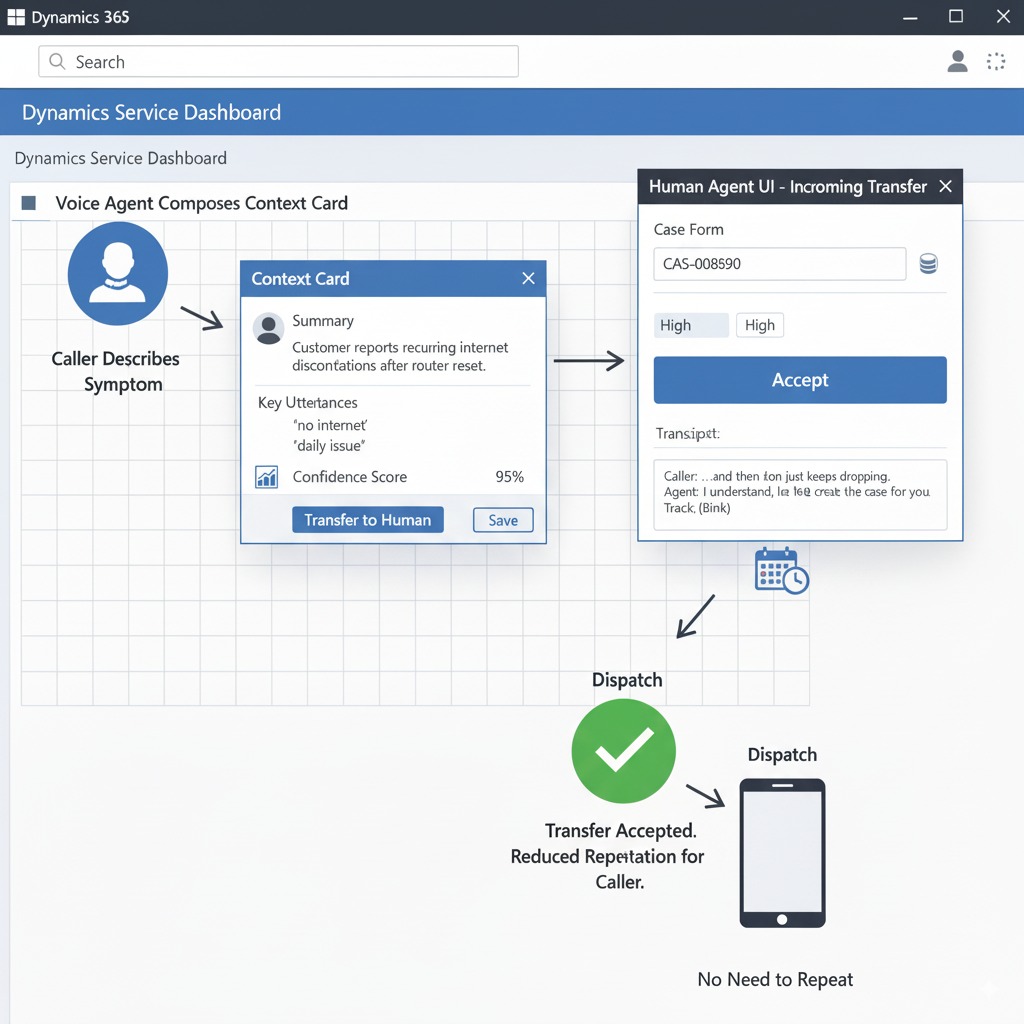
Quick example: incoming outage call → voice agent triages → case created in Dataverse → dispatch scheduled (call → case → dispatch).
CTA: Book a free Dynamics voice audit.
Peak Demand AI Agency observation: integrating human nuance is the real adoption blocker
Peak Demand’s work with utilities, transit agencies and municipal services shows one clear barrier: owners delay or reject voice AI when it sounds inhuman. Customers, business owners and frontline staff expect voice agents to carry real nuance, empathy and conversational timing — and too often native platform agents fall short.
Common humanization failures we see in the field:
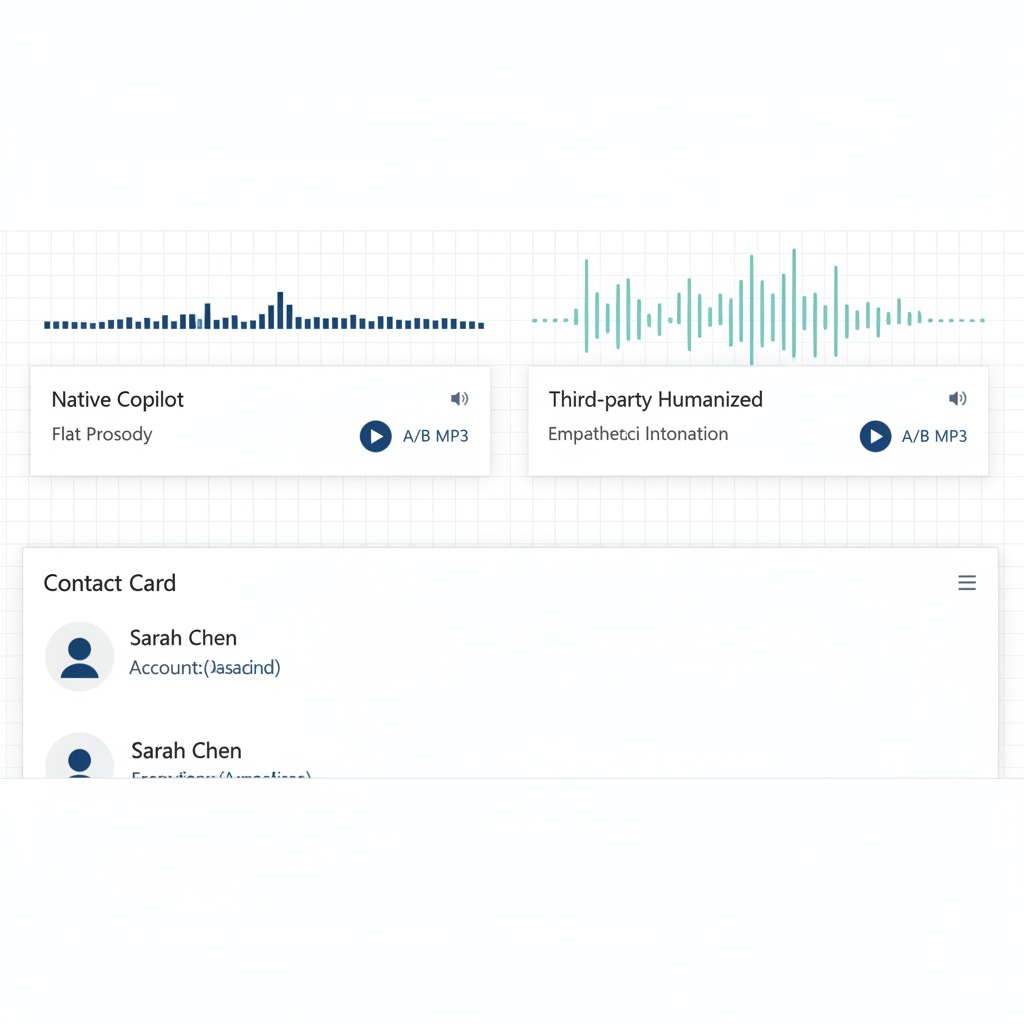
Flat prosody: monotone TTS that sounds scripted and untrustworthy.
Poor turn-taking: awkward pauses or interruptions that make callers hang up or repeat themselves.
Generic persona: impersonal responses that fail to mirror local tone, urgency or empathy.
When customer-facing interactions matter (outages, urgent service requests, billing disputes), these failures translate into transfers, repeat calls and lower CSAT. Our recommendation: evaluate third-party voice stacks (Twilio + OpenAI, Google, Amazon, Genesys) for any conversational flow that is customer-facing or brand-critical. These stacks let you tune prosody, persona and timing while securely calling Dynamics 365 for transactional actions.
Why integrate voice AI with Microsoft Dynamics 365 now (and why human nuance matters)

Dynamics 365’s Copilot momentum and Dataverse as a single source of truth make it a fast, secure path to automation: you can author bots in Copilot Studio or Power Virtual Agents and immediately map actions into Dataverse records. That closeness simplifies authentication, audit logging and reporting — important for utilities, transit and municipal teams that must prove compliance.
But technology alone won’t win adoption. Human nuance (tone, turn-taking, empathy) is what callers notice first — and what drives trust. When you combine Dynamics’ transactional strengths with a humanized voice strategy, owners can expect measurable results:
Reduced average handle time (AHT): quicker resolution on routine calls because the agent can complete intake and create Dataverse cases without manual rework.
Faster triage to action: shorter time from call to dispatch/work order creation, so crews reach incidents sooner.
Fewer SLA breaches and escalations: better-first-pass outcomes mean fewer tickets breach response windows and fewer costly human escalations.
Example: during an outage call, a humanized voice agent accurately triages severity, creates a Dataverse case, and triggers a priority dispatch — reducing friction between the caller and operations. For any customer-facing agent that represents your brand, strongly evaluate third-party voice stacks (Twilio+OpenAI, Google, Amazon, Genesys) for superior naturalness while keeping Dynamics as the authoritative datastore.
Integration options for integrating a voice agent with Dynamics 365
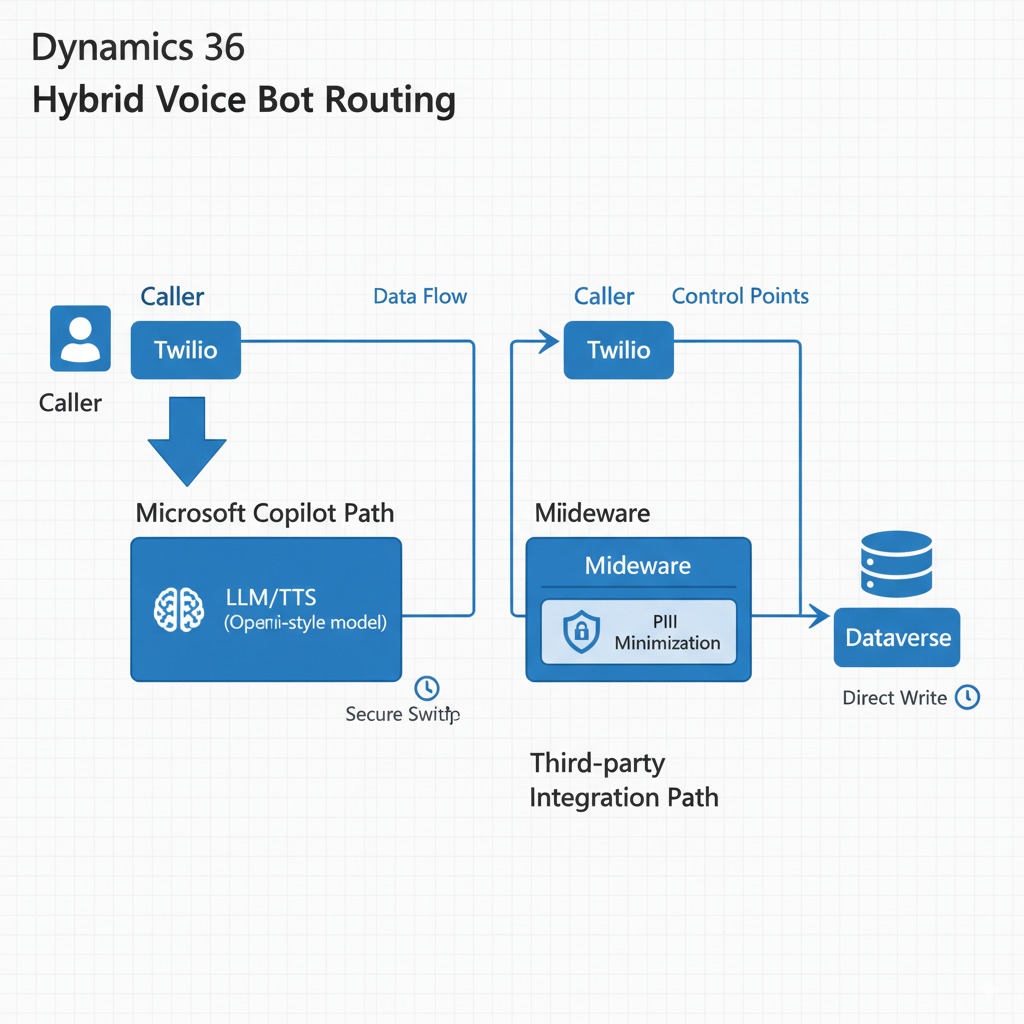
There are four practical paths to connect voice into Dynamics — each has clear tradeoffs owners should understand, especially around humanization (how natural the voice sounds and behaves).
1. Native Copilot Studio voice bot
Pros: Fastest route inside Microsoft; tight Dataverse access, single-vendor security and audit; lower integration surface.
Cons: Limited voice/TTS choices and persona control; less granular tuning of prosody and turn-taking; may sound more “platform-like.”
Humanization tradeoff: Moderate — good for transactional scripts, weaker for highly expressive customer-facing flows.
2. Power Virtual Agents + Phone System (Microsoft Phone System / Direct Routing)
Pros: Official phone-channel support; good for organizations that want voice inside the Power Platform; simpler compliance.
Cons: Requires Phone System licenses or Direct Routing/SIP setup; limited voice model choice; some vendor lock-in.
Humanization tradeoff: Similar to native Copilot — acceptable for scripted interactions, limited for nuanced brand voice.
3. Telephony via Twilio (or Amazon Connect / Google) → external LLM/TTS
Pros: Best control over voice quality, persona, prosody and multilingual support; easy to swap LLMs/TTS and A/B test voices.
Cons: More engineering (streaming, middleware), additional vendors to manage, and added compliance considerations.
Humanization tradeoff: Highest — this is where you get truly humanized, brand-aware voice.
4. Middleware (Azure Functions / Logic Apps / Integration layer)
Role: Required for any 3rd-party stack to translate voice-agent intents ↔ Dataverse (idempotency, retries, mapping). Also useful for hybrid flows (route premium calls to 3rd-party, keep transactional in Copilot).
Tradeoffs: Adds maintenance but provides resilience and auditability.
Recommended path for municipal / utility small teams: start with a hybrid approach — use Copilot Studio for internal/transactional workflows (fast compliance) and run a short pilot that routes customer-facing calls through Twilio + a high-quality LLM/TTS (humanized voice) with middleware to write safely into Dataverse. This gives the best mix of governance and caller experience.
Telephony licensing note: verify Microsoft Phone System licenses or Direct Routing requirements, or budget for PSTN numbers via Twilio/Amazon Connect. Phone numbers, per-minute telephony and LLM runtime are recurring costs — include them in procurement.
Where humanization is easiest to control: in 3rd-party stacks (Twilio + OpenAI/Google/Amazon) where you can choose voice models, tune prompts/personas, control turn-taking and run A/B tests.
Preparing Microsoft Dynamics 365 & Dataverse for integrating voice AI
Before you wire voice into Dynamics, do this admin work so the integration runs smoothly, stays auditable, and keeps sensitive data safe. Below are six practical prep steps plus screenshot pointers and common admin pitfalls to avoid.
6 prep steps (owner checklist)
Confirm environment & admin roles — verify the target Dynamics environment (Production vs Sandbox) and that an admin account has System Administrator or Dynamics/Dataverse admin rights. (Screenshot: Power Platform Admin Center → Environments → select environment → Settings.)
Review licensing & phone channel — check Phone System / Direct Routing entitlement or plan for PSTN via Twilio/Amazon Connect. Ensure required Copilot/Power Platform licenses are budgeted. (Screenshot: Microsoft 365 Admin Center → Billing → Licenses; Teams Admin Center → Voice / Direct Routing.)
Design Dataverse schema & ownership rules — identify tables (Contacts, Cases, WorkOrders/Assets) and add any custom fields for call_id, confidence_score, and source_channel. Plan row ownership and queues. (Screenshot: Power Apps → Dataverse → Tables → Cases / Contacts.)
Enable Power Virtual Agents / Copilot Studio — provision PVA/Copilot in the environment and confirm bot publishing permissions and channels.
Decide what data leaves Dynamics — explicitly list which fields may be sent to a 3rd-party voice provider (ideally only non-PII references or tokens). Create a PII minimization policy: do not include health identifiers, payment numbers, or sensitive personal data in prompt text.
Set logging, audit & retention policies — enable audit logging for calls/case writes, define recording retention, and map where recordings/transcripts will be stored (Dataverse vs vendor cloud).
Screenshot pointers
Power Platform Admin Center → Environments → Settings (env selection)
Power Apps → Dataverse → Tables (Cases / Contacts schema)
Microsoft 365 Admin Center → Billing → Licenses or Teams Admin Center → Voice
Common admin pitfalls
Publishing in Production before a sandbox test.
Missing Phone System or Direct Routing licensing and number provisioning delays.
Mapping free-text LLM outputs directly into Dataverse (use review hooks).
Sending PII in LLM prompts or transcripts without encryption/consent.
Note: minimize PII in third-party prompts — pass reference IDs (call_id, contact_id) to middleware that fetches sensitive fields from Dataverse only when absolutely needed and under strict audit controls.
Preparing Microsoft Dynamics 365 & Dataverse for integrating voice AI

Before connecting a voice agent to Dynamics, complete this admin work so the integration is reliable, auditable, and protects sensitive data. Below are six practical prep steps, common admin pitfalls, and a firm note to minimize PII exposure when using third-party voice providers.
6 prep steps (owner checklist)
Confirm environment & admin roles — pick the correct Dynamics environment (Sandbox for testing, Production for launch) and assign a System Administrator or Dataverse admin to own the project.
Review licensing & phone channel — verify required Power Platform/Copilot and Phone System or Direct Routing entitlements, or budget for PSTN provisioning via Twilio/Amazon Connect.
Design Dataverse schema & ownership rules — identify core tables (Contacts, Cases, WorkOrders/Assets) and add fields for call_id, confidence_score, source_channel; define queue ownership and record assignment logic.
Provision Power Virtual Agents / Copilot Studio — enable the bot framework in the target environment, confirm publishing permissions, and register required service accounts.
Decide what data may leave Dynamics — create a short whitelist of fields that can be shared with external voice vendors (avoid PII). Prefer sending reference IDs/tokens and fetch sensitive data server-side only when needed.
Set logging, audit & retention policies — enable audit logging for call-to-case writes, define transcript/recording retention windows, and document who can access recordings or exported logs.
Common admin pitfalls
Skipping sandbox validation and publishing directly to Production.
Underestimating phone-number provisioning lead times or licensing needs.
Allowing free-text LLM outputs to write directly into records without validation.
Including PII in prompts/transcripts without explicit consent or encryption.
PII minimization note: never include health identifiers, full payment details, or sensitive personal data in LLM prompts. Pass only reference IDs to middleware; fetch and write sensitive fields on the server under strict audit controls.
How to integrate third-party voice AI quality with Dynamics 365 (why third-party often sounds more human)
“Humanization” means more than a pleasant voice — it’s the combination of prosody (melody of speech), smooth turn-taking, a believable persona, and reliable contextual grounding. Third-party stacks (Twilio + OpenAI Realtime, Google/Vertex, Amazon Connect, Genesys) give you direct control over those elements, so your customer-facing agent can sound and behave like a helpful human rather than a scripted robot.
Four voice-quality dimensions owners care about
Prosody (expressiveness): control over pitch, emphasis and emotional cues so the agent sounds empathetic during outage calls and upbeat for confirmations.
Latency & turn-taking: streamed audio + incremental transcription reduces awkward pauses; adaptive silence thresholds prevent interruptions.
Contextual grounding: the agent references live Dataverse facts (account status, outage zones) while avoiding hallucination by calling secure middleware for truth.
Multilingual & accent support: multi-voice TTS and language detection let you match local accents and languages for better comprehension and trust.
Simple architecture (diagram description)
PSTN (caller) → Telephony layer (Twilio/Amazon Connect) → Stream to LLM + TTS (OpenAI/Google/Amazon) → Middleware / Orchestration (Azure Function / Logic App) → Dataverse (Dynamics 365 Web API)
(Middleware handles auth, idempotency, PII minimization, and writes back case/workorder updates.)
Secure patterns to protect data while keeping voice quality high
Send only reference IDs to the LLM. Middleware fetches sensitive fields from Dataverse and supplies minimal, tokenized context to the model.
Prompt design for safety: never embed raw PII in prompts; use short context windows and explicit “do not hallucinate” instructions.
Audit & retention: store transcripts and recordings under your retention policy; log call_id, case_id, confidence_score for traceability.
Fallbacks: implement a confidence threshold that instantly routes to a human when the model is uncertain.
Sample humanized script excerpt (outage triage)
Agent: “Hi — this is Peak Support. I’m sorry you’re without power. Can I confirm the address on file is 123 Main Street?”
Caller: “Yes.”
Agent: “Thanks — I see an outage reported in your area. I’ll log this as a high-priority case and dispatch a crew. Can I text you an ETA when a crew is en route?”
Caller: “Please do.”
Agent: “You’re all set. We’ll send updates by text. Is there anything else I can do right now?”
Pros & cons (quick)
Pros: best naturalness, persona control, rapid A/B testing, rich multilingual voices.
Cons: more engineering (streaming + middleware), added vendors to manage, extra compliance work.
How to integrate native Copilot voice with Dynamics 365 (when native is the right choice)
The native Copilot Studio / Power Virtual Agents route is the fastest, most secure way to add voice to Dynamics 365 when your needs are transactional, compliance-sensitive, and tightly coupled to Dataverse. It minimizes middleware, keeps recordings and transcripts inside your Microsoft tenancy, and is ideal for high-volume, predictable call flows—while admitting limits on expressive voice persona.
Quick step list to enable the voice channel (owner-friendly)
Confirm licensing — ensure Power Virtual Agents/Copilot entitlements and Phone System or Direct Routing support are in your licensing plan (or budget for PSTN via a telco/partner).
Provision a bot in Copilot Studio / PVA — create the bot in your Dynamics environment and assign publishing permissions to the service account.
Enable the voice channel — turn on the phone channel in PVA/Copilot Studio and attach an approved PSTN number (via Phone System, Direct Routing, or partner provisioning).
Map Dataverse actions — connect bot intents to Dataverse actions: create Case, lookup Contact, create WorkOrder. Configure queues and ownership rules.
Test in sandbox — run scripted calls, confirm case creation and audit logs, and validate handoff to humans.
Publish & monitor — soft-launch with controlled traffic, monitor confidence scores, and iterate.
Good use cases (native is acceptable)
Case creation from standard inbound calls (account lookups, outage intake).
Knowledge-base lookups for scripted FAQs and billing balances.
Routine scheduling and status checks that require strict audit trails.
Where native falls short (be candid)
If you need a distinctive brand voice, highly expressive prosody, nuanced turn-taking, or advanced multi-turn persona testing, native Copilot voice options are limited. For premium, humanized customer-facing experiences you’ll likely prefer a third-party LLM/TTS stack.
Licensing & phone number notes
Expect Phone System or Direct Routing requirements and potential per-minute PSTN charges or telco setup lead times. Confirm Copilot/PVA publishing seats and plan for incremental costs (numbers, minutes, premium AI features).
How the voice AI handles core workflows when integrating with Dynamics 365 (integrating real-world examples)
Below we map four owner-centric workflows (outage reporting, billing inquiries, work-order creation / dispatch, and FAQs), show the expected UX, and compare how a native Copilot route vs a 3rd-party humanized voice route handles them. Each workflow is accompanied by a recommended transfer/escalation rule and confidence thresholds you can use as a baseline.
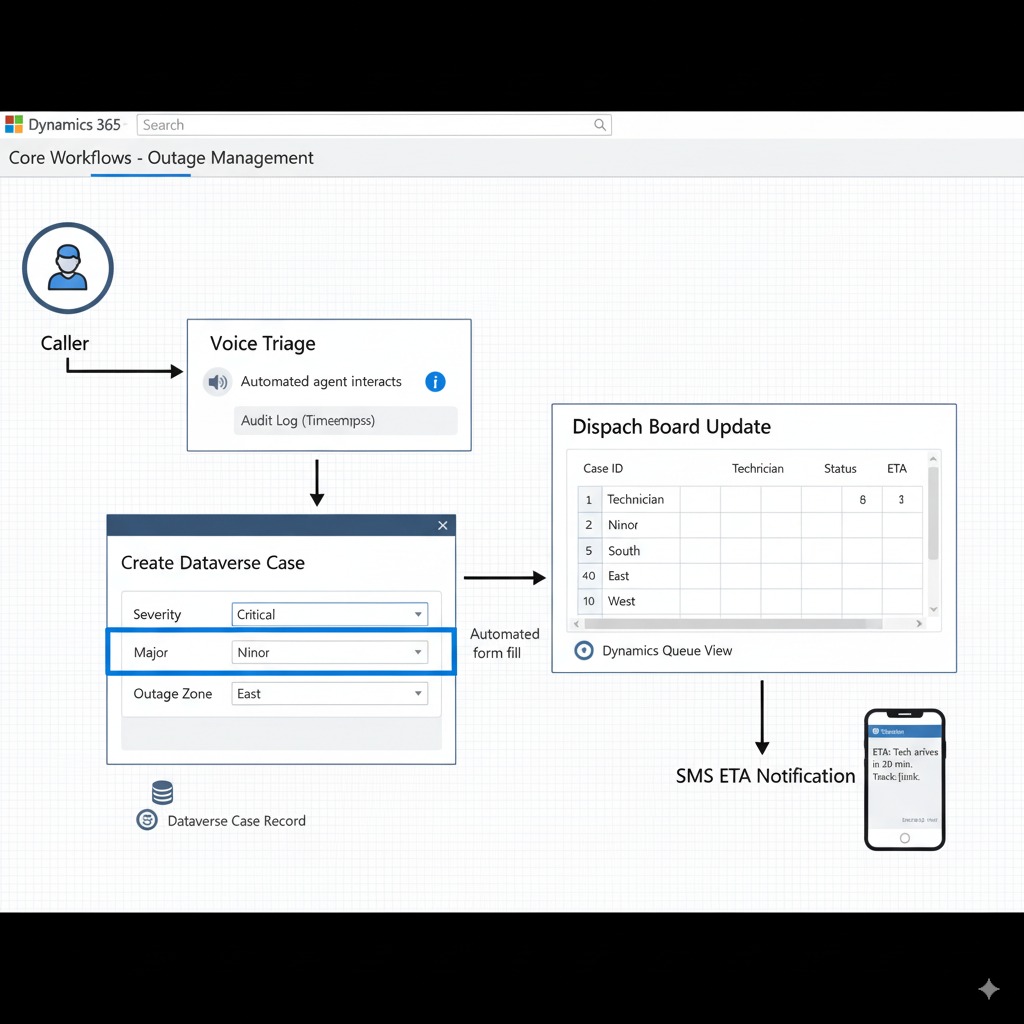
Workflow 1 — Outage reporting (caller urgency: high)
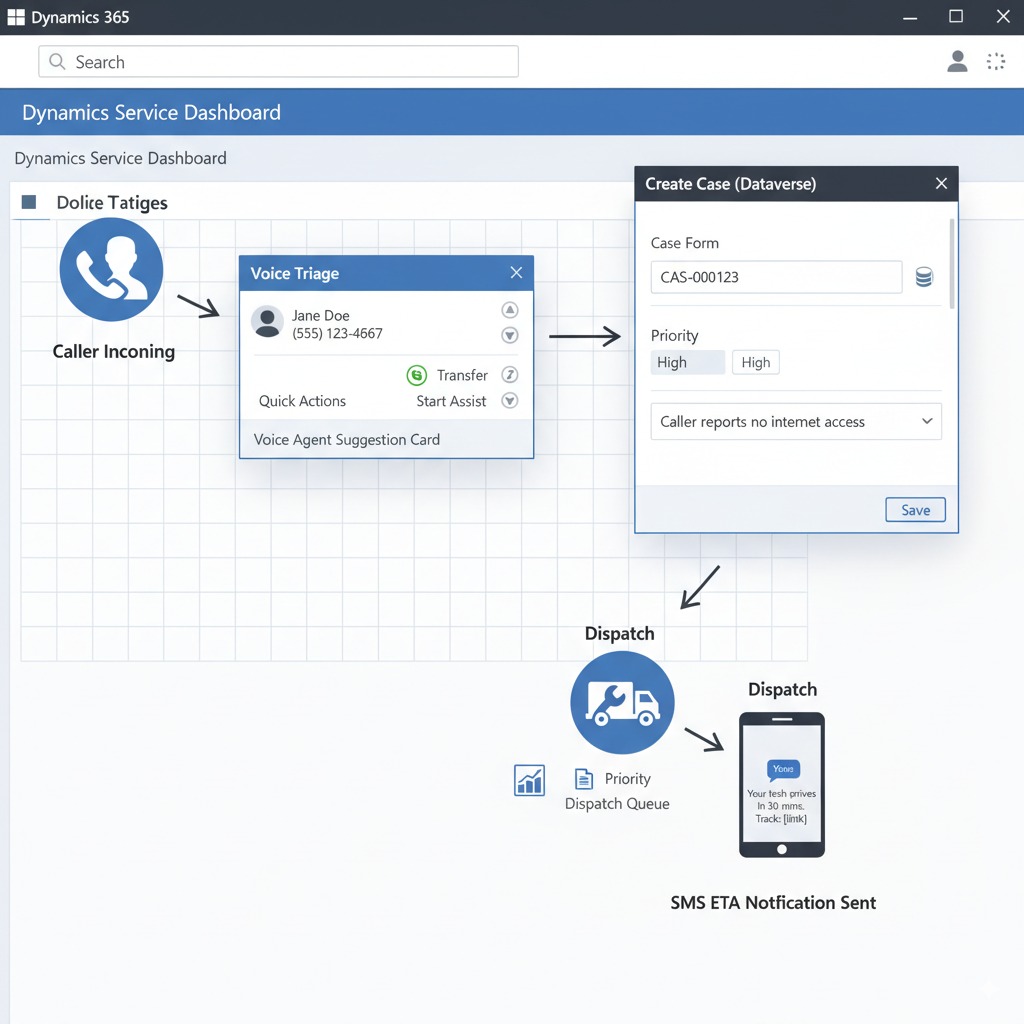
UX (what the caller experiences): Caller dials, voice agent answers with empathy, confirms location quickly, triages severity, creates a Dataverse case, and triggers priority dispatch. Caller receives an SMS/voice ETA.
Native (Copilot) behavior: Fast Dataverse writes, excellent audit trail, minimal middleware. Good at reliably creating cases and triggering queues. May sound more transactional than empathetic.
3rd-party behavior: More natural opening (“I’m so sorry — let’s get this fixed fast”), smoother turn-taking and reassurance language. Better at calming callers and reducing repeats. Requires middleware for secure Dataverse writes.
Transfer / escalation: Immediate transfer to human if caller reports life-safety issue or the agent confidence < 0.75.
Sample script (humanized): “I’m sorry you’re without power — can I confirm the address so I can log a high-priority case and dispatch a crew?”
Asset: Workflow diagram 1 (Outage → Case → Dispatch).
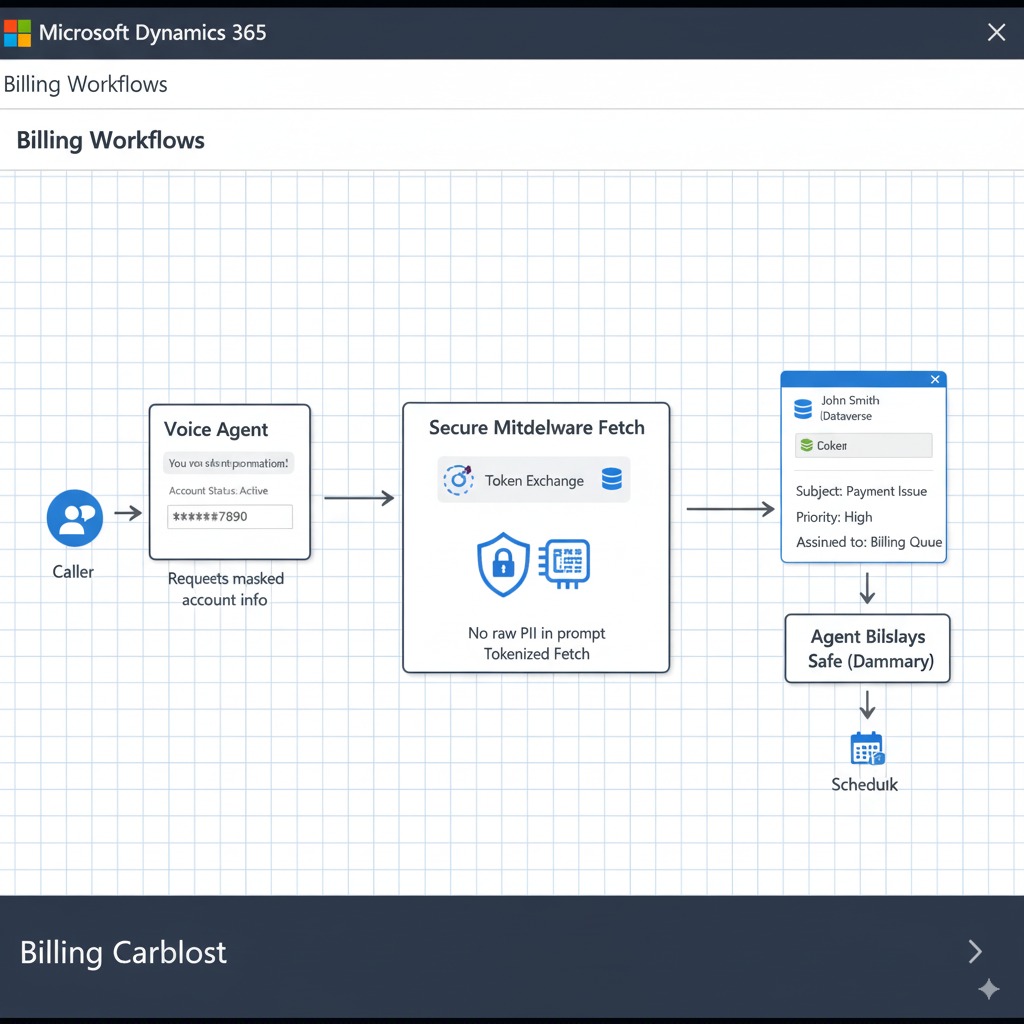
Workflow 2 — Billing & account inquiries (caller urgency: medium)
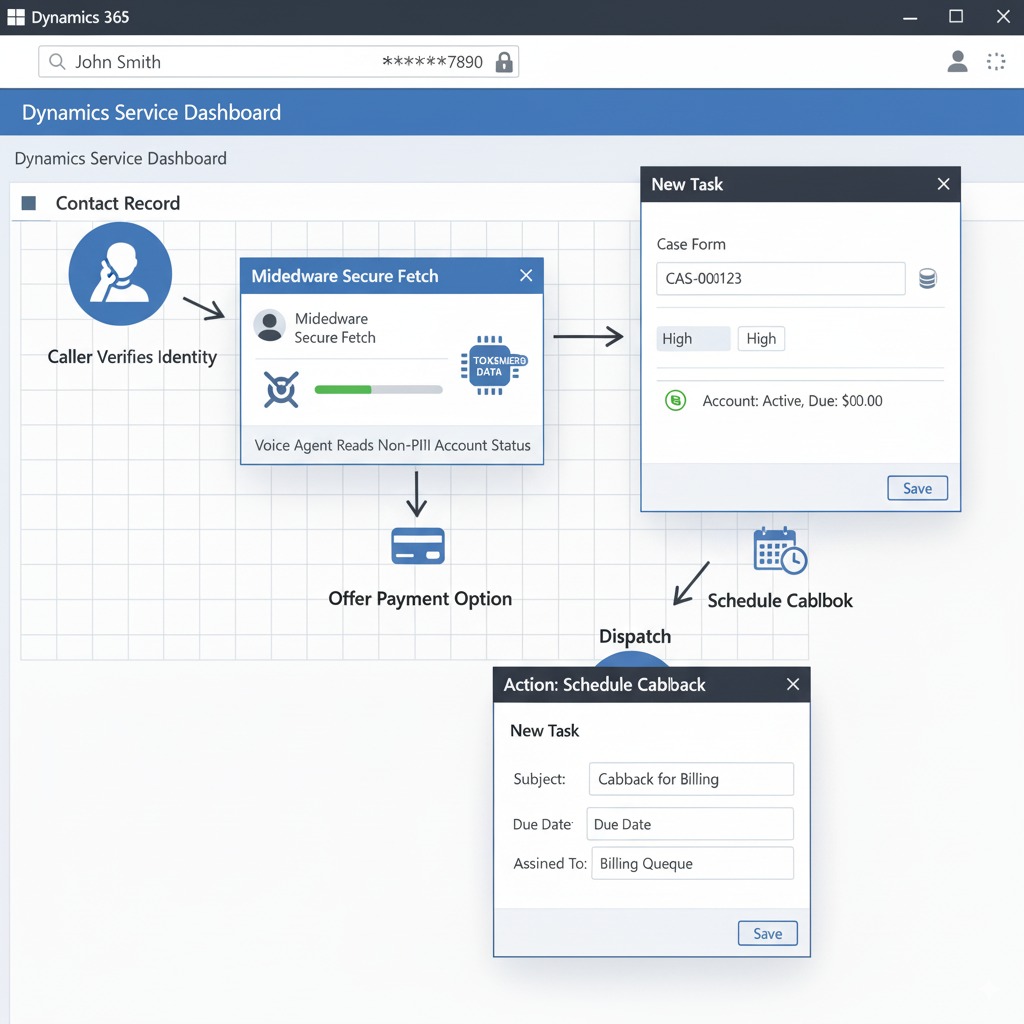
UX: Agent verifies identity, reads non-sensitive account status, offers quick balance and payment options, or schedules a callback to billing specialist.
Native: Good at reading exact fields from Dataverse and performing safe lookups. Safer for compliance but limited in conversational finesse.
3rd-party: Can sound more conversational when explaining charges and offer conditional phrasing (“It looks like this charge is… — would you like me to…”), improving CSAT. Use middleware to fetch sensitive fields server-side.
Transfer / escalation: Route to a specialist when caller requests refunds or disputed charges OR confidence < 0.70.
Asset: Workflow diagram 2 (Billing lookup → Action/Callback).
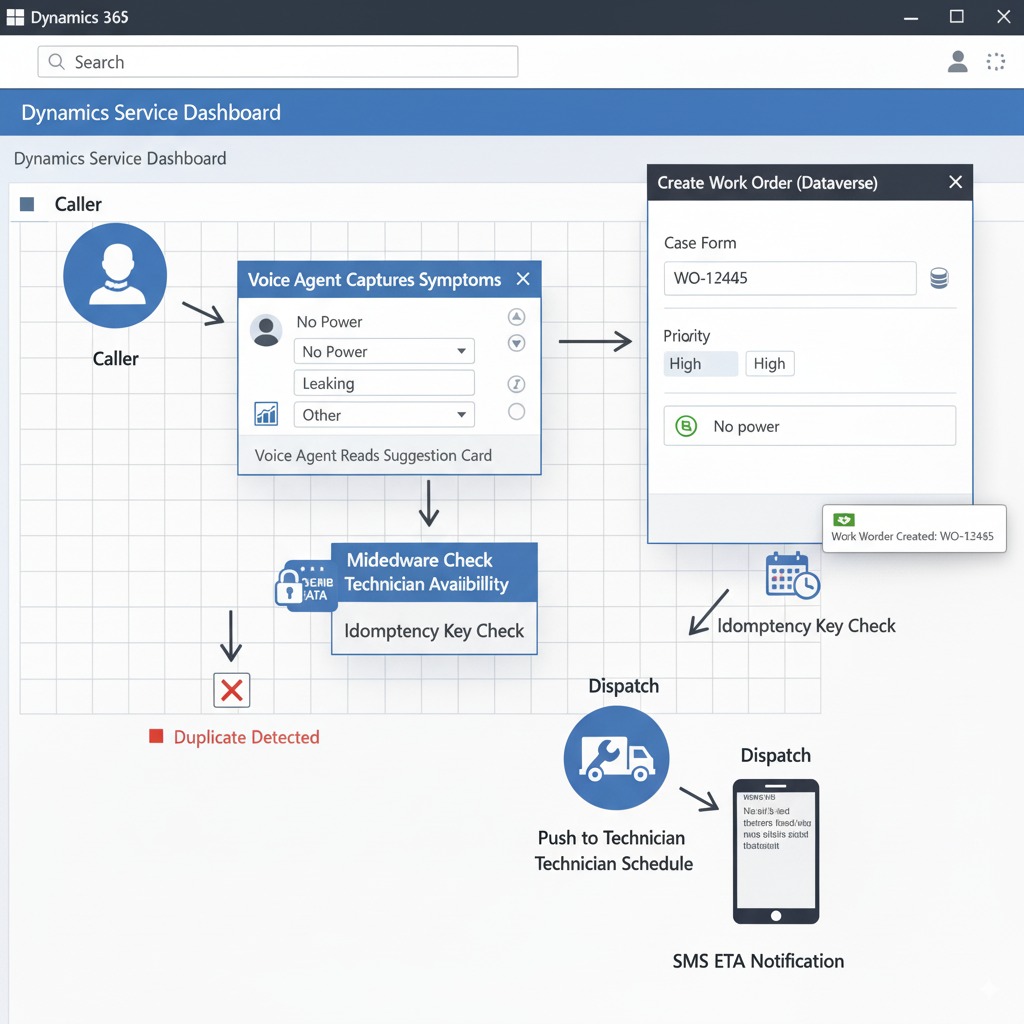
Workflow 3 — Work-order creation & dispatch (caller urgency: variable)
UX: Agent collects problem details, checks technician availability, creates a work order in Dataverse, and offers an ETA or schedules a slot.
Native: Excellent for deterministic forms and queue assignment; low error rate writing structured records.
3rd-party: Better at eliciting clear symptom descriptions and confirming conversationally, which reduces follow-up visits. Use idempotency keys in middleware to prevent duplicate orders.
Transfer / escalation: Escalate if required parts/certifications detected, or confidence < 0.72.
Asset: Workflow diagram 3 (Symptom → WorkOrder → Dispatch).
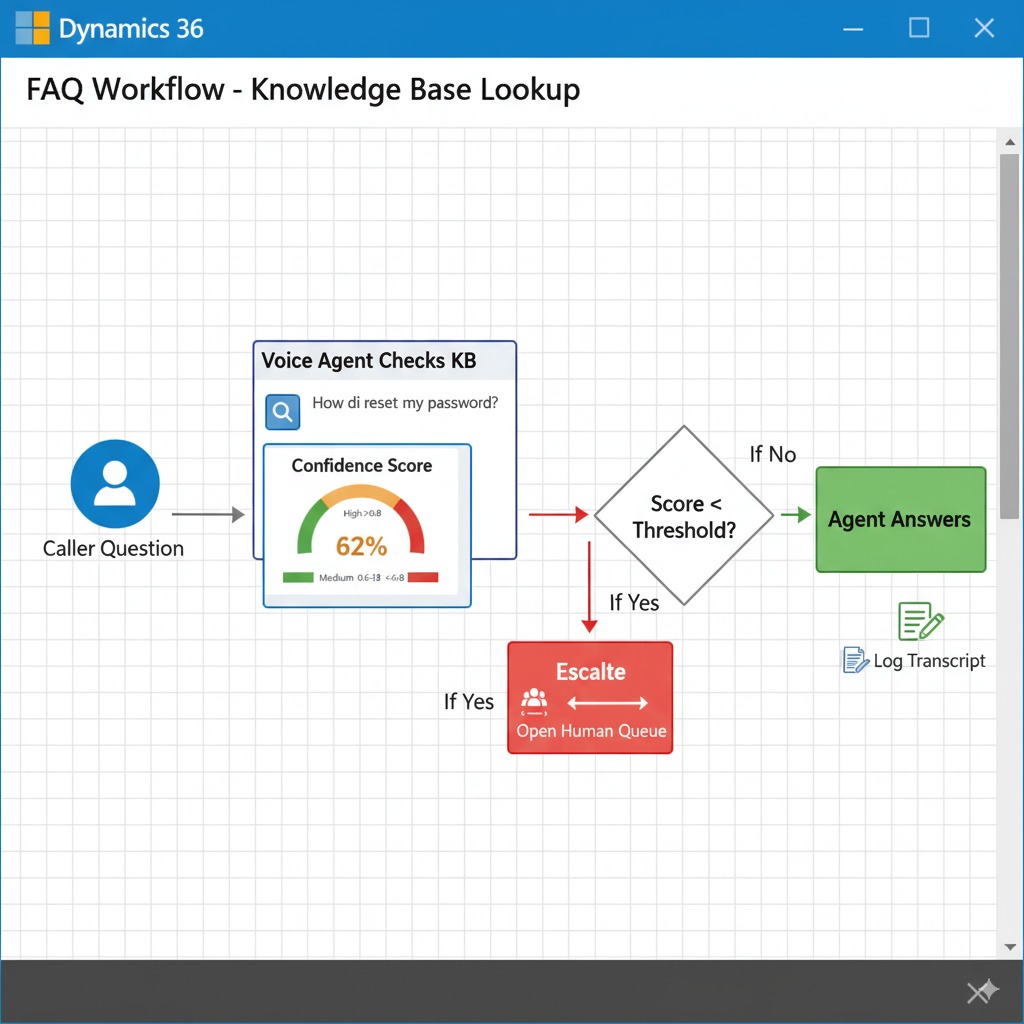
Workflow 4 — FAQs & basic troubleshooting (caller urgency: low)
UX: Agent answers common questions, offers KB links, schedules callbacks if unresolved.
Native: Fast KB lookups, consistent answers, good for regulated replies.
3rd-party: More natural explanations and flow control; can offer multi-turn coaching. Watch for hallucination—always validate KB references.
Transfer / escalation: Transfer if multi-turn loop detected or confidence < 0.65.
Asset: Workflow diagram 4 (FAQ → KB Lookup → Escalate if needed).
Side-by-side humanization notes (quick)
Tone & prosody: 3rd-party > native for expressive, emotionally appropriate speech.
Turn-taking / latency: Both can be tuned, but 3rd-party streaming setups give finer control to remove awkward pauses.
Accuracy / grounding: Native has simpler, more auditable Dataverse binding; 3rd-party needs middleware to guarantee truthfulness.
Operational risk: Native lowers integration surface; 3rd-party requires stronger governance and PII minimization.
Practical handoff & confidence rules (baseline)
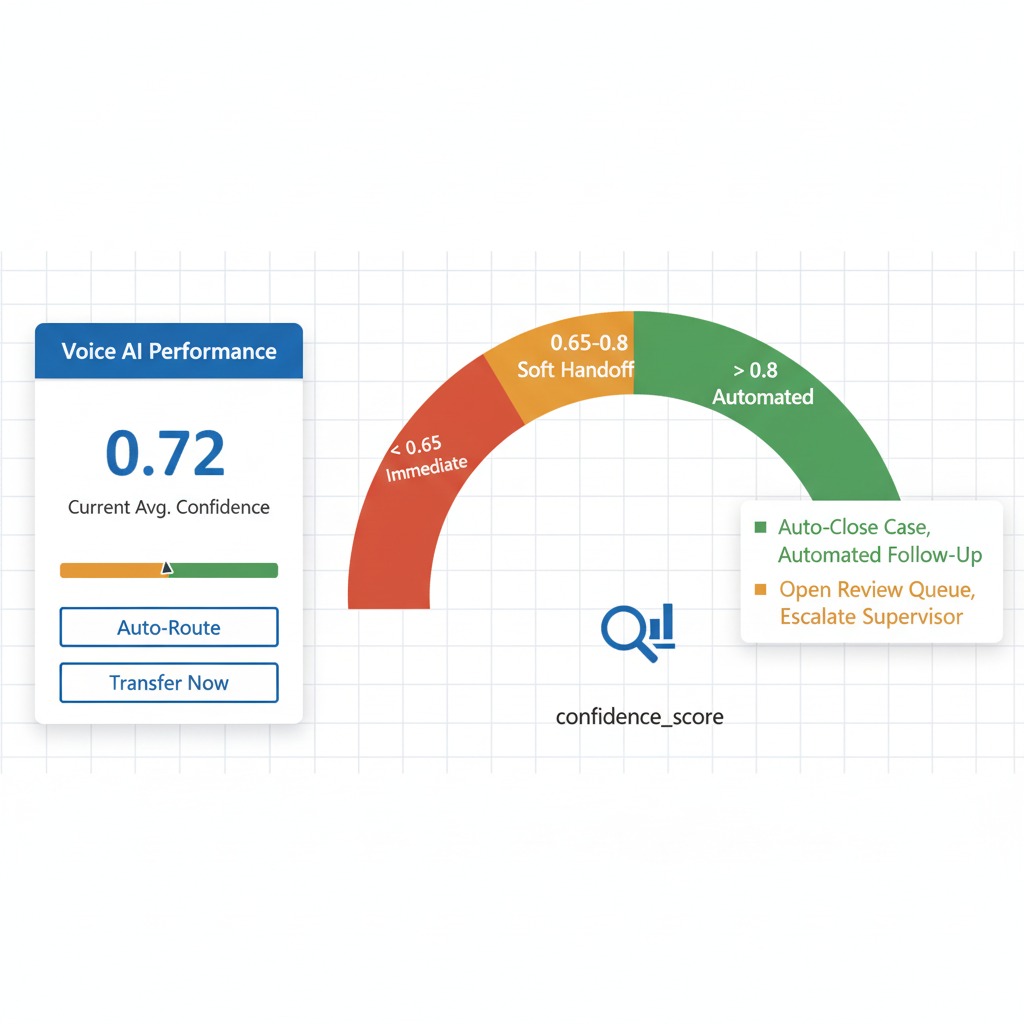
Confidence thresholds: escalate if confidence < 0.75 (safety/urgent), < 0.72 (work orders), < 0.70 (billing), < 0.65 (FAQs).
Always log
call_id,case_id,confidence_scoreand transcript pointer in Dataverse.
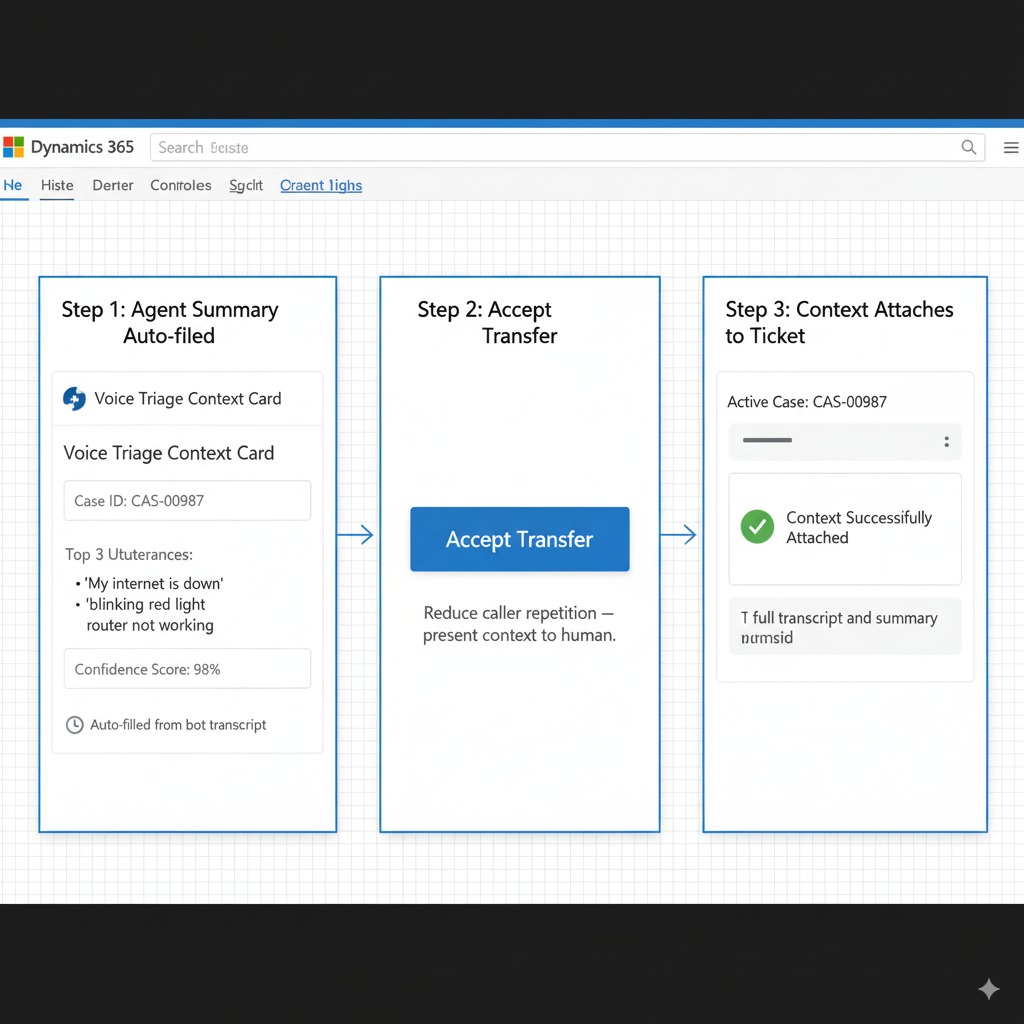
Use “soft handoff” where agent opens the human conversation with context summary (case, key utterances, confidence) to reduce repetition.
Security, compliance & data residency when integrating voice AI with Dynamics 365
Voice integrations touch sensitive customer data — treat privacy and governance as first-class project requirements. Below are six owner actions to protect PII and keep operations auditable when using either native Copilot voice or a third-party stack.
Six owner actions (must-do checklist)
Capture explicit consent on calls: add a short consent script at call start, logged to Dataverse. Example: “Before we continue, do you consent to this call and recording for service and troubleshooting? Reply ‘yes’ to continue.”
Minimize PII passed to models: never include raw identifiers (health numbers, full card numbers, SINs) in prompts. Pass only reference IDs; have middleware fetch sensitive fields server-side when strictly necessary.
Define retention & deletion policy: set transcript and recording retention windows (e.g., 90 days default) and apply automated deletion or archival workflows to meet local regs. Document exceptions for litigation or investigations.
Require audit logs & access controls: insist vendors provide searchable audit logs (call_id, user, timestamps, actions). Enforce role-based access in Dataverse and restrict who can export recordings/transcripts.
Vendor SLA & security checklist: require SLAs covering uptime, incident response times, data handling, encryption-at-rest/in-transit, SOC2/HIPAA attestation where relevant, and change-notice windows.
Map data residency & run a risk review: document where audio, transcripts and model processing occur (region & vendor). If processing leaves your tenant, demand contractual guarantees on residency, breach notification timelines, and subprocessors.
Extra safeguards: encrypt keys, use short-lived tokens for API calls, run regular penetration tests, and maintain an incident playbook.
Measuring success: KPIs to track after integrating voice AI with Dynamics 365
Track a small, clear set of KPIs so you can prove value and tune for humanization (the caller experience), not just automation. Hook these into Dynamics/Dataverse reports or export into the KPI CSV template.
Six KPIs to track
% Calls handled by AI (automation rate) — share of inbound calls fully handled (no human handoff).
Cases created by AI (volume & accuracy) — number of Dataverse cases the agent creates and % accepted without manual correction.
First Contact Resolution (FCR) — % of issues resolved on first interaction.
Average Handle Time (AHT) — average seconds from answer to call end (aim lower while preserving FCR).
SLA compliance rate — % of cases closed / responded to inside SLA windows.
Voice CSAT (humanization metric) — short CSAT tied to voice interaction (post-call 1–5 rating or NPS follow-up) that measures perceived empathy/naturalness.
Sample baseline → target (example)
Calls handled by AI: Baseline 0% → Target 40–60%
Cases created by AI accepted: Baseline 0 → Target 85% accuracy
FCR: Baseline 55% → Target 72–80%
AHT: Baseline 420s (7 min) → Target 300s (5 min)
SLA breaches: Baseline 12% → Target ≤4%
Voice CSAT: Baseline 3.2/5 → Target ≥4.2/5
How to report & cadence
Weekly (ops): Calls handled by AI, AHT, confidence scores, immediate SLA alerts — used for tuning and quick fixes.
Monthly (strategy): FCR, Cases accuracy, SLA compliance, Voice CSAT and trend analysis — used for roadmap decisions and vendor review.
Practical tips
Log
call_id,case_id,confidence_scoreand a transcript pointer in Dataverse for traceability.Correlate low-confidence calls with humanized CSAT dips to identify persona/script fixes.
Common pitfalls when integrating voice AI with Dynamics 365 — and how to avoid them
Voice → Dataverse integrations are powerful, but teams routinely stumble on a handful of operational and technical issues. Below are the most common pitfalls, eight quick fixes, a short case anecdote, and a clear escalation guideline you can adopt.
8 quick fixes
Mis-mapped Dataverse fields: validate mappings in a sandbox and publish mapping docs. Use field-level tests before go-live.
Duplicate records: enforce idempotency keys from middleware and match on canonical identifiers (contact_id + phone).
License misalignment: verify Copilot/PVA and Phone System/Direct Routing entitlements early — don’t assume existing licenses cover phone channels.
Telephony provisioning delays: reserve PSTN numbers early and run phone tests in sandbox numbers to confirm routing.
Poorly tuned handoffs: implement a “soft handoff” that sends context (case summary, confidence) to the human agent to avoid repeated questions.
LLM hallucination risk (3rd-party): never write unverified free text into records; require middleware verification or human review for uncertain answers.
Neglecting humanization testing: run A/B voice tests with real callers and measure Voice CSAT before full rollout.
Lack of audit & retention rules: enable audit logging and automated retention for recordings/transcripts to meet compliance.
Short case anecdote
A regional utility rushed a Copilot pilot into production and saw duplicate work orders because middleware used no idempotency. After enforcing idempotency keys and adding a pre-write validation step, duplicate orders stopped and dispatch errors dropped 90%.
Escalation guideline (operational)
Immediate (safety/incident): confidence <0.75 OR caller mentions life-safety → immediate human transfer + high-priority case.
Operational (data/accuracy): repeated low-confidence calls or >2 validation failures in an hour → pause automated writes, open incident ticket, notify ops lead.
Vendor issue: SLA breach (downtime >15m or security incident) → follow vendor SLA response plan and trigger executive notification.
Budgeting & procurement: what to expect to pay for integrating voice AI with Dynamics 365

Below are realistic high-level cost scenarios and procurement tips so owners can budget confidently. Costs vary by call volume, required voice quality (LLM/TTS choice), and whether you buy native Copilot seats or a custom third-party stack.
Cost components to budget for
Microsoft licensing (Copilot/PVA seats, Phone System / Direct Routing)
Telephony (PSTN numbers, per-minute charges via Twilio/Amazon Connect/ carrier)
LLM & TTS runtime (per-token / per-minute model costs for OpenAI/Google/Amazon)
Middleware & hosting (Azure Functions, Logic Apps, or self-hosted service)
Integrator fees (pilot, customization, QA, training)
Ongoing support & monitoring
3 budget scenarios (indicative)
Low (proof-of-concept / small org): ~$5k–15k one-time + $500–2k/month. (Small Copilot pilot or Twilio PoC, limited minutes.)
Mid (multi-location, production): ~$25k–75k one-time + $2k–7k/month. (Full pilot, middleware, integration, modest runtime costs.)
High (enterprise, hybrid, high-volume): $100k–300k+ one-time + $10k+/month. (Custom voice persona, high-quality LLM/TTS, SLA guarantees, multi-region residency.)
Value note: superior humanization (third-party tuning, premium TTS) often increases CSAT, reduces repeat calls and dispatch mistakes — making higher upfront spend pay back via lower ops cost.
Tips for negotiating Microsoft licensing & partner SLAs
Negotiate pilot pricing or short-term add-on seats before committing enterprise licenses.
Request explicit Phone System/Direct Routing cost clarity and number provisioning SLAs.
Require data residency, breach notification timelines, and SOC2/HIPAA attestation in the contract.
Insist on measurable SLAs (uptime, response times) and an exit/transition clause.
Procurement checklist
Confirm environment (Sandbox vs Prod) and required seats.
Reserve PSTN numbers and estimate minutes.
Define retention & residency requirements contractually.
Request sample runbooks and incident response times.
Include acceptance criteria for pilot → production.
Developer appendix — what your tech team will need

This is the technical checklist your developers need to implement a production-grade Dynamics + voice-AI integration. No gated nonsense — everything required is listed below so your team can build, test and operate safely.
Included items (developer-ready checklist):
Auth flows: Authorization Code + PKCE for UI flows; Client Credentials for server-to-server; short-lived tokens and rotating secrets.
PVA / Copilot export & mapping: exportable bot package, intent → Dataverse action map, field whitelist for external calls.
Webhook samples: JSON payload examples (event_type, call_id, contact_id, intent, confidence_score, timestamp, action_payload).
Streaming patterns: media stream (WebSocket/RT) → middleware → LLM/TTS pipeline; incremental transcription and partial-response streaming.
Middleware skeleton: responsibilities (auth, token exchange, idempotency, fetch-only sensitive fields, orchestration, telemetry).
Twilio / OpenAI wiring: Twilio Media Streams → middleware → OpenAI Realtime (or Google/Amazon) TTS loop; safe prompt templates.
Idempotency & retry: idempotency-key usage, dedupe logic, exponential backoff + jitter for retries.
Telemetry & auditing: required events (call_id, case_id, confidence, duration, handoff_reason), retention rules, and audit-log hooks.
Testing checklist: sandbox numbers, staged traffic, CSAT A/B test plan, failover to human agents.
Security & privacy: PII minimization patterns, short context tokens (no raw PII in prompts), encryption in transit & at rest, vendor SLA clauses.
Next steps: 30–60 day rollout plan for integrating voice AI with Dynamics 365
A clear 6-week plan keeps stakeholders aligned and gets you from prep → pilot → production safely, with humanization checks built in.
Week-by-week checklist
Week 1 — Prep: confirm environment, assign admins, verify licenses & phone channel, finalize Dataverse schema and PII whitelist.
Week 2 — Author / Prototype: build basic Copilot/PVA flows or spin up Twilio+LLM demo; map intents → Dataverse actions; create test numbers.
Week 3 — PSTN testing: run live calls to sandbox numbers, validate transcription, case creation, idempotency, and basic handoffs. Begin A/B humanization tests (voice A vs B).
Week 4 — Soft launch: route a small % of real traffic to the agent, monitor confidence scores, CSAT, and operational alerts; enable soft handoffs to humans.
Weeks 5–6 — Optimize: tune prompts, update voice persona, fix mapping issues, train human agents on escalation summaries. Increase traffic to ~25–50%.
Weeks 7–8 — Scale & Harden: scale to full traffic as metrics allow; finalize retention, audit, and runbook. Complete post-launch review.
Recommended stakeholders
Ops lead (owner-facing KPIs & rollout decisions)
IT / Platform admin (env, Dataverse, security)
Dev/Integration lead (middleware, idempotency, telemetry)
Vendor contact(s) (Microsoft / Twilio / LLM vendor)
Customer service manager (human handoff, training)
Success metrics
30 days: automation rate 20–40%; Voice CSAT ≥ 3.8/5; case accuracy ≥ 75%
60 days: automation rate 40–60%; Voice CSAT ≥ 4.2/5; case accuracy ≥ 85%; SLA breaches ↓ by 50%
Humanization milestones
Complete A/B voice tests by Week 3; iterate persona by Week 5 based on Voice CSAT and qualitative call reviews.
Rollback / emergency plan
Immediately divert PSTN numbers to human agents (DNS/number routing).
Pause automated writes (enable manual review queue).
Open incident ticket (ops + vendor) and notify execs.
Post-mortem and mitigation before re-enable.
Ready to talk? Schedule a free discovery call with Peak Demand
Interested in hearing how a humanized voice AI can work with your Microsoft Dynamics 365 environment? Book a no-cost, no-obligation discovery call with Peak Demand — we’ll listen to your goals, map your top call types, and recommend the fastest path (native, third-party, or hybrid).
What we’ll cover (30-minute agenda)
Quick intro & goals: what success looks like for you.
Current state: phone volumes, Dynamics environment, and top 5 call types.
Recommended approach: native vs third-party tradeoffs for your use cases.
Pilot options & next steps: how we’d scope a short demo you can hear and measure.
Who should join
Ops / Service lead (owner or manager)
IT / Dynamics admin or platform owner
Any vendor contact you already have (telco or telephony provider)
Please bring
Top 5 inbound call types by volume or priority
Current phone / telephony provider and any active Copilot/PVA licenses
A sample case/work-order workflow (optional)
Why this call helps
No technical deep-dive required — we translate outcomes into a recommended pilot.
We’ll produce a concise recommendation you can action: pilot path (Copilot, Twilio+LLM, or hybrid), pilot scope, and a clear checklist to get started.
Next step / CTA
Click to schedule: [Schedule a free Dynamics voice discovery call]
Or reply to this article to request a call and we’ll get you set up.
If you prefer, we can also run a short live demo during the call so you can hear humanized vs native voices in your workflow.
Learn more about the technology we employ.

Customers, owners and staff expect real human nuance from anyone (or anything) answering the phone. If your voice agent sounds flat or robotic, callers lose trust — and your team pays the cost in transfers, repeat calls and lower satisfaction. Peak Demand builds enterprise-grade, humanized AI receptionists that integrate with Microsoft Dynamics, Salesforce, HubSpot and Zendesk (or connect via Twilio to best-in-class LLMs and TTS). We’ll help you choose native vs third-party, run a short pilot, and tune voice, script and handoffs so the agent actually sounds human. Book a free Dynamics voice audit or request a side-by-side demo today.